Home
HMD
Cell Phone
Crest 5G
Page 43
HMD Crest 5G - Page 43
62 pages
Manual
Save Page as PDF
To Next Page
To Next Page
To Previous Page
To Previous Page
Loading...
V
ersion
:
June 22nd 2024
43
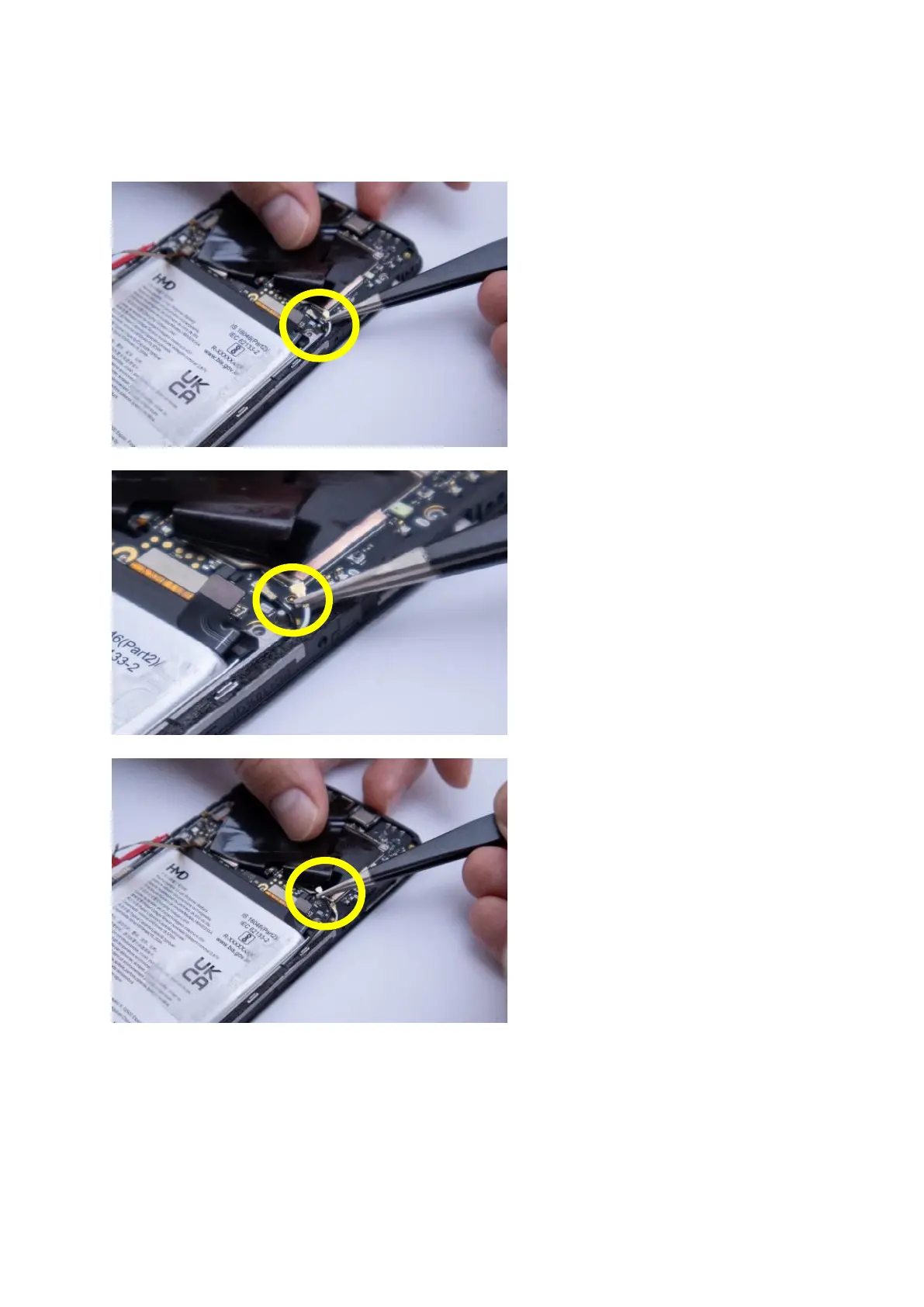
Disconnect t
h
e co
ax cables on the t
op
side
Fold the bla
ck
f
oil on the to
p side
and undernea
th you will nd the
white and blac
k
c
o
ax cab
les. Use
the angled tw
eezer t
o disconnect
them
Carefu
lly remov
e the white coa
x
cable fr
om the screen fr
ame
Then disconne
ct
the black
coax
cable
42
44
Table of Contents
Main Page
HMD Crest and Crest Max Repair Guide
1
Table of Contents
2
Exchange of Back Cover
4
Required Tools
4
Required Spares
4
Dis-Assembly Steps
4
Assembly Steps
11
Exchange of Battery
16
Required Tools
16
Required Spares
16
Dis-Assembly Steps
16
Assembly Steps
23
Exchange of Charging Port
27
Required Tools
27
Required Spares
27
Dis-Assembly Steps
27
Assembly Steps
36
Exchange of Screen
41
Required Tools
41
Required Spares
41
Dis-Assembly Steps
41
Assembly Steps
49
Related product manuals
HMD Crest Max
7 pages
HMD Pulse
45 pages
HMD Pulse Pro
45 pages
HMD 110
28 pages
HMD Skyline
66 pages
HMD Nokia 110
28 pages
HMD Fusion
13 pages
HMD Barbie
6 pages
HMD Vibe
41 pages
HMD Pulse+
45 pages
HMD 105 2024
28 pages



 To Next Page