HELLO? SPEAKERPHONE? YES!
BLUETOOTH
®
CONNECTION, CONTINUED
If you’re connecting to a computer, you may have some extra steps on that end.
You’ll have to get that information from the computer company.
Depending on your device, you may be prompted to enter a pairing code. If
prompted, enter “0000” as the code.
To disable pairing of an existing device and pair a new device, press and hold the
+ and - buttons for 5 seconds to activate pairing mode.
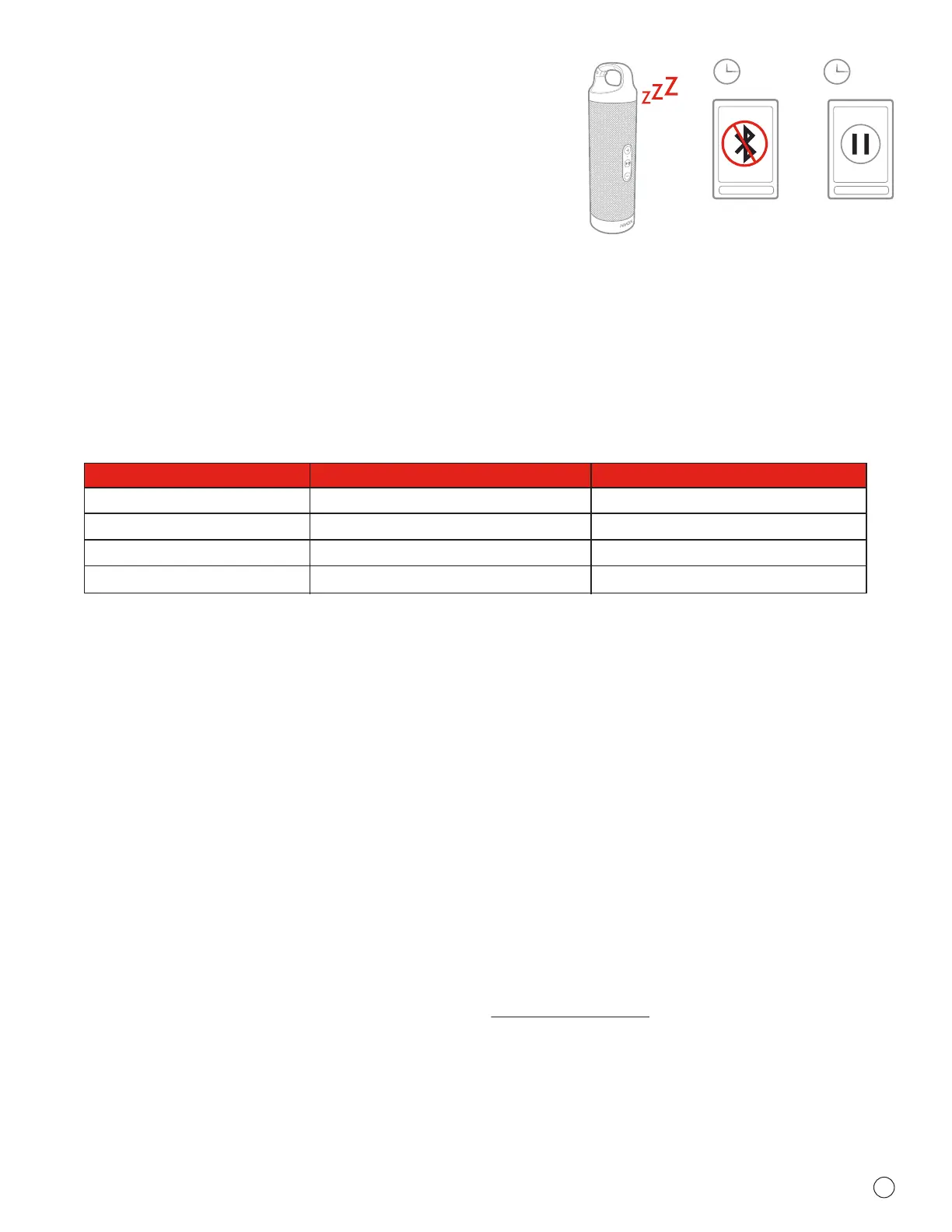
Note: If you turn on your Dynamite but haven’t started the party yet, it will
automatically power off after 2 minutes of unpaired inactivity.
Note: Once you've paired, if you pause the party for 15 minutes or more, the
Dynamite will automatically shut off to preserve battery power.
2m
15m
When friends call asking to join the party — and you know they
will — answer the phone without disconnecting from your HMDX
Dynamite. Yes, that’s right. Your speaker is a speakerphone too.
How amazing is that? Here’s how it works:
1. Make sure your phone and speaker are connected through
Bluetooth.
2. Answering and ending a call works the same way: simply click
the PLAY/PAUSE button on your Dynamite.
3. If you’d rather not talk, hold down the PLAY/PAUSE button on
your Dynamite for 3 seconds to ignore the call.
THE COOLEST PART: The Dynamite knows when a call is
coming in and pauses the music before ringing. When you hang
up, the music starts where it left off — and so does the party. If
it’s you making the call, just start dialing from your phone, and
the Dynamite automatically does its hands-free thing. Isn’t it
refreshing to know your speaker totally gets you?
Situation
Short Press Play/Pause Button Long Press Play/Pause Button
1
st
Incoming call
2
nd
Incoming call
On call
Both calls active
Pick up call
End call
Call 1 on hold, pick up call 2
Hang up call 1, switch to call 2
Reject call
Move call from speaker to device
Reject call 2
Switch between 1
st
call and 2
nd
call
Check out the chart below for a complete guide on handling calls with your Dynamite.
1 YEAR LIMITED WARRANTY
STUFF THE GOVERNMENT MAKES US SAY
FCC Disclaimer:
Note: This device complies with part 15 of the FCC Rules. Operation is subject to
the following two conditions: (1) This device may not cause harmful interference, and
(2) this device must accept any interference received, including interference that may
cause undesired operation.
Note: This equipment has been tested and found to comply with the limits for a
Class B digital device, pursuant to part 15 of the FCC Rules. These limits are
designed to provide reasonable protection against harmful interference in a
residential installation.
This equipment generates, uses, and can radiate radio frequency energy and, if not
installed and used in accordance with the instructions, may cause harmful
interference to radio communications. However, there is no guarantee that
interference will not occur in a particular installation.
If this equipment does cause harmful interference to radio or television reception,
which can be determined by turning the equipment off and on, the user is
encouraged to try to correct the interference by one or more of the following
measures:
• Reorient or relocate the receiving antenna.
• Increase the separation between the equipment and receiver.
• Connect the equipment into an outlet on a circuit different from that to which the
receiver is connected.
• Consult the dealer or an experienced radio/TV technician for help.
Note: Changes or modifications not expressly approved by HMDX could void the
user's authority to operate this equipment.
IC Caution: RSS-GEN Issue 4 November 2014
This device complies with Industry Canada’s licence-exempt RSSs.
Operation is subject to the following two conditions: (1) This device may not cause
interference, and (2) This device must accept any interference, including interference
that may cause undesired operation of the device.
For detailed warranty instructions and information, visit:
USA: www.hmdxaudio.com/customer-support/warranty-1yr
CAN: www.hmdxaudio.ca/warranty-1yr
To obtain warranty service on your HMDX product, contact a Consumer Relations
representative by telephone or email for assistance (you can find their contact info
on page 1). Please make sure to have the model number of the product available.
COMING CLEAN
A soft, dry towel is all you need to clean off your speaker.
Using water, harsh cleaners, or anything else only starts
messing with the mechanics inside. So, yeah, don’t do it.
STUFF OUR LAWYERS MAKE US SAY
A MESSAGE FROM THE ENVIRONMENT
IMPORTANT SAFEGUARDS:
When using an electrical product, basic precautions should always be followed,
including the following:
READ ALL INSTRUCTIONS BEFORE USING
• WARNING: Do not place speakers too close to ears. May cause damage to
eardrums, especially in young children.
• Use this product only for its intended use as described in this manual. Do not
use attachments not recommended by HMDX.
• HMDX is not liable for any damage caused to smartphones, iPod/MP3
players, or any other device.
• Do not place or store this product where it can fall or be dropped into a tub
or sink.
• Do not place or drop into water or any other liquid.
• Not for use by children. THIS IS NOT A TOY.
• Never operate this product if it has a damaged cord, plug, cable
or housing.
• Keep away from heated surfaces.
• Only set on dry surfaces. Do not place on surface wet from water or cleaning
solvents.
Attention California Residents:
WARNING: This product contains chemicals known to the State of
California to cause cancer, birth defects, and other reproductive harm.
WARNING:
This product has an internal, non-replaceable lithium battery. Please dispose in
accordance with your local, state, province, and country guidelines.
This product contains small parts that may present a choking hazard for young
children.
CAUTION: All servicing of this product must be performed by authorized HMDX
Audio Service Personnel only.
©2015 HMDX. All Rights Reserved.
IB-HXP340
BC


 To Previous Page
 Loading...