EasyManua.ls Logo

HMDX Hangtime - User Manual

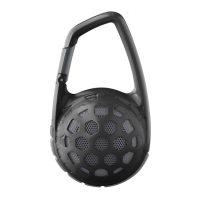
HMDX Hangtime
3 pages
Print Icon
To Next Page IconTo Next Page
Loading...
HEY THERE!
JUST CHARGE IT
WE’RE HERE TO HELP. CONTACT US!
HX-P140
You’ve got questions? We’ve got answers.
Contact a Consumer Relations representative by phone or email to help answer any questions.
Please be sure to have the model number of your product available. (Hint: It’s HX-P140)
Register your speaker! Information about where you bought it and how you’re using it is like
gold for the people who make these speakers.
USA: www.hmdxaudio.com/customer-support/product-registration
CAN: www.hmdxaudio.ca/product-registration
Charging the speaker is so easy you’ve probably figured it out by
now, but just in case, you’ve got two options: you can charge it
using your computer or a wall outlet. The Hangtime needs about
3 hours for up to 4 hours of party time.
1. The cord that came with the speaker — the one with the USB
on one end and the micro USB on the other — will work with your
computer.
2. If you want to use the wall outlet, you’ll need to pick up a power
cord with a micro USB the next time you’re at the store, or use any
USB AC adapter, including the one for your cell phone.
CONTROL YOUR DESTINY ... OR AT LEAST YOUR SPEAKER SHED SOME LIGHT
BLUETOOTH
®
CONNECTION — IT’S A SETUP
Like any amazing couple, this one starts with a connection — one between your
device and the speaker’s Bluetooth. Here’s how it works:
1. Make sure the smartphone, tablet, or computer you’re using with the speaker
has Bluetooth.
2. Turn on the speaker and look for the little blinking light.
3. Do whatever your device needs you to do on its end.
4. Look for HMDX Hangtime in your device’s Bluetooth list or click YES.
5. Now hit PLAY on your speaker and crank it up — or down if you’re lame.
USA
cservice@hmdxaudio.com
1.800.753.3000
8:30am–7:00pm EST M–F
cservice@homedicsgroup.ca
1.888.225.7378
8:30am–5:00pm EST M–F
CANADA
3s
Bluetooth
®
Devices
HMDX Hangtime
on
>
Thank you for purchasing the HMDX Hangtime. Check out the sections
below for all the important information about your new speaker.
HANGTIME
USER GUIDE
AND WARRANTY INFORMATION
3h
CHARGE
AC adaptor not included.
Bottom:
Continued on page 2.
1. This is the power button.
2. Turn the music up.
3. Push it to play, push it again to pause.
4. Turn the music down.
5. Check out how much juice is in the battery.
6. Lets you know when Bluetooth is connected.
7. Here’s where you hook it up old-school.
8. The power cord goes here.
7
8
2
3
4
5
6
1
Pairing Mode
Bluetooth Light Battery Light
Connected
Charging
Ready to Party
Aux-In Mode
Question and Answer IconNeed help?

Do you have a question about the HMDX Hangtime and is the answer not in the manual?

Summary

Contact and Support Information

Customer Support Channels

Provides phone numbers and email addresses for USA and Canada customer service.

Product Registration

Encourages users to register their speaker for feedback to manufacturers.

Charging the Hangtime Speaker

Charging Options

Explains how to charge the speaker using a computer's USB or a wall outlet.

Speaker Controls and Indicators

Button Functions

Identifies and explains the function of each button on the speaker.

Indicator Light Meanings

Describes the Bluetooth and Battery indicator lights.

Bluetooth Connectivity

Establishing a Bluetooth Connection

Details the steps to connect a device to the speaker via Bluetooth.

Pairing and Device Management

Covers pairing codes, disabling devices, and automatic power-off.

Alternative Audio Input

Auxiliary Audio Connection

Explains how to connect devices using the old-school audio jack.

Speakerphone Features

Using the Speakerphone

Details how to answer, end, or ignore calls using the speaker.

Call Handling Guide

Summarizes call management actions via the PLAY/PAUSE button.

Durability and Maintenance

Water Resistance Information

Explains the speaker's IPX4 water resistance and proper flap usage.

Cleaning Instructions

Provides guidance on how to clean the speaker safely.

Warranty Information

Limited Warranty Details

Directs users to websites for detailed warranty instructions and service.

Regulatory and Safety Information

FCC and IC Compliance Statements

Details regulatory compliance statements for FCC and Industry Canada.

Important Safety Precautions

Lists essential safety guidelines for product usage to prevent harm.

California Proposition 65 Warning

Provides a warning regarding chemicals known to cause cancer or reproductive harm.

Environmental and Battery Safety

Advises on battery disposal, small parts hazard, and servicing.

Overview

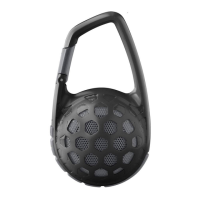
The HMDX Hangtime (HX-P140) is a portable Bluetooth speaker designed for on-the-go audio and speakerphone functionality. It offers wireless connectivity, a durable design, and user-friendly controls for music playback and call management.

Function Description:

The HMDX Hangtime serves as a wireless speaker that connects to Bluetooth-enabled devices such as smartphones, tablets, and computers. It allows users to stream music and manage phone calls hands-free. The speaker features an integrated speakerphone, pausing music for incoming calls and resuming playback once the call ends. It also includes an auxiliary input for connecting non-Bluetooth devices via a 3.5mm audio cable. The Hangtime is designed with an IPX4 rating, indicating resistance to splashing water, making it suitable for various environments.
Important Technical Specifications:

  • Model Number: HX-P140
  • Connectivity: Bluetooth, 3.5mm Aux-in
  • Battery Life: Up to 4 hours of party time on a full charge.
  • Charging Time: Approximately 3 hours.
  • Water Resistance: IPX4 (splash-proof).
  • Bluetooth Pairing Code (if prompted): 0000
  • Battery Type: Internal, non-replaceable lithium battery.

Usage Features:

  • Power On/Off: Controlled by a dedicated power button.
  • Bluetooth Pairing:
    1. Ensure the speaker is charged and powered on.
    2. Activate Bluetooth on your device.
    3. Select "HMDX Hangtime" from your device's Bluetooth list.
    4. A blinking light indicates pairing mode, and a solid light confirms connection.
    5. To disable pairing of an existing device and pair a new one, press and hold the PLAY/PAUSE button for 5 seconds.
    6. The speaker automatically powers off after 2 minutes of unpaired inactivity.
  • Music Playback Control:
    • Volume Up/Down: Dedicated buttons for adjusting volume.
    • Play/Pause: A single button to play or pause music.
  • Aux-in Connection:
    1. Plug one end of the provided 3.5mm audio cable into the speaker's aux-in port.
    2. Plug the other end into the headphone jack of your audio device.
    3. Turn on the speaker and play music from your device. Note that playback control (play/pause) will be managed from the connected device in this mode.
  • Speakerphone Functionality:
    • Answering/Ending Calls: Short press the PLAY/PAUSE button.
    • Rejecting Calls: Hold down the PLAY/PAUSE button for 3 seconds.
    • Managing Multiple Calls:
      • On 1st incoming call: Short press to pick up, long press to reject.
      • On call: Short press to end call, long press to move call from speaker to device.
      • On 2nd incoming call: Short press to put call 1 on hold and pick up call 2, long press to reject call 2.
      • Both calls active: Short press to hang up call 1 and switch to call 2, long press to switch between call 1 and call 2.
    • The speaker automatically pauses music for incoming calls and resumes after the call ends.
  • Charging:
    • Connect the included USB to micro USB cable to the speaker's charging port and a computer's USB port.
    • Alternatively, use a USB AC adapter (not included) for wall charging.
    • A battery light indicates charging status (blinking for charging, solid for ready to party).

Maintenance Features:

  • Cleaning: Use a soft, dry towel to clean the speaker. Avoid using water, harsh cleaners, or cleaning solvents, as these can damage the internal components.
  • Water Resistance: The IPX4 rating provides splash resistance. Ensure the back flap covering the ports is flush with the speaker for optimal protection against water. Avoid submerging the speaker in water.
  • Battery Disposal: The product contains an internal, non-replaceable lithium battery. Dispose of the device in accordance with local, state, province, and country guidelines.
  • Servicing: All servicing of this product must be performed by authorized HMDX Audio Service Personnel only.

Safety Information:

  • Do not place speakers too close to ears, especially for young children, to prevent potential ear drum damage.
  • Use the product only for its intended use as described in the manual.
  • Avoid placing or storing the product where it can fall or be dropped into water or other liquids.
  • This product is not a toy and is not intended for use by children.
  • Do not operate the product if it has a damaged cord, plug, cable, or housing.
  • Keep away from heated surfaces.
  • Only set on dry surfaces; do not place on wet surfaces.
  • The product contains small parts that may present a choking hazard for young children.
  • Changes or modifications not expressly approved by HMDX could void the user's authority to operate the equipment.

HMDX Hangtime Specifications

General IconGeneral
BrandHMDX
ModelHangtime
CategorySpeakers
LanguageEnglish

Related product manuals