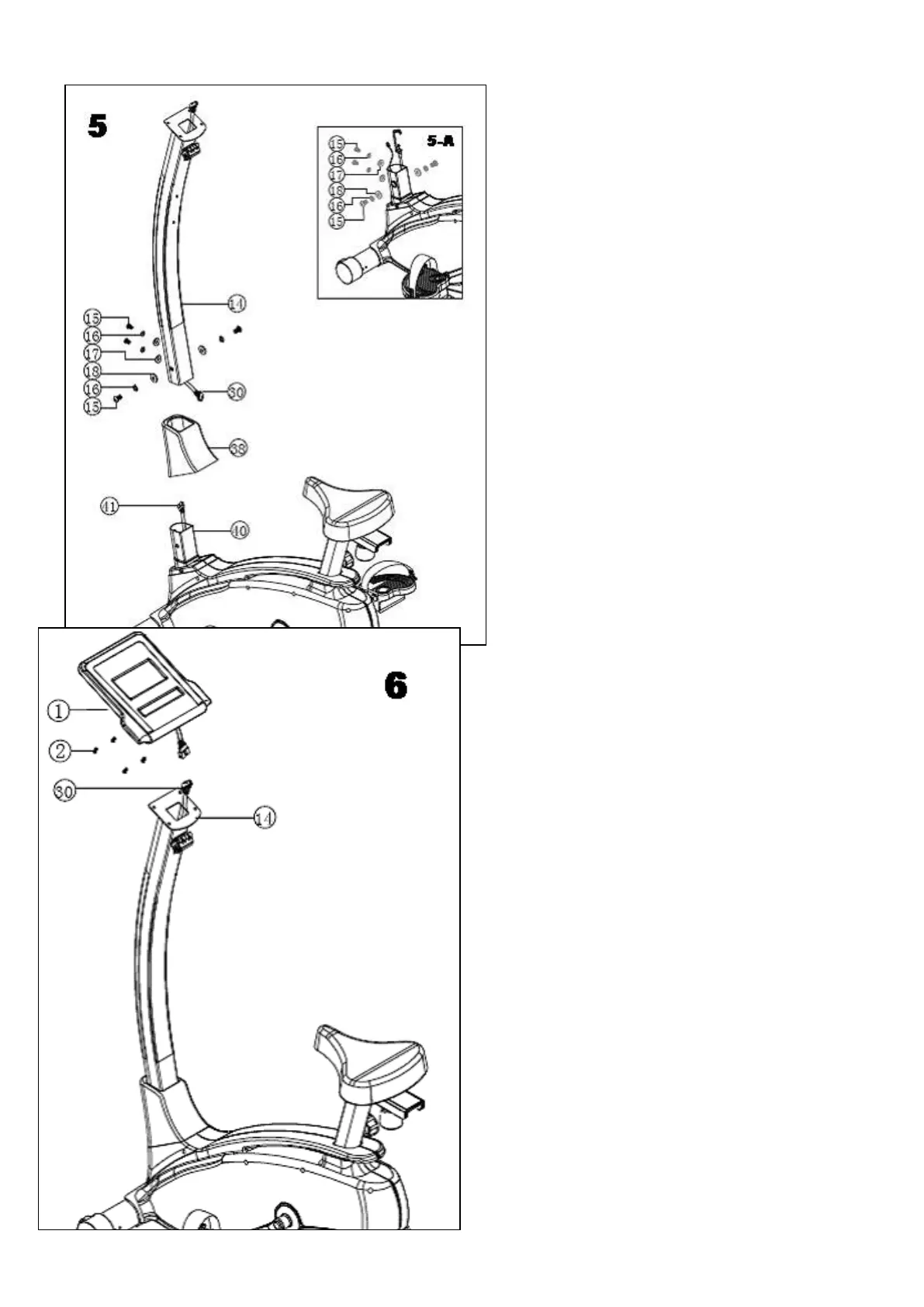
5. Connection of computer post (pic5)
1.Take the four screws M8*20(15) four M8
spring
washer(16) 腰two M8 arc washer(17) and two
flat
washer OD20*ID8.5*1.5T(18) (PIC5-A)
2. Invaginate the computer post sheath(38)
onto computer
post, then move upward for a certain distance
so as to
conveniently assembly.
3. Make the computer post (14)approach main
frame set
(40), connect the sensor wire upper
section(30) and
sensor wire bellow section(41);
4.Insert the computer post set(14) into main
frame(40),
fasten well with pre-take down screw and
washer.as
right picture.
5.Finally put down the computer sheath, clip
well with two
outer cover.
6. Assembly of computer (pic6)
1.Take the screw(2) at back of computer(1) down.
2.Connect the sensor wire upper section(30)
which exclose out
Computer post and computer sensor wire at back
of computer.
3.Attach computer(1) onto the fixed piece of
computer post(14),
fasten well with pre-take down screw(2)


 To Next Page
 Loading...