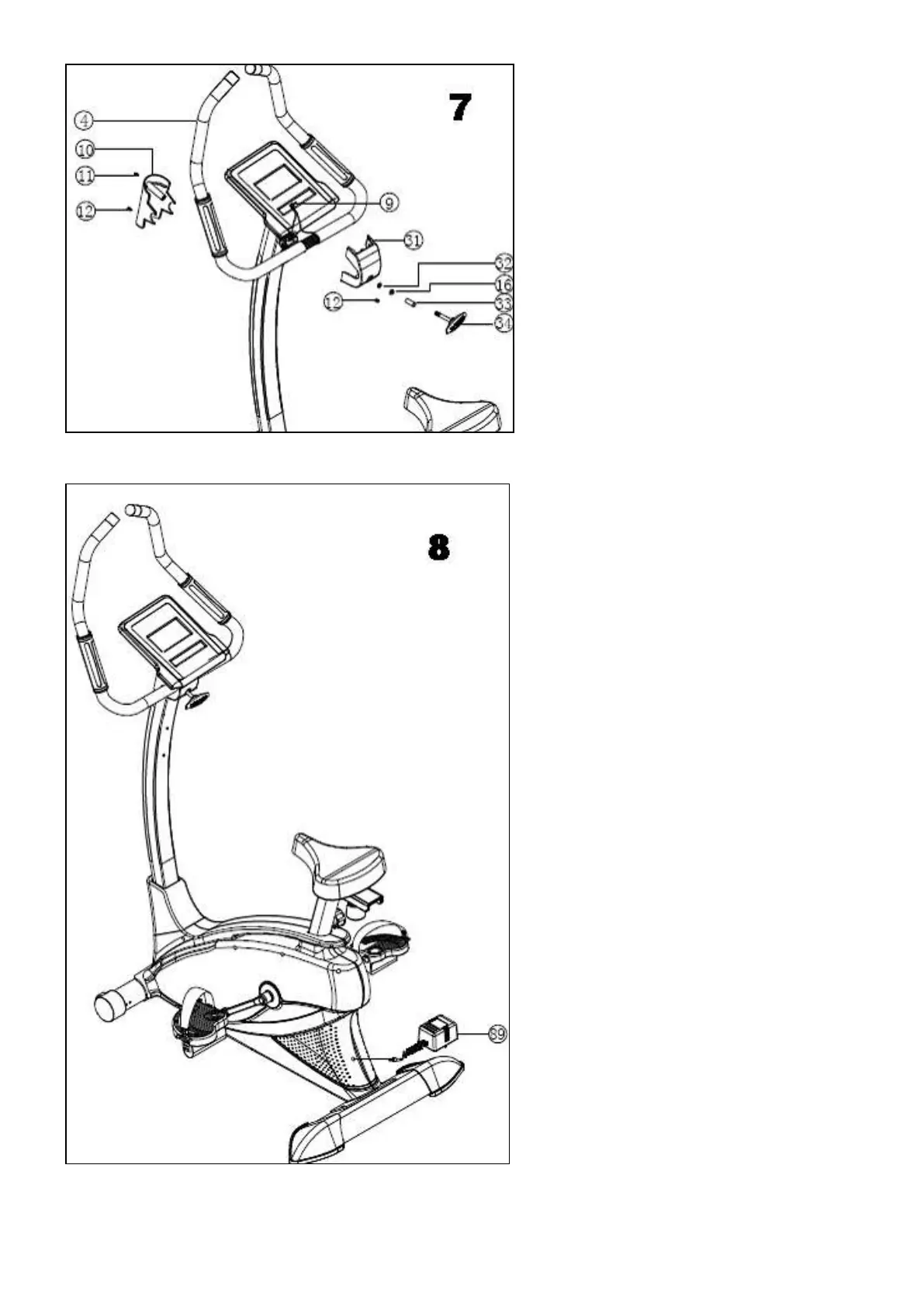
7.Connection of handle bar tube and
handle bar cover (pic7)
1. Fix the handle bar tube(4) with forehead,
cover the handle bar cover-back(10),
fasten well with screw M5*1612.
2. Cover the handle bar cover-front(31),
turn handle bar tube to a certain angle and
fix with knob(34) 腰handle bar knob(33)
腰M8 spring washer(16) and flat washer
OD12*ID8*1.5T(32)
3. Fix the handle bar cover-front(31) with
screw M5*16(12), then fix the handle bar
cover-front(31) and handle bar coverback
(10) with screw M4*20.
4. Finally insert the hand pulse wire(9) into
the dot at back ofcomputer.
8.Connection of transformer (pic8)
Connect the one side of transformer(89)
and tail of outer
cover;another side connect to the (220V)
power supply.
Then owner can start practice.


 To Next Page