
 Need help?
Do you have a question about the Hobby Biotherm II and is the answer not in the manual?
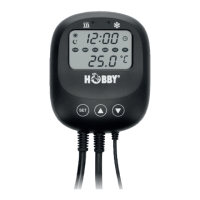
The device in question is the Hobby Biotherm II Digital Temperature Controller for Terraria. It is designed to precisely regulate temperature in terrariums, aquariums, paludariums, greenhouses, or aviaries, ensuring a stable environment for various animals.
The Biotherm II is an advanced digital temperature controller that allows for separate control of heating and cooling elements. It features an innovative measuring and control system, enabling temperature adjustments in precise 0.1°C increments. The device also incorporates a real-time clock with one-second interval control, making it possible to program specific day and night temperature cycles.
A key safety feature is the automatic shutdown of both heating and cooling outputs during programming, preventing accidental operation. The device is equipped with an acoustic and optical alarm system that activates if the temperature deviates significantly from the set values, providing an immediate alert to potential issues. The display shows both the set and actual temperature values, and it is illuminated for easy readability, even in low light conditions. An LED activity indicator on the control unit visually confirms whether heating or cooling elements are actively regulating the temperature.
The waterproof temperature sensor utilizes a Quick-Connect connector for simple and secure installation. The main regulator unit includes two plug sockets, one for a heating device and one for a cooling device, each capable of handling up to 600W (resistive load). The total connected load for both sockets is a maximum of 1200W. The Biotherm II's "Smart-Chip" technology ensures stable and reliable temperature control, making it suitable for a wide range of applications requiring constant temperature management.
The Biotherm II offers intuitive programming through touch sensors on the control unit.
Setting the Current Time: To set the current time, press and hold the "SET" button for approximately 3 seconds until the clock symbol blinks on the display. Briefly press "SET" again to enter hour adjustment mode. Use the up/down arrow buttons to set the hour. Press "SET" again to confirm the hour and proceed to minute adjustment. Set the minutes using the arrow buttons. Hold "SET" for 3 seconds to save the time.
Setting Day and Night Start Times: For initial operation, both a day start time and a night start time must be programmed. It is recommended to align these times with the lighting duration of the terrarium.
Setting the Set Temperature (Day and Night): The Biotherm II allows for separate day and night temperatures, which is beneficial for animals requiring a temperature drop at night. The adjustable range is 0.0°C to +60°C.
Setting the Switching Delay for Heating and Cooling: This feature protects connected electronic devices by preventing rapid on/off cycling. The range is 0.1°C to 15.0°C.
Setting the Alarm for Temperature Exceedance/Undershoot: An alarm can be set to activate if the temperature goes above or below a programmed threshold. The range is 0.0°C to +15°C.
Setting the Cooler Switch-on Delay: This feature protects connected cooling devices. If the temperature rises slowly, the cooler starts immediately. If it rises quickly, the cooling function starts only after the set delay. The range is 0 to 10 minutes.
Setting the Temperature Unit: The display can show temperature in either Fahrenheit or Celsius.
Troubleshooting:
Cleaning and Maintenance: Always disconnect the device from the mains power supply before performing any cleaning or maintenance. Use a lint-free cloth, slightly dampened with water, to clean the product. Do NOT use harsh cleaning agents or solvents.
Drip Loop: Ensure a "drip loop" is formed with the power cable, especially when using an extension cord. This prevents water from running along the cable and reaching the electrical outlet. If the plug or socket gets wet, do not pull the plug. First, switch off the fuse or circuit breaker for the device, then pull out the power cable and check the socket for water.
Sensor Placement: Position the temperature sensor in the terrarium far enough away from heat sources to avoid inaccurate measurements.
Warranty: Dohse Aquaristik GmbH & Co. KG provides a 24-month warranty from the date of purchase. For warranty or repair, return the device to the dealer where it was purchased. The warranty card and terms are available on the manufacturer's website: www.hobby-terraristik.com.
 General
| Brand | Hobby |
|---|---|
| Model | Biotherm II |
| Category | Controller |
| Language | English |

 To Next Page