07-15
WLAN-Module *
Hobby's CI-Bus board management can link
together up to 15 devices, enabling you to ope-
rate them using just one central control panel that
shows their functions on its display. (standard)
When coupled to a WLAN module, all of the
functions on the LCD control panel can be wire-
lessly controlled via your smartphone, tablet or
notebook.
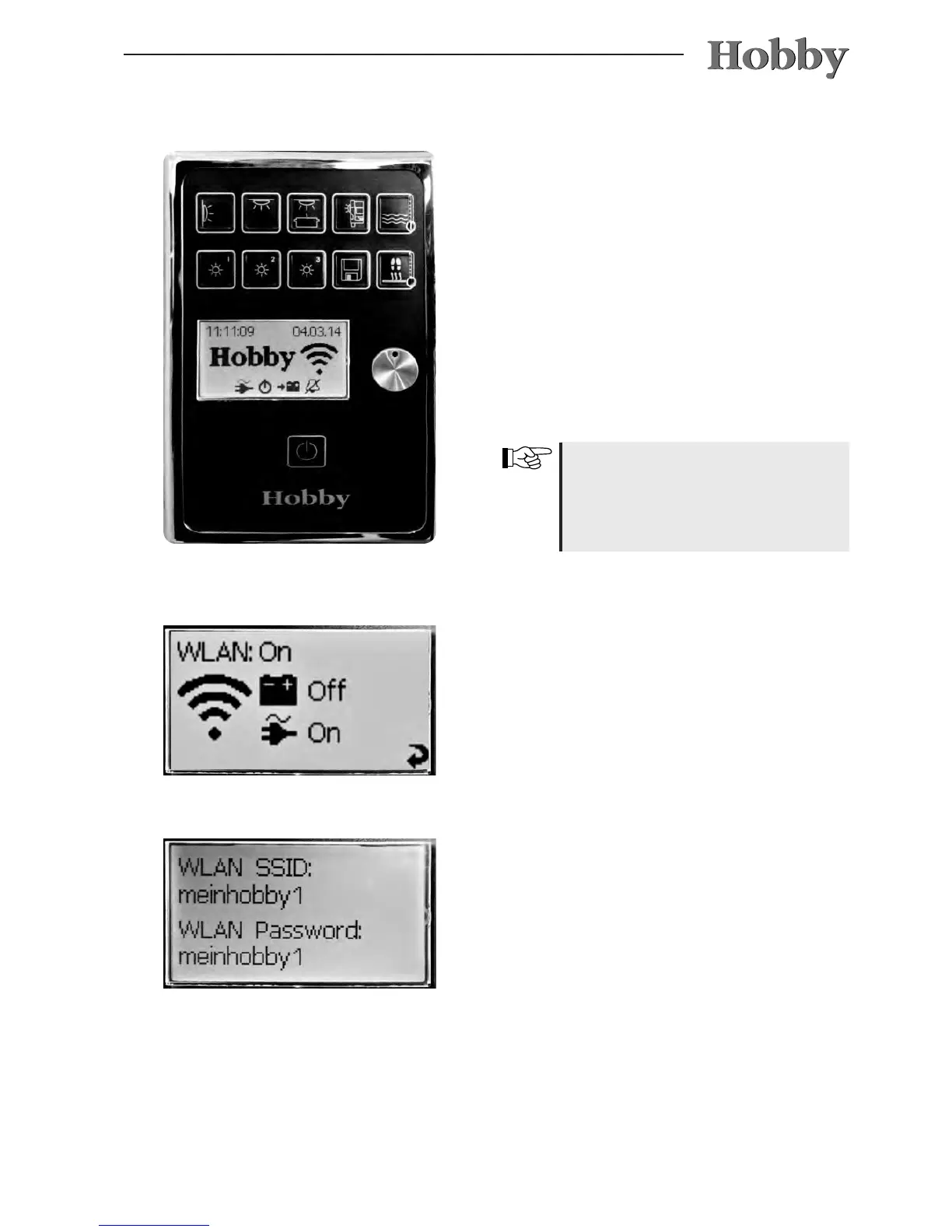
After the main switch on the control panel has
been switched on and all of the connections
have been correctly attached, a WLAN network
is set up that is recognized by all WLAN-enabled
devices.
The SD card is also found on the
WLAN module. The devices are
updated on this card. This SD card
cannot be written in Windows le
format.
Turn the rotary encoder to access the WLAN
menu. Power is supplied via the battery (for self-
sufcient vehicles or hitched base vehicles only)
and/or via the built-in mains supply circuit. The
WLAN is ready as soon as “WLAN: On” appears
after the module has been switched on.
Press the rotary encoder key to access the sub-
menu in which the connection data for the WLAN
network is displayed. (The menu on the left only
shows example data.)
The WLAN-enabled device must be connected
to the network and the password must be con-
rmed: under Settings, go to “WLAN” and select
the network “meinhobby1” (in this example).
Should this not be displayed immediately, you
must rst use the search/scan function.



 To Next Page