HOBO®MXGateway(MXGTW1)Manual
23470‐F
TheHOBOMXGatewayprovidesnearreal‐timedatamonitoringformostMXseriesloggersby
automaticallytransmittingloggeddatatotheHOBOlink®website.Youcaneasilysetupthe
gatewaywiththeHOBOmobile®orHOBOconnect®apponyourphoneortablet.Once
configured,thegatewayusesBluetooth®LowEnergy(BLE)toregularlycheckfor
measurementsfromupto100loggerswithinrange.Loggermeasurementsarethenuploaded
fromthegatewayviaEthernetorWiFitoHOBOlink,whereyoucansetupautomaticemailor
textalarmnotifications,displayyourdatainadashboard,andexportdataforfurtheranalysis.
Note:AllMXloggersexcepttheMX100seriesaresupportedbythegateway.ContactOnset
TechnicalSupportforquestionsonMX100loggercompatibilitywiththegateway.
Specifications
TransmissionRange Approximately30.5m(100ft)line‐of‐sight
WirelessDataStandard Bluetooth5.0(BLE)
Connectivity WiFi802.11a/b/g/n2.4/5GHzor10/100Ethernet
PowerSource ACadapterorPoE
Dimensions 12.4x12.4x2.87cm(4.88x4.88x1.13inches)
Weight 137g(4.83oz)
TheCEMarkingidentifiesthisproductascomplyingwithallrelevant
directivesintheEuropeanUnion(EU).
SettinguptheGateway
Followthesestepstosetupthegatewayforthefirsttime.
1. Downloadtheapp.
IfyouareusinganiPhone®oriPad®:Download
HOBOmobilefromtheAppStore®.
IfyouareusinganAndroidphoneortablet:Download
HOBOconnectfromGooglePlay™.
2. Powerupthegateway.
a. Insert
theappropriateplugforyourregionintotheAC
adapter.ConnecttheACadaptertothegatewayand
plugitin.
b. Waitforthegatewaytobootupandappearintheapp.
Whilethegatewaybootsup,theLEDonthegateway
willstartassolidyellowand
thenswitchtoblinking
yellow.Itwilltake4to5minutesbeforethegateway
appearsintheapp.
3. CreateaHOBOlinkaccount.Gotowww.hobolink.comand
createanaccountifyoudon’talreadyhaveone.Youwill
receiveanemailtoactivatethenewaccount.
4. Setup
thegatewaywiththeapp.
HOBOconnectinstructions
a. TaptheSettingsicon.
b. IfyourHOBOlinkaccountisnotalreadyconnectedto
HOBOconnect,tapConnectAccount.Enteryour
HOBOlinkusernameandpasswordandtapConnect.
c. MakesuretheUploadDatatoggleisenabled.
d. PlugintheEthernetcableifyoudeviceisusing
Ethernet.
e. InHOBOconnect,tapDevicesandfindthegatewayby
searchingorscrollingthroughthetiles.Ifthegateway
doesnotappear,makesureitiscompletelypoweredup
asdescribedinstep2andwithinrangeofyourphoneor
tablet.
f. Tap thegatewayintheappto
connecttoit.
g. Onceconnected,tapatthebottomofthescreen
toconfigurethegateway.
h. Enteranameforthegateway.Thegatewayserial
numberwillbeusedifnonameisentered.
i. IftheEthernetconnectionisusingDHCP(dynamicIP
addresses),thenskiptostep
g.
j. TosetupEthernetwithstaticIPaddresses,tapEthernet
Configuration,tapDHCPtoggletodisableDHCP.Fillin
HOBOMXGateway
MXGTW1
IncludedItems:
Mountingkit
ACadapter
RequiredItems:
HOBOlinkaccount
MobiledevicewithBluetooth
HOBOmobileappfordevices
withiOS
HOBOconnectappfor
deviceswithAndroid™
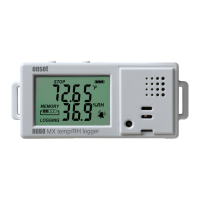
MX1101,MX1102,MX1104,
MX1105,MX2001,MX2200,
MX2300,orMX2501loggers
PluginAC
adapterhere


 To Next Page
 Need help?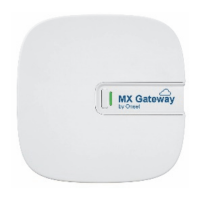

 General