HOBOMXGatewayManual
1‐800‐LOGGERS 2 www.onsetcomp.com
thenetworkingfieldsandtapSave.Consultyour
NetworkAdministratorasneeded.
k. TosetupWi‐Fi,tapWi‐FiConfiguration,tapCurrent
Networkortypeanetworkname.Enterthepassword
forthenetworkandtapSave.
l. Taptosavethenewconfigurationsettingstothe
gateway.
HOBOmobileinstructions
a. TaptheDevicesiconandthentapGatewaysatthetop
ofthescreen.
b. TapUseMXGateways(orgotoSettingsandthentap
HOBOlink).
c. EnteryourHOBOlinkusernameandpasswordandtap
Done.(EnableUploadDataifyouarenotpromptedfor
theusername
andpassword.)
d. Select“fromaGateway”forthedefaultHOBOlink
uploadsetting.
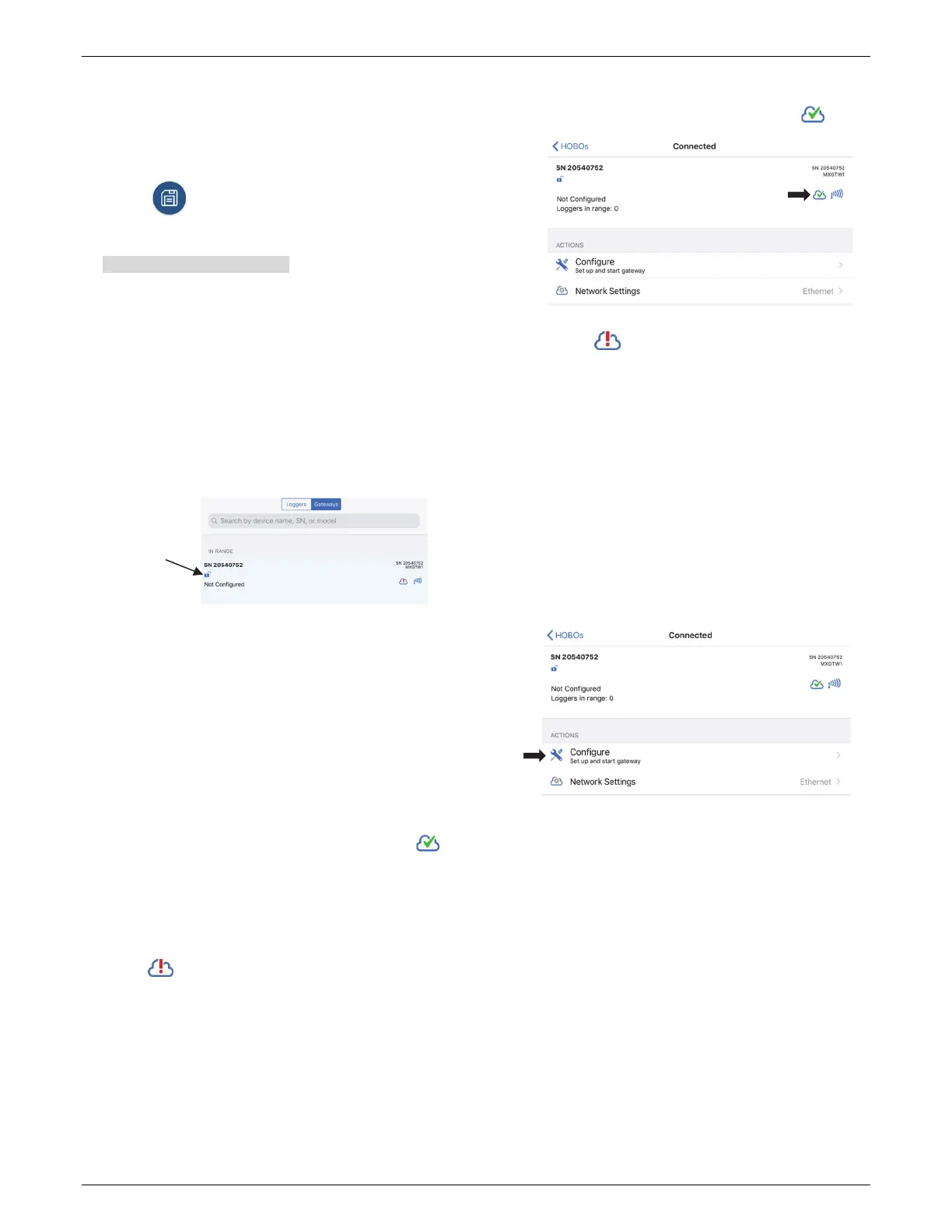
e. TapDevicesandthentapGatewaysatthetopofthe
screen.Tapthegatewaytoconnecttoit.
Ifthegatewaydoesnotappear,makesureitis
completelypoweredupasdescribedinstep
2and
withinrangeofyourphoneortablet.
f. TosetupWiFi:
i. TapNetworkSettings.
ii. Tap WiFiandthenthearrowtoopenWiFiSettings.
iii. SelectUseCurrentWiFiNetworktouseyourphone
ortablet’sexistingWiFISSIDandthentypeyour
password.Tap
Save.
iv. Thegatewaywillautomaticallytestthenetwork
connectionaftersavingthesettings.Thecloudicon
inHOBOmobilewilldisplayagreencheckmark
oncethenetworksettingshavebeensuccessfully
configured.Ifamessageappearsintheapp
promptingyoutocyclethepoweronthegateway,
followtheinstructions
andremovethepowercord
andthenplugitbackinafteracoupleofseconds.If
thetestisnotsuccessfulandthisiconstillappears
,makesureallyoursettingsareentered
correctlyandsaved.
g. TosetupEthernet:
PluginanEthernetcable.Thenetwork
settingsare
automaticallyconfiguredifyourEthernetconnectionis
usingDHCP(dynamicIPaddresses).Thecloudiconin
HOBOmobilewilldisplayagreencheckmark .
IfyourEthernetusesstaticIPaddressesandthisicon
appears :
i. TapNetworkSettings.
ii. Tap Ethernetandthenthearrowtoopen
Ethernet
Settings.
iii. DisableDHCP.
iv. TapIPAddress,SubnetMask,andRoutertoeditthe
addresses(consultyourNetworkAdministrator).
v. TapAddDNSServerandenteranaddress.Repeatif
necessary(theappcanstoreuptothreeDNSserver
addresses).
vi. TapSave.
h. IfHOBOmobileisnot
alreadyconnectedtothegateway,
tapDevicesandthentapthegatewaytoconnecttoit.
i. TapConfigure.
j. Enteranameforthegateway.Thegatewayserial
numberwillbeusedifnonameisentered.
k. TapStart.
5. Setupandstartloggers.
MXseriesloggers
mustbeconfiguredtousethemwiththe
gateway.Ifanyofyourloggersarealreadylogging,youwill
needtoreconfigurethemasdescribedinthefollowing
steps.
Note:MX100seriesloggersarenotsupportedbythe
gateway.ContactOnsetTechnicalSupportforquestionson
MX100loggercompatibilitywiththegateway.
Toconfigurealoggerforusewiththegateway:
a. TaptheDevicesiconintheapp.(InHOBOmobile,tap
Loggersatthetopofthescreen.)
b. Taptheloggerintheapptoconnecttoit
Tapanywhere
intherowto
connecttothe
gateway


 To Next Page
 Loading...