HOBOMXGatewayManual
1‐800‐LOGGERS 3 www.onsetcomp.com
c. TapConfigureinHOBOmobileortapin
HOBOconnect.
d. Makesure“fromaGateway”ischeckedunderUpload
DatatoHOBOlinkInHOBOmobileorselectGatewayfor
the“UploadDatavia”configurationsettingin
HOBOconnect.
e. Chooseotherloggersettingskeepinginmindthe
following:
Aloggingintervalof5minutesorslowerisoptimalfor
thegateway,althoughitcansupportalogginginterval
downto1minute(seeViewingDataUploadedfrom
theGatewayfordetails).
Ifyouselectaloggingintervalfasterthan1minute,the
dataloggedatthefasterratewillnotbe
availablefor
thegatewaytoupload.Usetheapptoreadoutthe
loggerandretrievethisdata.
Burstloggingandstatisticsarenotsupportedbythe
gateway.Usetheapptoreadouttheloggerand
retrievethisdata.
ForMX1104,MX1105,MX2200,MX2300,andMX2501
loggers,Bluetoothisautomaticallyenabledtoensure
regulargatewayuploadscanoccur.
ThegatewayusesBluetoothLowEnergyto
communicateovertheairwithloggerswithinrange.If
MX2200orMX2501loggersorthetopendofan
MX2001loggerisdeployedinwater,thegatewaywill
notbeableto
communicatewiththem.
ii. TapStart.Foradditionalhelpwiththe app,refertothe
user’sguideavailablefromAboutorat
www.onsetcomp.com/support/manuals.
Thegatewaywillregularlycheckloggerswithinrangeand
uploaddatatoHOBOlink.SeeViewingDataUploadedfromthe
Gatewayfordetailsonworkingwithdata.
DeploymentandMountingGuidelines
Followtheseguidelineswhenselectingalocationtoplacethe
gateway:
The gatewayrequiresACpowerandaninternet
connection.Selectalocationforthegatewaythatisnear
anACoutletandanEthernetport(ifusingEthernet)or
withinrangeofyourWiFirouter(ifusingWiFi).
Therangeforsuccessfulwirelesscommunicationbetween
thegatewayandloggersisapproximately30.5m(100ft)
withfullline‐of‐sight.Ifthereareobstaclesbetweenthe
gatewayandtheloggers,suchaswallsormetalobjects,
theconnectionmaybeintermittentandtherange
betweenloggersandthegatewaywillbedecreased.Test
therangebypositioningyourphoneortabletwhereyou
wanttodeploythegateway.Ifthephoneortabletcan
connecttoaloggerwiththeappfromthatlocation,then
thegatewayshouldbeabletoconnecttotheloggeras
well.
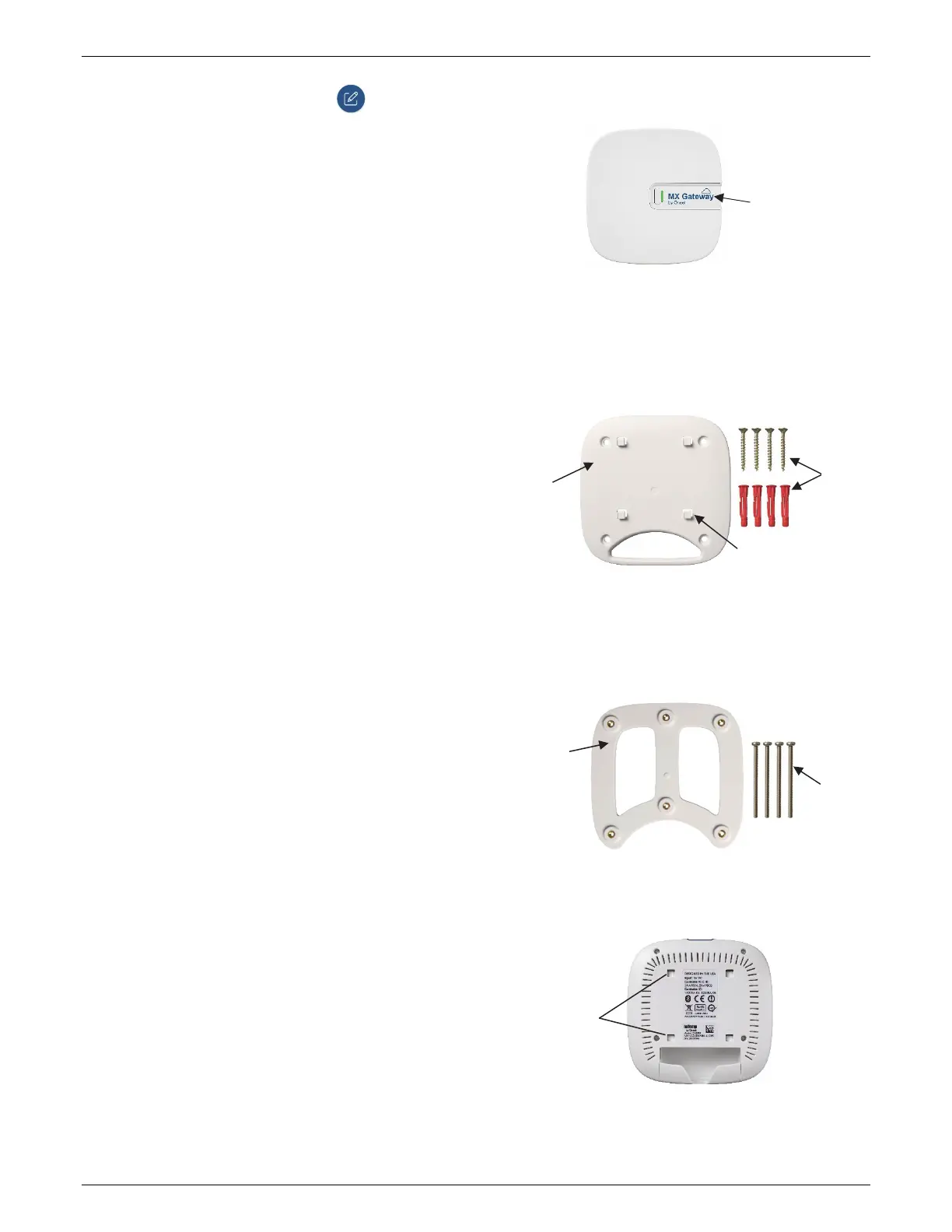
If
youaremountingthegatewayonawallorotherflat
surface,mountthefaceofthegatewaytowardsthe
coverageareawiththelogoorientedhorizontallyas
shownbelowforoptimalsignalstrength.Alsomountaway
fromthecornerswherewallsmeetandabovethetallest
obstructionsintheroom.
Ifyou aremountingthegatewayonaceiling,placeiton
thelowestavailablemountingpointfacingdownwardsfor
optimalsignalstrength.AlsomountawayfromHVACducts
andbelowI‐beamsorsupportbeams.
Usetheenclosedmountingkittomountthegatewaytoa
flatsurface.Usetheself‐tappingscrewsandanchorsto
affixthegatewaymountingplatetoawallorceiling.
Ifyouaremountingthegatewayonawoodensurface,use
boththegatewaymountingplateandthemounting
bracketshownbelow.Placethegatewaymountingplate
overthemounting
bracketsotheholesarealigned.Use
themachinescrewstoaffixitthesurface(youmayneed
todrillpilotholesinthe surfacefirst).
Oncethegatewaymountingplateisinplaceonthewallor
otherflatsurface,usethefourholesonthebackofthe
gatewaytoattachittothefourclipsonthemounting
plate.
Self‐tapping
screwsand
anchors
Machine
screws
Oneoffourclipsto
attachtogateway
Gateway
mounting
plate
Mounting
bracket;
attachto
mounting
plateabove
Usetheseholes
toattachthe
gatewaytothe
clipsonthe
mountingplate
Forwallmounting,
positionthegateway
facingthecoverage
areawiththelogo
orientedasshown


 To Next Page
 Loading...