3
38
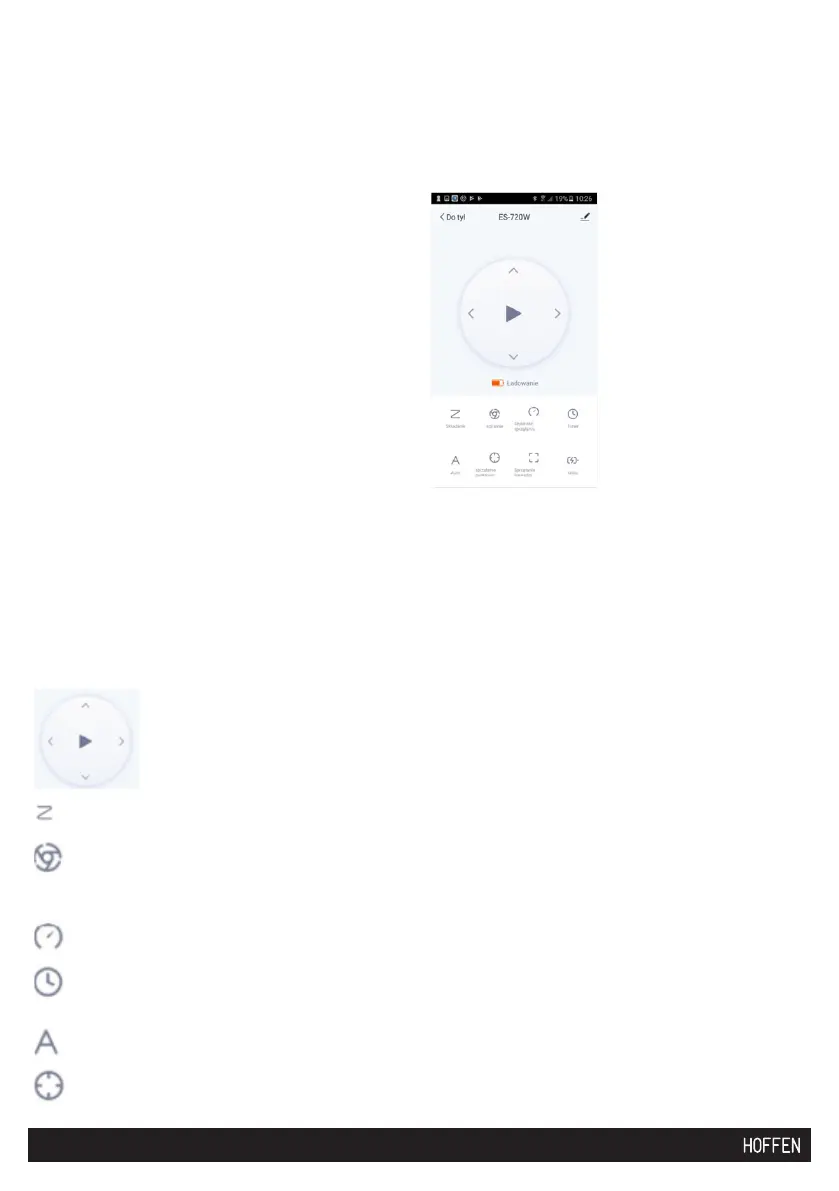
7.4 CONTROL VIA THE APP.
“My house” tab
Select device to clean from the “All devices” level, or the selected room, e.g.
“Living room”. Click the added device. The window below will display. Select the
relevant operation mode.
Available functions:
Select the room to clean from the “All devices” level, or the selected room, e.g.
“Living room”. Click the added device. The window below will display. Select the
relevant operation mode.
Dostępne funkcje:
- manual device control
- the vacuum cleaner moves along a zigzag path
- the vacuum cleaner moves along a spiral line, making wheels of incre-
asing diameter
- vacuuming speed
– set a schedule
- automatic vacuum cleaner movement
- point vacuuming
LP REASON PROBLEM SOLUTION
01 IR system failure Clean the sensors (see p.
8.5 Cleaning the sensors)
02 Clogged intake opening Clear the intake opening,
remove all dirt
03 Battery charge level low Place the device in the
docking station
04 Drive failure (left or right
wheel)
Remove all dirt which might
be blocking the wheels
05 Other damage See p. Warranty and service


 To Next Page