Congratulations on your purchase of the WS-Bag! Since positive word
of mouth is the best way to grow our business, we want your install to go as
smoothly as it was designed to. If you have any questions or concerns, we are
here to help. Email or call us during regular business hours. If you still need
help, then please consider a professional installation by your dealer.
2
Hogtunes Contact Information
Email: techsupport@hogtunes.com
USA Tel: 608
-
554
-
7631
•
Canada Tel: 705
-
719
-
6361
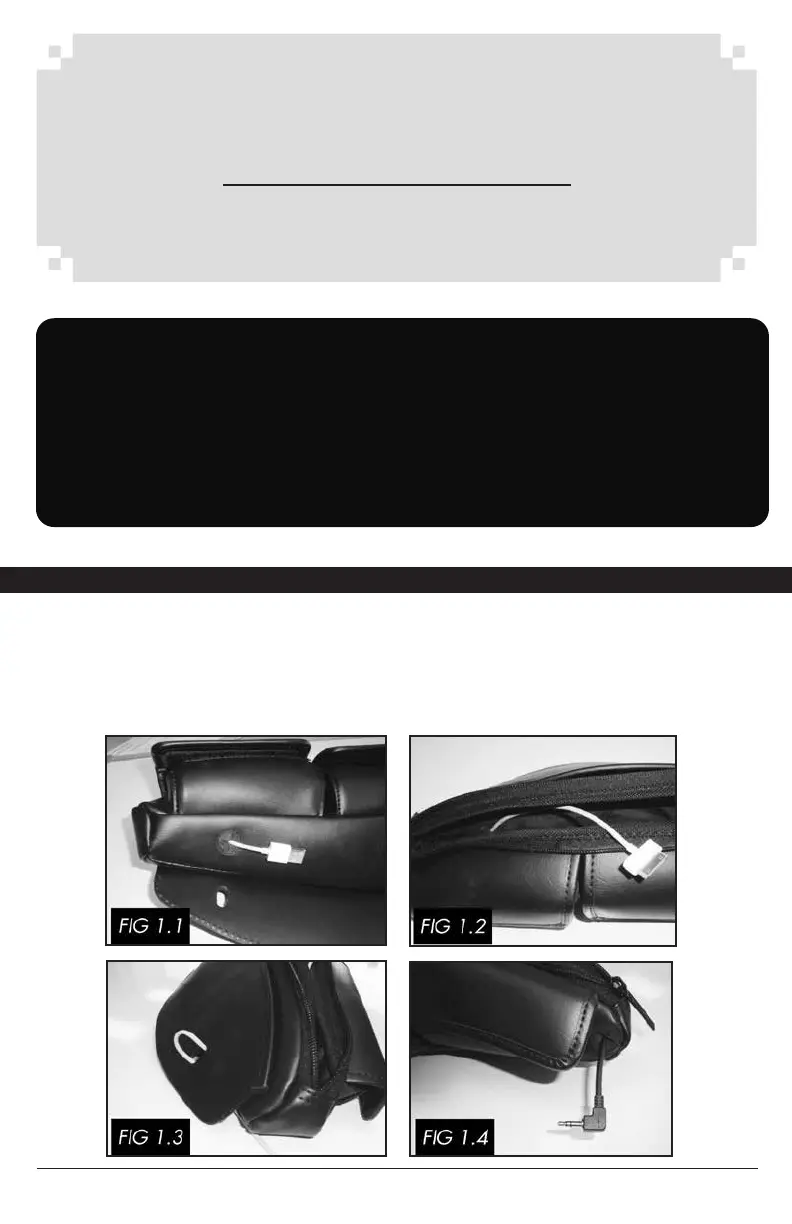
On the underside of the bag, there is a “X” grommet to allow a USB cable to pass
into the bag and an audio cable as per Fig 1.4. Skip to next page if not using.
From inside the zippered pouch, push the standard USB cable through as shown
in Fig 1.1. Pull all the slack through leaving enough slack for your USB powered
device as shown in Fig 1.2.
IMPORTANT: When mounted, MAKE SURE the bag does not obscure your
view of the road or surroundings. Install the bag so it will not shift or move while
riding with or without anything in the bag. Make sure the mounted bag will not
contact any controls or moving parts of your bike. Before riding, secure any cargo
inside the bag, taking special care with eyeglasses. Make sure all flaps/zippers etc
are in the closed position. Your Hogtunes WS-BAG is designed to slip in between
the windshield and the inner dash of your bikes fairing. Care must be taken when
mounting the bag so it stays firmly secured to your bike!
PREPARING THE BAG FOR INSTALLPREPARING THE BAG FOR INSTALLPREPARING THE BAG FOR INSTALL



 To Next Page