EasyManua.ls Logo

Holland Electronics HMM-10H - User Manual

Holland Electronics HMM-10H
3 pages
Print Icon
To Next Page IconTo Next Page
Loading...
AGILE UHF/CATV MODULATOR MODEL HMM-10H
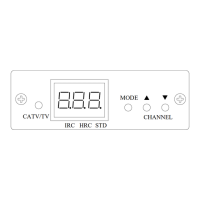
1. Front Panel
2. Rear Panel
3.
Display Indication
Channel Number
Cable Standard Frequency
Cable HRC Frequency
Cable IRC Frequency
ON: Cable Channel
OFF: TV Channel
IRC HRC STD
CATV/TV
MODE
CHANNEL
Question and Answer IconNeed help?

Do you have a question about the Holland Electronics HMM-10H and is the answer not in the manual?

Summary

Front Panel Controls

Rear Panel Connections

Display Indicators

Modulator Operation

Modulator Programming

Program Frequency Type

Selects the frequency type (TV, cable standard, HRC, IRC) using MODE and keys.

Select Channel

Navigates and selects the desired channel using the ▲/ keys.

Store Settings

Settings are automatically stored in permanent memory after selection.

Unit Lock Functionality

Lock the Unit

Press MODE for 4 seconds to lock; indicated by an LED.

Unlock the Unit

Press MODE for 4 seconds to unlock, restoring display functionality.

Important Safety Information

Limited Warranty Details

Holland Electronics HMM-10H Specifications

General IconGeneral
BrandHolland Electronics
ModelHMM-10H
CategoryModulator
LanguageEnglish