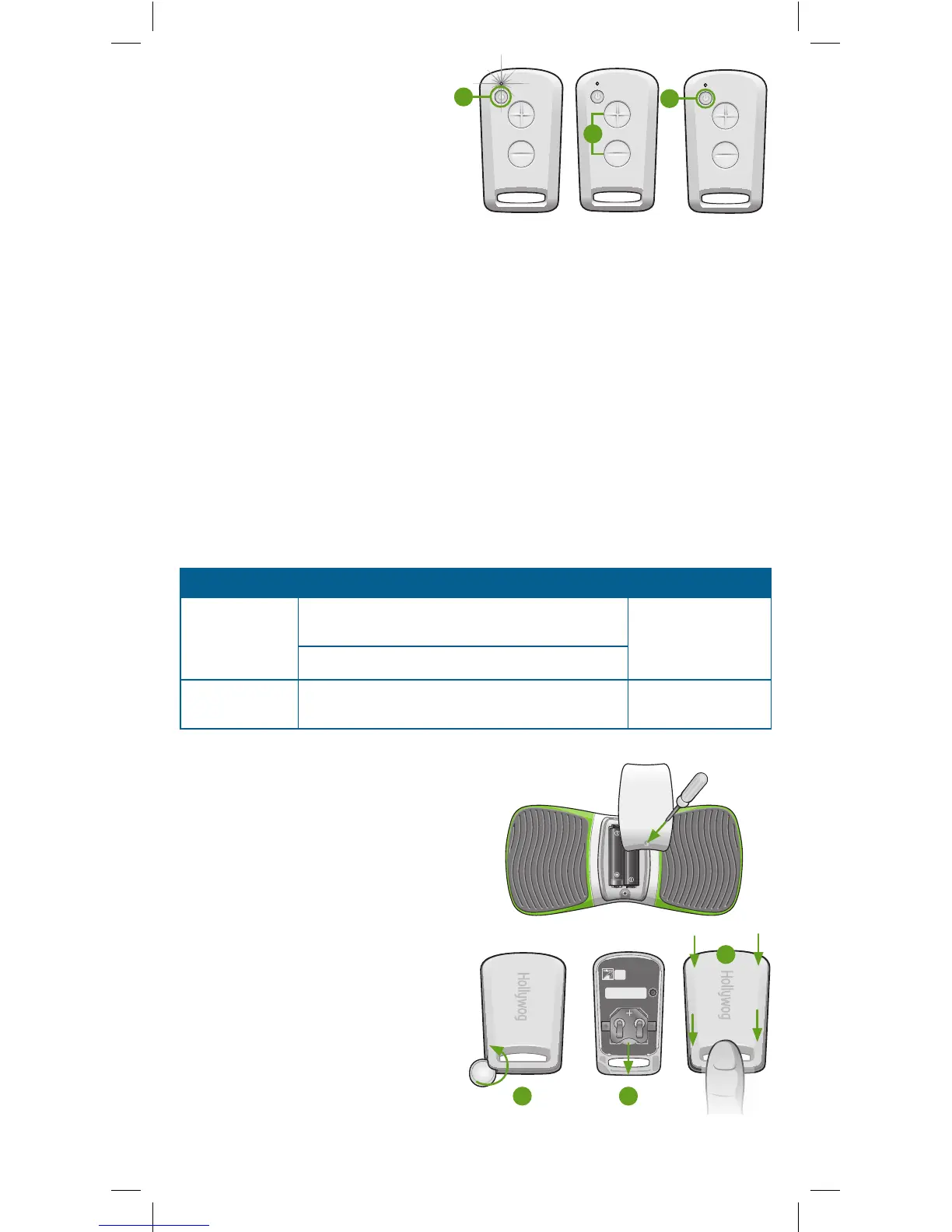
4. Press the St art/Stop button on the
remote control to begin the treatment.
Note: The LED on the WiTouch Pro
device will ash rapidly during treatment.
5. Press the (+/-) buttons to increase or de-
crease the intensity of the stimulation until
it is at a comfortable level. Note: The stim-
ulation intensity can be controlled on the
WiTouch Pro device with either the remote control or the buttons located on the device.
This allows for adjustment by either you or your healthcare professional.
6. Press the Start/Stop button on the remote control to stop the treatment at any time.
Treatment will automatically stop after 30 minutes. Note: If a treatment is stopped and
restarted the treatment will restart at the rst stage.
Removing the WiTouch Pro
Important! Do not remove the device until the treatment has stopped.
1. After treatment, or when you want to remove the device, grasp the edge of the device
and gel pad to ensure the gel pad does not stay on the skin. Slowly peel the device away
from the skin.
2. Align, and place the green protective liners back on the gel pads. Ensure the pads are
completely covered.
Battery Replacement
When battery replacement is needed the LED will ash as follows:
To replace the WiTouch Pro Device Batteries:
1. Using the included #0 Phillips head
screwdriver remove the cover.
2. Remove the old batteries, and place the
new batteries in the correct polarity.
3. Replace the battery compartment cover.
To replace the remote control battery:
1. Place the provided screwdriver, coin or
at tool in the groove on the side of the
remote control. Turn the coin and lift the
cover off.
2. Slide the old battery out, and slide a new
CR2032 battery into the slot. Note: The
(+) is facing upward.
3. Align the cover with the remote control
base. Holding the handle portion of the
remote control, snap the cover down
into place.
Note: Consult your local authorities for proper
battery disposal.
Item Description Battery
WiTouch Pro
device
LED ashes yellow every two (2) seconds when
the unit is On
(2) AAA alkaline
batteries
LED ashes yellow rapidly during treatment
Remote Control LED will ash yellow once when the Start/Stop
button is pressed or no LED ash at all.
(1) CR2032 lithium
battery
Note: Fully depleted batteries will have no ashing LED.
6
5
4
1 2
3



 To Next Page