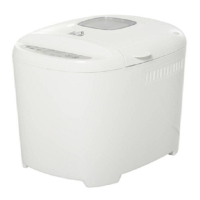
This document is an instruction manual for the HOMCOM BM4406-GS Bread Maker, a kitchen appliance designed to automate the process of making various types of bread and dough. The bread maker is intended for home use and emphasizes ease of operation and maintenance.
Function Description
The HOMCOM BM4406-GS Bread Maker is a versatile appliance that performs the entire bread-making process, from kneading and rising to baking. It offers 12 pre-programmed settings, allowing users to create a wide range of baked goods. The core function involves mixing ingredients, kneading the dough, allowing it to rise, and then baking it to completion.
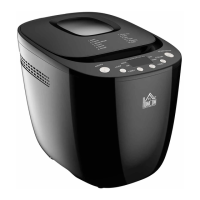
The appliance features a control panel with several buttons for selecting programs, crust color, and loaf size, as well as a START/STOP button to initiate or halt operations. A viewing window on the top lid allows users to monitor the baking process without opening the lid, which helps maintain consistent internal temperature. The bread maker also includes a delay function, enabling users to program the appliance to start baking at a later time, ensuring fresh bread is ready when desired. This delay function can be set for up to 13 hours.
After baking, the bread maker automatically enters a "KEEP WARM" phase for 60 minutes, which helps keep the bread warm until it can be removed. In the event of a power interruption, the machine has a memory function that allows it to resume the program if power is restored within 10 minutes, preventing the need to restart the entire process.
The various programs cater to different bread types and baking needs:
- Basic: For normal bread, with options to add extra ingredients for flavor.
- French: Produces bread with a crisper crust and lighter texture, involving a longer rise time.
- Wholewheat: Specifically for whole wheat bread, though the delay function is not recommended for this setting.
- Quick: Bakes a loaf in less time than the Basic setting, resulting in a smaller, denser texture.
- Sweet: For sweet breads, with an option to add flavor-enhancing ingredients.
- Dough: Kneads and rises dough without baking, suitable for making bread rolls, pizza, or steamed bread.
- Gluten-free: For gluten-free bread, allowing for additional ingredients.
- Cake: Involves kneading, rising, and baking using soda or baking powder.
- Sandwich: Designed for light-textured bread with a thinner crust.
- Buttermilk: For bread made with butter and yogurt.
- Kneading: A program solely for kneading flour.
- Bake: A baking-only program, useful for increasing baking time on other settings or for re-baking.
The bread maker also includes a "COLOR" button to select the desired crust darkness (Light, Medium, or Dark) and a "LOAF" button to choose the bread size, which can affect the total operation time.
Usage Features
Operating the HOMCOM BM4406-GS Bread Maker involves a straightforward process, beginning with proper ingredient placement. Users are instructed to place the bread pan into the machine and secure it by turning it clockwise. The kneading blade is then inserted onto the drive shaft, with a recommendation to grease the holes to prevent dough from sticking.
Ingredients should be added in a specific order: liquids first, followed by sugar, salt, and flour. Yeast or baking powder should always be the last ingredient, placed in a small indentation made in the flour, ensuring it does not come into direct contact with liquids or salt, especially when using the delay function. This precise layering is crucial for optimal fermentation and bread quality.
After adding ingredients, the lid is gently closed, and the power cord is plugged into an outlet. The desired program is selected using the "MENU" button, followed by choosing the crust color with the "COLOR" button and loaf size with the "LOAF" button. If a delayed start is desired, the "TIME" button is used to set the delay. Finally, the "START/STOP" button initiates the program.
During certain programs (Basic, French, Whole wheat, Sweet, Gluten free, Sandwich, and Buttermilk), the machine will beep to signal that it's time to add additional ingredients. Users can open the lid at this point to incorporate them. Once the baking cycle is complete, the machine will beep again, and the working light will turn off. To remove the bread, the "START/STOP" button is pressed for approximately two seconds, the lid is opened, and the bread pan is carefully removed using oven mitts. The bread pan is then inverted to release the loaf, which should be cooled on a rack for about 20 minutes before slicing. A hook is provided to remove the kneading blade, which may be hidden in the bottom of the loaf.
The manual also provides important safety guidelines for usage, such as not touching hot surfaces, not immersing the appliance in water, and ensuring the mains lead is safely positioned. It also warns against covering the bread maker, as this can pose a fire risk.
Troubleshooting tips are included to address common issues such as smoke, bread not rising, difficulty removing the loaf, or incorrect baking results. For example, if the display shows "H HH," it indicates a high internal temperature, requiring the machine to cool down. "L LL" indicates a low internal temperature, suggesting the machine needs to warm up to room temperature or use the BAKE program to accelerate warming. "Err" signifies a disconnected temperature sensor, requiring professional attention.
Maintenance Features
Proper cleaning and maintenance are essential for the longevity and performance of the HOMCOM BM4406-GS Bread Maker. Before cleaning, the appliance must be unplugged and allowed to cool completely.
The bread pan should be wiped inside and out with a damp cloth. Abrasive agents or sharp objects should not be used to avoid damaging the non-stick coating. The pan must be thoroughly dried before being reinstalled.
The kneading blade can be difficult to remove if dough has dried around it. In such cases, the pan should be filled with warm water and allowed to soak for about 30 minutes, which will loosen the blade for easy removal. The blade should then be wiped clean with a damp cotton cloth.
The lid and viewing window should be cleaned inside and out with a slightly damp cloth.
The housing of the bread maker should be gently wiped with a wet cloth. Abrasive cleaners should be avoided to prevent damage to the polished surface. The housing should never be immersed in water.
Before storing the bread maker, it is crucial to ensure all parts are completely cool, clean, and dry. The measuring spoon and kneading blade should be placed in the designated drawer, and the lid should be closed.
The manual also provides guidance on ingredient measurement, emphasizing the use of the provided measuring cup and spoon for accuracy. It warns against using normal kitchen teaspoons or tablespoons, as precise measurements are critical for successful bread making. This attention to detail in ingredient handling is part of the overall maintenance of consistent baking results.


 To Next Page
 General