EasyManua.ls Logo

Home Link MPUW1801 User Manual

Home Link MPUW1801
4 pages
To Next Page IconTo Next Page
Page #1 background imageLoading...
Page #1 background image
Appliance Control
Built-in WIFI module and buzzer
Smart alarm siren function
Life-time cloud service is included
Auto WIFI set up with APP
Individual socket setting from your smartphone
Energy Monitoring
Graphical representation of energy consumption
Schedule Timers
Set timers for automatic switching of devices
Power Rating
Input AC120V, 60Hz, max.15A
Consumption: typ. <1W
Operating Conditions
Temperature 0-60ºC (32-140ºF)
Relative Humidity 10% -98% (without dew formation)
Storage Conditions
Temperature -20 to +85ºC
Relative Humidity 5% - 99% (without dew formation)
Dimensions : 60 x 72 x 60 mm
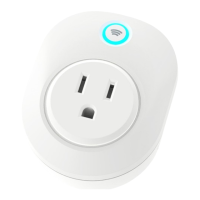
Toggle Wi-Fi Socket
User Manual
Getting started
Congratulations on your purchase of this powerful WIFI Socket. This product works together with your Android or iOS mobile device and
Internet via Wi-Fi. Please check that your mobile device is up to date and running the latest version of it’s operating system. Please also check
that your WIFI router is working properly and that its operating manual confirms that it operates on 2.4 GHz with WPA/WPA2 encryption.
MPUW1801
The Wi-Fi socket will only work on a 2.4GHz Wi-Fi connection, NOT a 5GHz connection. 2.4GHz is the
standard connection for most routers, and 5GHz connections will typically have “5G” appended to
the end of the router’s network name.
Question and Answer IconNeed help?

Do you have a question about the Home Link MPUW1801 and is the answer not in the manual?

Home Link MPUW1801 Specifications

General IconGeneral
BrandHome Link
ModelMPUW1801
CategoryNetwork Card
LanguageEnglish

Summary

Getting Started with Your Wi-Fi Socket

Installing the HomeLink App

Setting Up the Wi-Fi Socket

Pairing the Socket

Steps to pair the Wi-Fi socket with your network and app, including WPS option.

Connecting to Amazon Alexa

Instructions to link your HomeLink account with Amazon Alexa for voice control.

Advanced Socket Features

Timer Functionality

How to set and manage timers for automatic device switching.

Sharing Device Access

Procedure to share control of the socket with other smartphone users.

Important Information and Troubleshooting

Wi-Fi Signal Considerations

Notes on Wi-Fi signal strength, penetration, and repeater usage for optimal performance.

Troubleshooting Connectivity

Solutions for common issues like failing to pair the socket or signal loss.

Safety Instructions

Essential safety precautions and warnings for using the Wi-Fi socket.