This document describes an evaporative cooler, model HME020396N, designed for household and indoor use. It functions by using water evaporation to cool the air, making it an effective appliance for personal comfort in dry environments.
Function Description
The evaporative cooler operates by drawing in air, passing it over a water-saturated cooling pad, and then releasing the cooled, humidified air into the room. This process involves a water tank, a pump to distribute water to the cooling pad, and a fan to circulate air. The unit features a control panel and a remote control for easy operation.
Usage Features
The evaporative cooler offers several modes and settings to customize your cooling experience:
- ON/OFF: A simple button to power the unit on or off. Upon first use, the unit starts at a middle fan speed for 3 seconds, then switches to a low fan speed.
- Speed: Allows you to cycle through three fan speeds: LOW, MID, and HIGH. The display will show 1, 2, or 3 corresponding to the selected speed.
- Wind Mode: This feature offers different airflow patterns:
- NORMAL mode: Provides a consistent airflow at the selected fan speed (HIGH, MID, or LOW).
- NATURE mode: Mimics natural, irregular wind patterns through a preset computer program.
- SLEEP mode: Also uses a preset computer program to imitate natural, irregular wind, but with specific adjustments for sleep comfort. If HIGH wind speed is selected, the unit will operate in HIGH NATURE wind mode for half an hour, then revert to LOW NATURE wind mode. Similarly, if MID wind speed is selected, it will operate in MID NATURE wind mode for half an hour before reverting to LOW NATURE wind mode. If LOW wind speed is selected, it will operate in LOW NATURE wind mode continuously.
- Left/Right Swing: Activates or deactivates an automatic horizontal oscillation of the air outlet, distributing air across a wider area.
- Up/Down Swing: Activates or deactivates an automatic vertical oscillation of the air outlet.
- Cool: Initiates the evaporative cooling function. When activated, the pump will turn on, wetting the cooling pad. After approximately three minutes, as the pad becomes saturated, the air from the outlet will become cool. The Cool button and symbol on the display will light up.
- Timer: Allows you to set an operating duration from 1 to 24 hours. Each press of the button increases the timer by 1 hour. Pressing it again after reaching 24 hours will cancel the timer.
- Max Mode: Activates a maximum operating mode where the unit functions with evaporative cooling and the fan operates at high speed. The Max mode indicator will light up. In Max operating mode, pressing the WIND SPEED button will change the fan speed, but the unit will exit Max operating mode without canceling the evaporative cooling function. Pressing the COOL button in Max operating mode will stop the evaporative cooling and exit Max operating mode, while the wind speed remains unchanged. When Max operating mode is canceled, the indicator light turns off.
For optimal performance, it is important to ensure there is an open window or door in the room to allow air to exhaust.
Maintenance Features
Regular cleaning and maintenance are crucial for the unit's efficiency and longevity. Always disconnect the unit from the power supply before performing any cleaning or maintenance.
- Cleaning the Housing: The unit's exterior can be cleaned with a soft, damp cloth and a little mild detergent. For greasy dirt, a small amount of toothpaste can also be used. Avoid getting water on the control panel.
- Cleaning the Filtration Mesh: Over time, dust and dirt can accumulate on the filtration mesh, affecting performance. It is recommended to clean the mesh weekly. To do this, unplug the unit, remove the filtration mesh by its handle, clean it with mild detergent and a soft brush, and ensure it is completely dry before reinstallation.
- Cleaning the Evaporator: The evaporator also requires cleaning. After unplugging the unit and removing the filtration mesh, remove the screw holding the evaporator and take it out. Clean it with mild detergent and water, ensuring it is completely dry before reinstallation.
- Cleaning the Water Tank: The water tank should be cleaned weekly to prevent the accumulation of dust and dirt. Unplug the unit, pull out the water tank, clean it with a little mild detergent on a towel, rinse it with water, and then replace it. The water level must always be maintained between the MIN and MAX lines.
Storage: If the evaporative cooler will not be used for an extended period, follow these steps:
- Switch off the cooler and unplug it.
- Empty and drain all water from the tank.
- Run the unit in Fan Only mode for 1 to 2 hours to ensure all parts are completely dry (the exact time depends on ambient humidity).
- Store the unit in a dry location at room temperature, away from direct sunlight and extreme temperatures (very hot, cold, or damp environments).
Troubleshooting: The manual provides a basic troubleshooting guide for common issues like the unit not working or poor dedust effect, offering solutions such as checking the plug connection, pressing the ON/OFF button, or cleaning the filtration mesh and air vents. For persistent issues, contacting customer service or a qualified technician is advised. Users should not attempt to open or repair the unit themselves.
Safety Instructions: The manual emphasizes several important safety instructions, including not opening or repairing the unit by unqualified persons, keeping the unit dry and unplugged during maintenance or when not in use, avoiding obstruction of air vents, placing the unit on a solid horizontal surface, and keeping the unit out of reach of children. It also advises against using the unit with a damaged power cord and specifies that the appliance is intended for household and indoor use only.

 Need help?
 General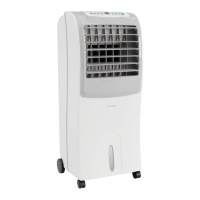

 To Next Page
