28
Function and device overview
3 Function and device overview
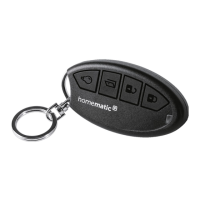
The Homematic IP Key Ring Remote Control – access
control allows you to control your Homematic IP Door
Lock Drive. At the push of a button a door can be opened,
locked or unlocked via the door lock drive. The “light”
button can be used to switch individually defined light
sources on or o.
Device overview (see figure 1):
(A) Device LED
(B) Button 1 “Lock” (button pair 1)
(C) Button 2 “Unlock” (button pair 1)
(D) Button 3 “Open door” (single button)
(E) “Light” (on/o) button
1
(F) System button
(G) Battery compartment (and cover)
1)
Button “Light” switches connected devices: Short button press
device “on”, long button press device “o”.


 To Next Page
 Loading...