This document describes the Homtone BD-CG018S Coffee Grinder, a household appliance designed for grinding roasted coffee beans.
Function Description:
The Homtone BD-CG018S is a coffee grinder that allows users to grind roasted coffee beans to various fineness levels for different brewing methods, including Espresso, Mocca, Siphon, Filter Coffee, Pour Over, and French Press. It offers 51 grind size options, adjustable by rotating the coffee bean hopper. The grinder features three modes of operation: Cup mode, Time mode, and Espresso mode, allowing for flexible control over the grinding process and amount. It can grind directly into a coffee powder jar or into a portafilter using provided cradles.
Important Technical Specifications:
- Model: BD-CG018S
- Rated Power: 165W
- Rated Voltage: 220-240V~
- Bean Hopper Capacity: 275g
- Powder Jar Capacity: 150g
- Grinder Level: 1-51 (51 grind size options)
- Time Setting: Max. 60s
- Cup Setting: Max. 12 Cup
- Dimensions: 200x135x310mm
Usage Features:
Setting the Coffee Bean Hopper:
To remove the hopper, ensure the grinder is unplugged, press the release lever, turn the hopper counter-clockwise until the unlock icon aligns with the arrow, and lift it. To assemble, ensure the conical burr is clean, align the unlock icon on the base with the arrow on the hopper, and turn the hopper clockwise until the lock icon aligns with the arrow. Improper assembly will prevent the grinder from working.
Setting Coffee Grind Size:
Place the coffee powder jar correctly, fill the bean hopper with coffee beans, and close the lid. Rotate the coffee bean hopper to adjust the grind size from fine to coarse.
- Espresso: Fine (Grind Setting 1-7)
- Mocca: Middle Fine (Grind Setting 8-15)
- Siphon: Middle (Grind Setting 16-26)
- Filter Coffee: Middle (Grind Setting 27-34)
- Pour Over: Middle Coarse (Grind Setting 35-43)
- French Press: Coarse (Grind Setting 44-51)
The control panel includes an LED display and functional buttons.
- A. Filter holder's accessory light
- B. Cup mode light
- C. Time mode light
- SET button: Switches between cup and time mode, and adjusts grinding time per cup.
- Start/stop button/Pulse mode button: Starts/stops grinding, activates pulse mode.
- Time/cup Decrement button (-)
- Time/cup Increment button (+)
Operation Instructions:
- Fill the bean hopper with desired coffee beans.
- Select the coarseness by rotating the coarseness adjustment ring.
- Power on the unit; the buzzer sounds once, the display shows "01" (default cup), and four buttons illuminate.
Cup Mode:
- Active when no portafilter cradle is installed, indicated by the illuminated cup icon. Used for grinding into the coffee powder jar.
- Defaults: 1 cup and 4 seconds per cup.
- Cup number (1 to 12) can be adjusted using "+" or "-" buttons.
- Grinding time per cup (3s to 5s) can be adapted by holding the "SET" button for approximately 1 second until it flashes. Adjust with "+" or "-" buttons (0.1s increments for short press, continuous for long press). The last setting is memorized even after unplugging.
- Total grinding time is calculated by (number of cups) x (grinding time per cup).
Time Mode:
- Activated by double-clicking the "SET" button when no portafilter cradle is installed. Default time "10.0s" illuminates. Used for grinding into the coffee powder jar.
- Time selection (1s to 60s) can be adjusted using "+" or "-" buttons. Short pressing changes time by 0.1s (1-15s range) or 1s (16-60s range). Long pressing changes time continuously.
- Double-click "SET" to switch back to Cup mode.
Espresso Mode:
- Activated automatically when a portafilter cradle is installed, indicated by the illuminated espresso icon.
- Default time: 8s. Total grinding time (5s to 20s) can be adjusted using "+" or "-" buttons (0.1s or 1s increments for short press, continuous for long press).
- To start grinding, push the portafilter into the machine. Push again to stop. No need to use the "start/stop" button on the display.
- When choosing a very fine grind setting, a smaller amount of powder is normal. Adjust grinding time or cups to increase powder as needed.
- Two portafilter cradles (53mm and 58mm) are provided. Insert the cradle until a click is heard. The portafilter must sit stably and horizontally.
- 53mm & 58mm Dosing Rings are provided to prevent coffee grounds from overflowing the basket.
- When using the filter holder accessory, turn the grinding selection regulator to number 1 or 7 of the "Espresso" section.
- In espresso mode with the filter holder accessory, you can only grind for 1 or 2 cups of espresso and cannot use the Dosing Ring.
- If using a portafilter without a Dosing Ring, stop grinding by pushing the filter, tamp, and push again to resume grinding to avoid spillage.
- After setting time or cup, press Start/Stop to begin grinding. Press again to stop.
- In time mode, press and hold to activate pulse mode. Grinding continues until released (range 0.1s to 60s). Double-click SET to exit pulse mode.
- In espresso mode, holding the button counts up the timer to a maximum of 20s from 8s. Releasing stops grinding.
- Hold both "+" and "-" buttons for approximately 2 seconds to turn off the press sound ("OFF" displayed). Hold again to turn it back on. Sound preference is retained even after unplugging.
Important Safeguards:
- Read all instructions.
- Do not immerse cord, plugs, or machine in water or other liquid.
- Supervise children when the appliance is in use.
- Unplug when not in use, before cleaning, or before putting on/taking off parts.
- Avoid contact with moving parts.
- Keep hands and utensils out of the coffee bean box while grinding.
- Do not operate with damaged cord/plug or after malfunction/damage. Return to seller for repair.
- Do not use unrecommended attachments.
- Do not use outdoors.
- Do not let cord hang over edges or touch hot surfaces.
- Check coffee bean box for foreign objects.
- Operate with lid securely in place.
- Do not place on or near hot gas/electric burner or in a heated oven.
- Avoid defeating safety interlock mechanisms.
- For household use only. Commercial use voids warranty.
- Only for roasted coffee beans. Do not use for hard seeds, spices, nuts, etc.
- Slight traces of use or residual coffee grounds may be present due to strict quality control and testing during manufacturing.
- Caution: Do not immerse in water. Do not dismantle to reduce fire/electric shock risk.
Power Saving Mode:
If inactive for over 3 minutes, the unit enters power saving mode. Press any button to restart.
Maintenance Features:
General Maintenance:
- Empty the ground coffee container after each use to preserve aroma and prevent degradation.
- Always unplug before cleaning.
- Do not use strong detergents or abrasive pads.
- Clean lids and ground coffee holder in warm, soapy water.
- Clean the inside of the coffee bean box with a damp cloth.
Cleaning Conical Burrs (Regular cleaning is important for consistent grinding results):
- Unlock bean box.
- Remove beans.
- Lock bean box.
- Run grinder until empty.
- Remove bean box.
- Remove upper burr (hold upper mill, turn counter-clockwise, lift vertically).
- Clean upper burr with the cleaning brush.
- Clean lower burr with the cleaning brush.
- Clean powder outlet with the cleaning brush.
- Push upper burr firmly into position.
- Lock upper burr.
- Align bean hopper into position.
- Lock bean hopper.
- Remove powder residue.
- To replace the upper burr, insert it and turn it clockwise. Ensure residual coffee and grounds in the lower burr are cleared for proper alignment.
Troubleshooting Guide:
- E1+ (No bean holder or bean holder not connected tightly): Assemble or tighten the bean holder until the micro switch is closed. The error code will disappear.
- E2+ (Motor is overheating): Unplug the power cord, wait 10 minutes for cooling, then restart.
- E2+ (Total operating is 4 cycles, it power off automatically to protect the unit): Unplug the power cord, wait 10 minutes for cooling, then restart.
Warranty and Customer Service:
- Limited 1-year Warranty: Covers defects due to faulty material or workmanship. Does not include accident or misuse. Free replacement if defective within warranty.
- Contact customer service with name, address, phone number, and order number.
- Email: cs@homtone.com
Correct Disposal:
This product should not be disposed of with other household waste in the EU. Recycle responsibly to promote sustainable reuse of materials. Use return and collection systems or contact the retailer for environmentally safe recycling.

 Need help?
 General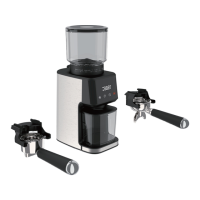

 To Next Page