− If you are
traveling far from home and can no
longer receive the stations you
preset, you can use the Auto Select
feature to find stations in the local
area.
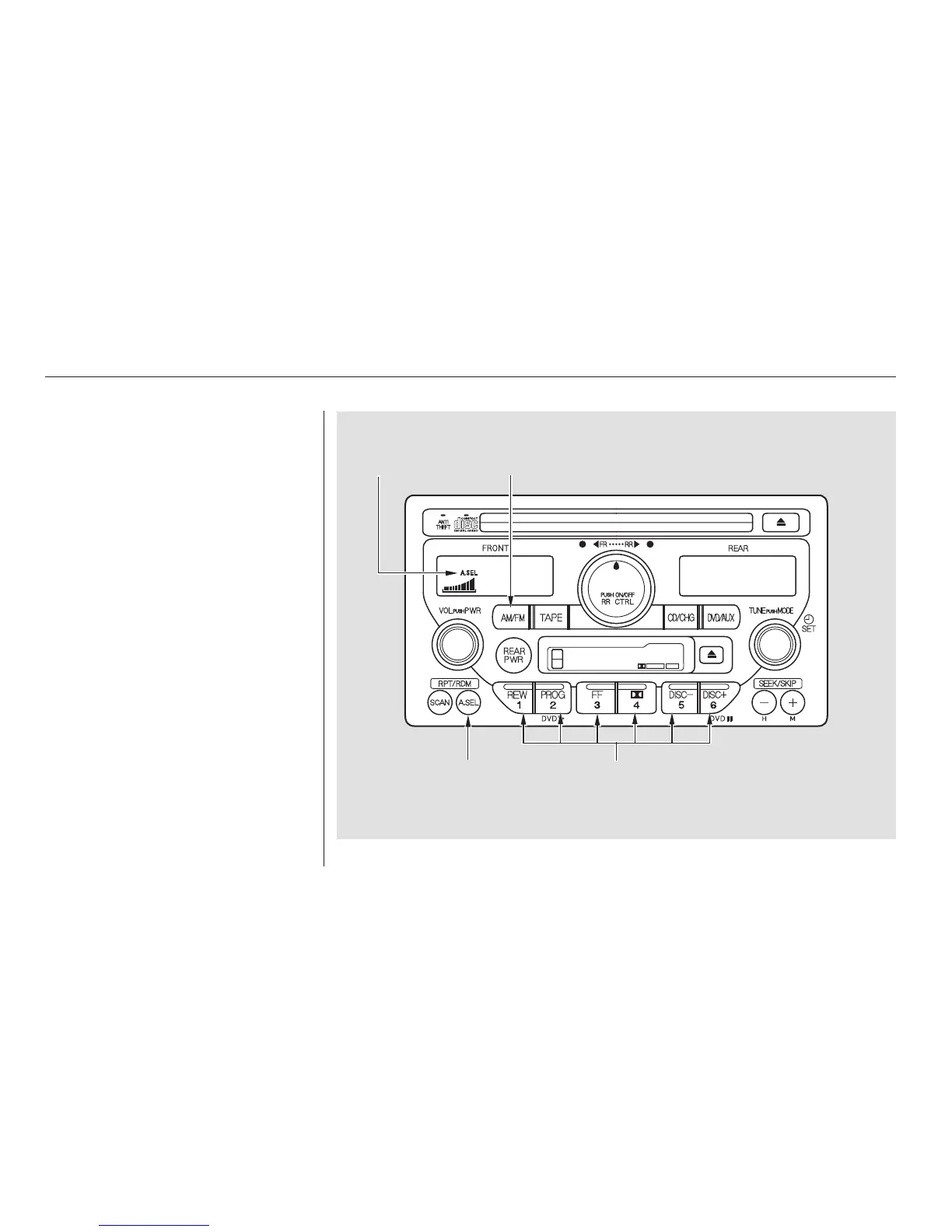
To activate Auto Select, press the
A. SEL button. A. SEL will flash in
the display, and the system will go
into scan mode for several seconds.
It automatically scans both bands,
looking for stations with strong
signals. It stores the frequencies of
six AM stations and twelve FM
stations in the preset buttons. You
can then use the preset buttons to
select those stations.
If you are in a remote area, Auto
Select may not find six strong AM
stations or twelve strong FM stations.
If this happens, you will see a ‘‘0’’
displayed when you press any preset
button that does not have a station
stored.
AUTO SELECT
Audio System
Comfort and Convenience Features
172
A.SEL
INDICATOR
AM/FM
BUTTON
A.SEL
BUTTON
PRESET BUTTONS




 To Next Page