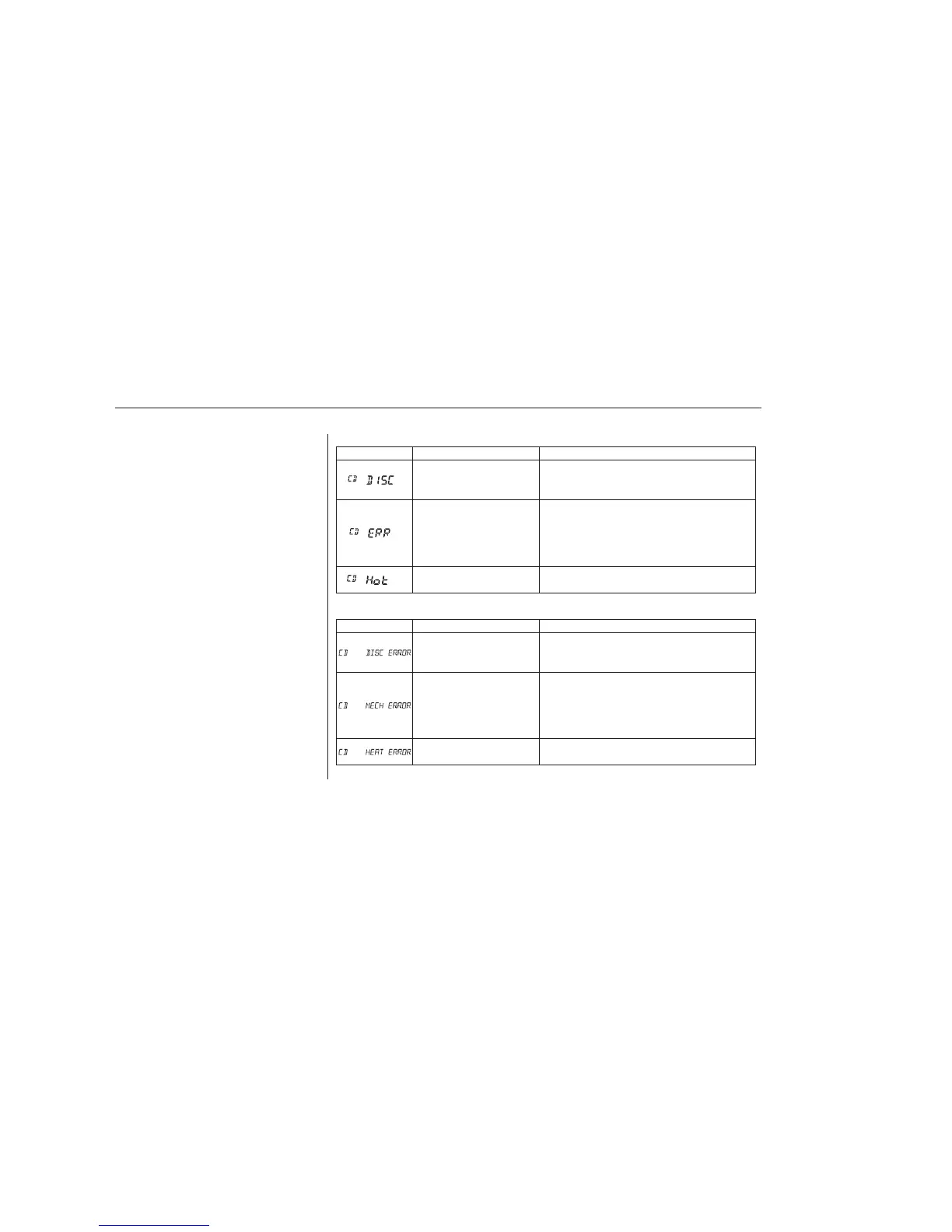
Error Message Cause Solution
CauseError Message Solution
FOCUS Error
Mechanical Error,
or a DVD has
been loaded in the
CD player
High Temperature
Press the EJECT button and pull out the CD.
Check if it is inserted correctly in the CD player.
Make sure the CD is not scratched or damaged.
Press the EJECT button and pull out the CD.
Check the CD for damage or deformation. If
the CD cannot be pulled out, or the error
message does not disappear after the CD is
ejected, see your dealer.
Will disappear when the temperature returns to
normal.
FOCUS Error
Mechanical Error,
or a DVD has
been loaded in the
CD player
High Temperature
Press the EJECT button and pull out the CD.
Check if it is inserted correctly in the CD player.
Make sure the CD is not scratched or damaged.
Press the EJECT button and pull out the CD.
Check the CD for damage or deformation. If
the CD cannot be pulled out, or the error
message does not disappear after the CD is
ejected, see your dealer.
Will disappear when the temperature returns to
normal.
Thechartontherightexplainsthe
error messages you may see in the
display while playing a disc.
If you see an error message in the
display while playing a disc, press
the eject button. After ejecting the
disc, check it for damage or
deformation. If there is no damage,
insert the disc again.
Theaudiosystemwilltrytoplaythe
disc. If there is still a problem, the
error message will reappear. Press
the eject button, and pull out the disc.
Insert a different disc. If the new
disc plays, there is a problem with
the first disc. If the error message
cycle repeats and you cannot clear it,
take your vehicle to a dealer.
LX models
EX and EX-L models
Disc Player Error Messages
136
06/06/30 17:57:39 31S9V640 0141









 To Next Page