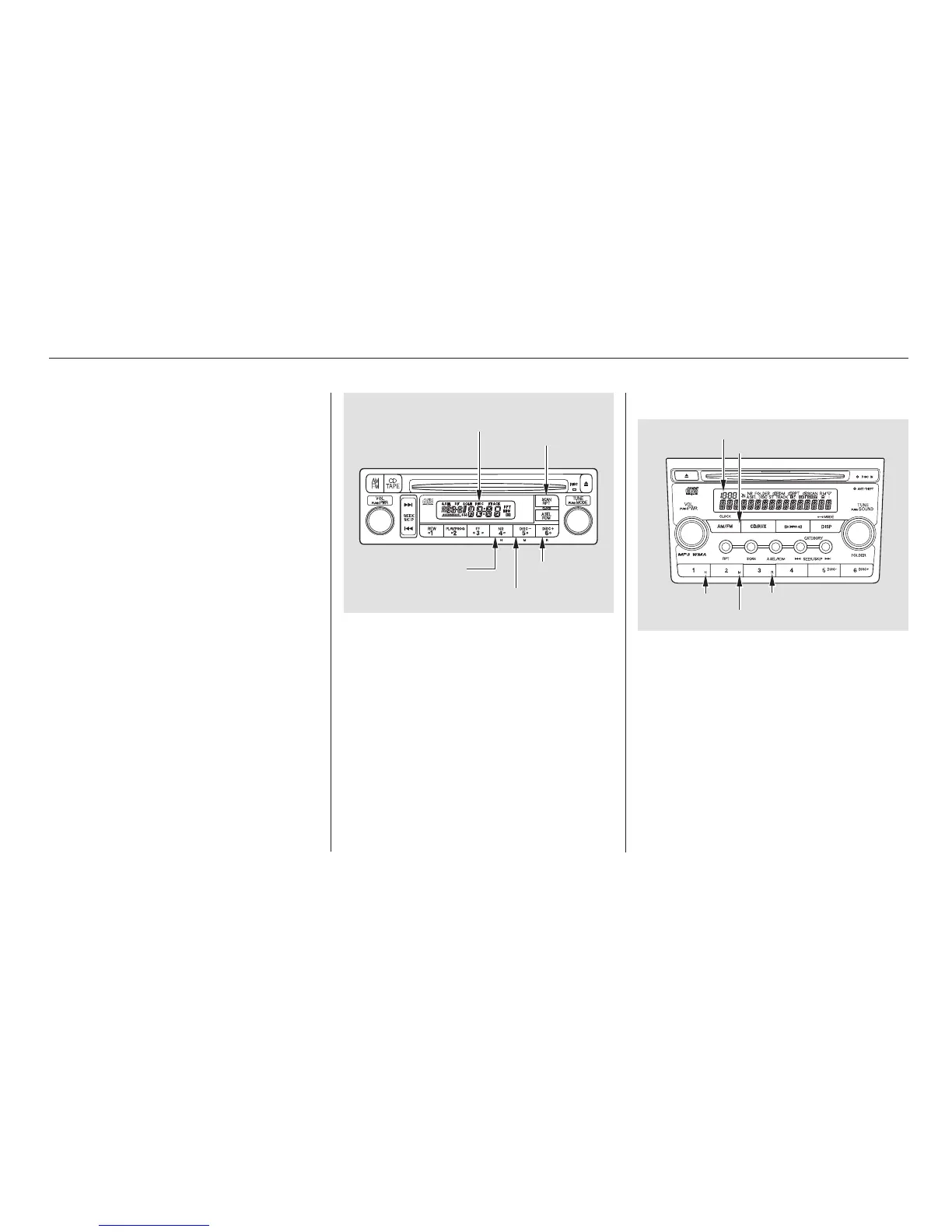
You can use the R button to quickly
set the time to the nearest hour.
Press the R button while pressing
the CLOCK button. If the displayed
time is before the half hour, pressing
Rsetstheclockbacktotheprevious
hour. If the displayed time is after
the half hour, pressing R sets the
clock forward to the beginning of the
next hour.
For example:
1:06 will reset to 1:00
1:53 will reset to 2:00
To set the hour, press the H button
while pressing the CLOCK (SCAN/
RPT) button until the hour advances
to the desired time. Change the
minute by pressing the M button
while pressing the CLOCK (SCAN/
RPT) button until the minute
advances to the desired time.
Press and hold the CLOCK button
until the numbers flash and you hear
abeep.Changethehourbypressing
the H button until the numbers
advance to the desired time. Change
the minute by pressing the M button
until the numbers advance to the
desired time.
If your vehicle’s battery is
disconnected or goes dead, you may
need to set the clock.
LX model
On U.S. EX and SC models
Setting the Clock
132
CLOCK
BUTTON
H BUTTON R BUTTON
TIME DISPLAY
M BUTTON
R BUTTON
CLOCK BUTTON
TIME DISPLAY
H BUTTON
M BUTTON
07/04/26 18:53:35 31SCV650 0137













 To Next Page