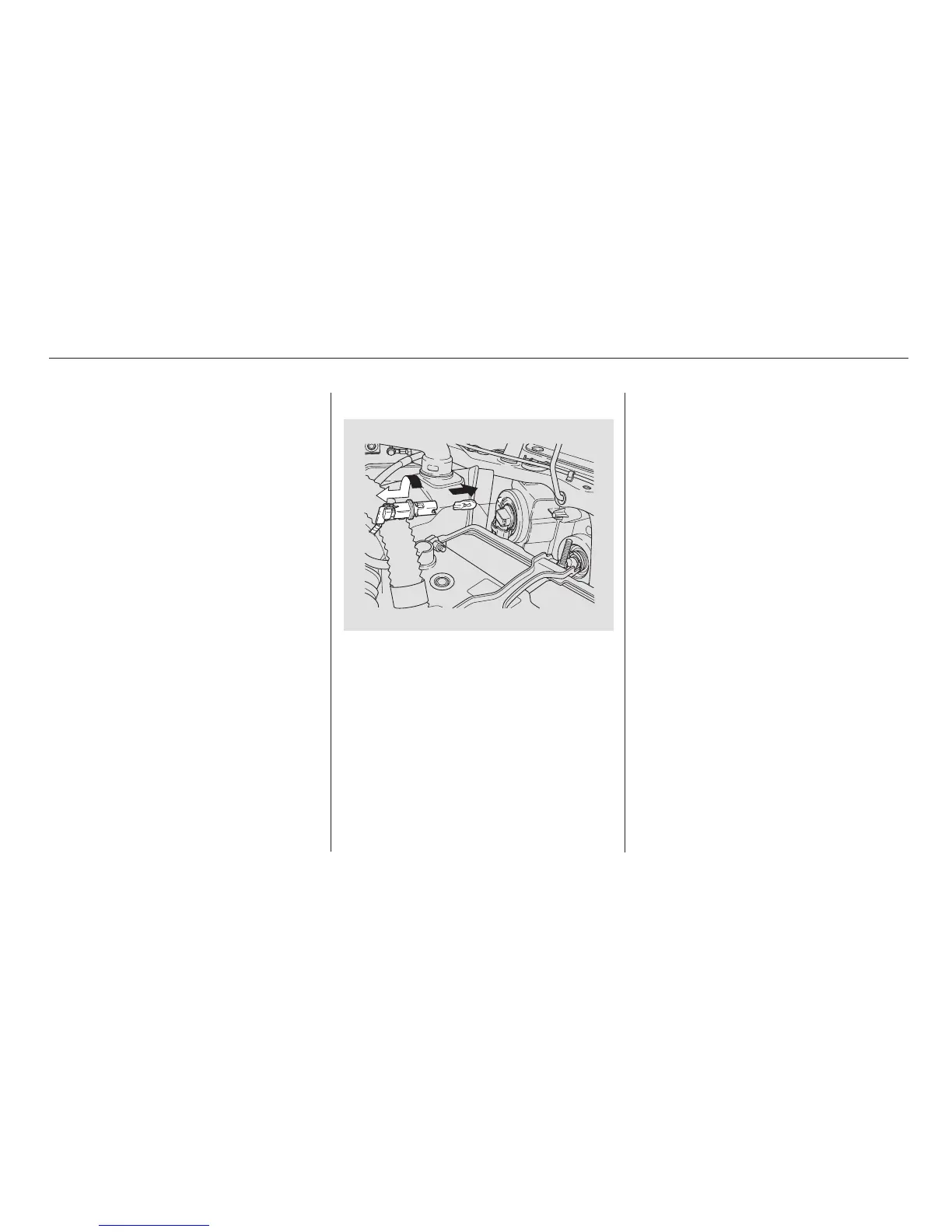
Pull the bulb straight out of its
socket. Push the new bulb straight
into the socket until it bottoms.
The front side marker light is next
to the headlight bulb. On the
driver’s side, remove the front end
of the air intake duct by pulling it
out (see page ).
Reinstall the socket into the light
assembly by turning it clockwise
until it locks.
Turn on the lights to make sure
the new bulb is working.
Put the light assembly back into
the body, bottom first. Push on the
top edge until it snaps into place.
Remove the socket from the light
assembly by turning it one-quarter
turn counterclockwise.
Testthelightstomakesurethe
new bulb is working.
Install the front end of the air
intake duct.
Reinstall the socket into the light
assembly by turning it clockwise
until it locks.
1.
3.
2.
4.
5.
6.
4.
5.
6.
203
On SC model
Lights
206
07/04/26 19:03:39 31SCV650 0211







 To Next Page