EasyManua.ls Logo

Honda Civic 2016 - Playing Bluetooth Audio

Honda Civic 2016
621 pages
Print Icon
To Next Page IconTo Next Page
To Previous Page IconTo Previous Page
Loading...
260
uuAudio System Basic OperationuPlaying Bluetooth® Audio
Features
Playing Bluetooth® Audio
Your audio system allows you to listen to music from your Bluetooth-compatible
phone.
This function is available when the phone is paired and connected to the vehicle’s
Hands-Free Telephone (HFT) system.
2 Phone Setup P. 363
1Playing Bluetooth® Audio
Not all Bluetooth-enabled phones with streaming
audio capabilities are compatible with the system.
To check if your phone is compatible, ask a dealer.
Only one phone can be used with HFT at a time.
When there are more than two paired phones in the
vehicle, the first paired phone the system finds is
automatically connected.
If more than one phone is paired to the HFT system,
there will be a delay before the system begins to play.
In some cases, the name of the artist, album, or track
may not appear correctly.
Some functions may not be available on some
devices.

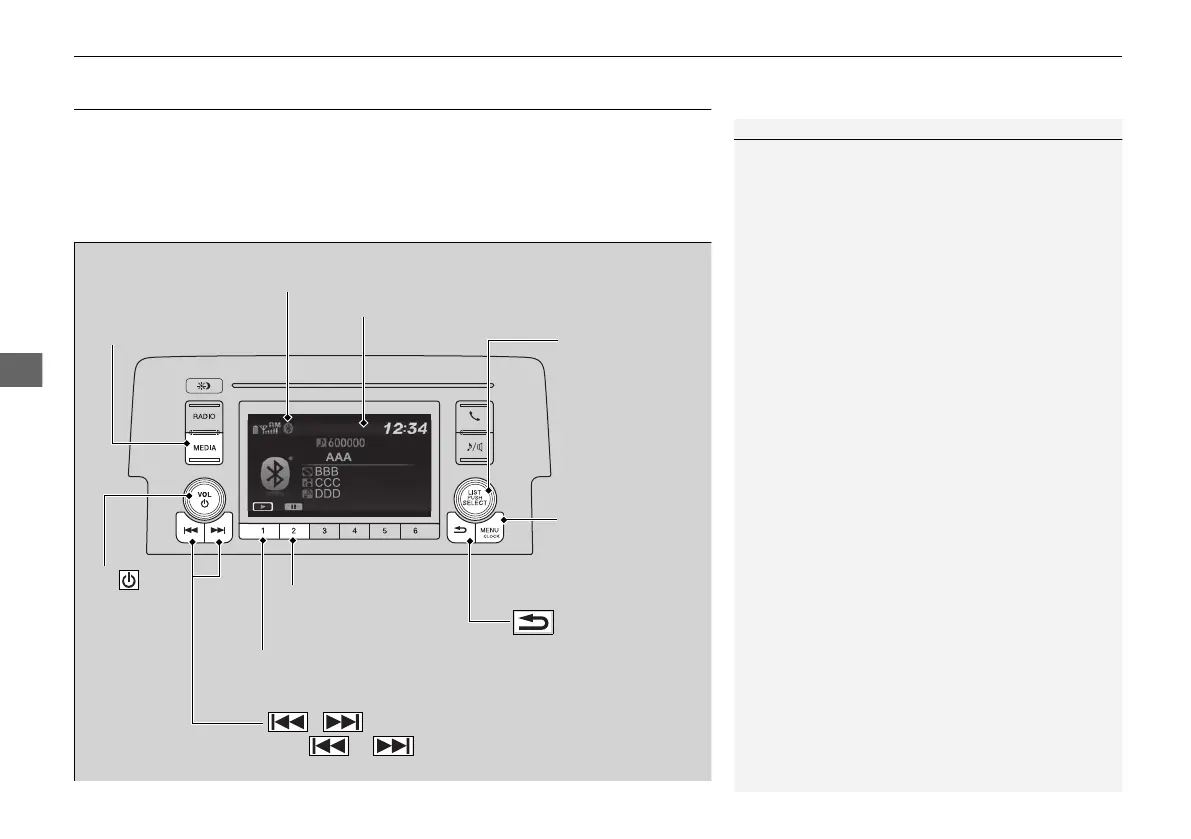
MEDIA Button
Press to select
Bluetooth Audio
mode (if
connected)
VOL/
(Volume/
Power) Knob
Press to turn
the audio
system on
and off.
Turn to
adjust the
volume.
MENU/CLOCK
Button
Press to display the
menu items.
Audio/Information Screen
Bluetooth Indicator
Appears when your phone is connected to HFT.
/ (Seek/Skip) Buttons
Press or to change files.
Play Button (Preset 1)
Press to resume a file.
Pause Button (Preset 2)
Press to pause a file.
Selector Knob
Turn to change
groups.
Press to display a
music search list.
Turn to select an
item, then press to
set your selection.
(Back) Button
Press to go back to the
previous display.
17 CIVIC 4D HATC HMSB (IN KN PH KQ KS KU KZ VT MA PA)-42TBA6100.book 260 ページ 2018年4月9日 月曜日 午後4時35分

Table of Contents