rear seats.
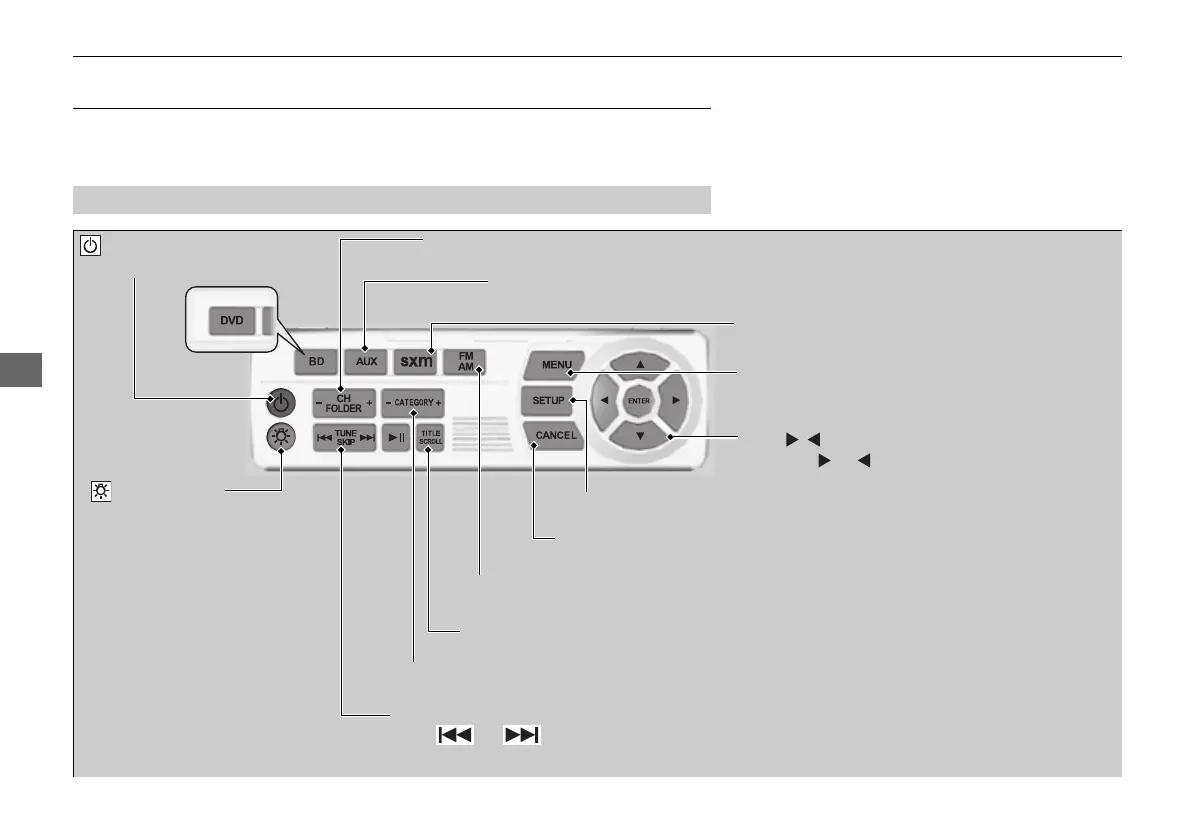
(Power) Button
Press to turn on the system.
CH/FOLDER Bar
Press - or + to change the channel or folder.
(Light) Button
Press to illuminate
the buttons and bars
for a few seconds.
TUNE/SKIP Bar
Press or to tune the radio frequency, change section in
the channel or track.
TITLE/SCROLL Button
Press to switch search mode on SiriusSXM® mode.
CANCEL Button
Press to go back to the previous display or operation.
3,4, , and ENTER Buttons
Use 3, 4, , or to highlight a menu item, and
press the ENTER button to make a selection.
CATEGORY Bar
Press - or + to change the category.
AUX Button
Press to use a USB, iPod, auxiliary video (rear), or auxiliary audio (front).
FM/AM Button
Press to listen to AM or FM radio.
SETUP Button
Press to display the setup items.
SXM Button
Press to listen to SiriusSXM® radio.
MENU Button
Press to the display audio menu for AM/FM radio,
SiriusSXM® radio, or CD
*
on the overhead screen.















 To Next Page