EasyManua.ls Logo

Honda S2000 - Stabilizer Link Removal;Installation

Honda S2000
1088 pages
Print Icon
To Next Page IconTo Next Page
To Previous Page IconTo Previous Page
Loading...
Front Suspension
Stabilizer
Link Removal/lnstallation
1.
Raise
the
front
of
the vehicle, and support
it with
safety stands
in
the
proper
locations
(see
page
1-13). Remove the
front wheel.
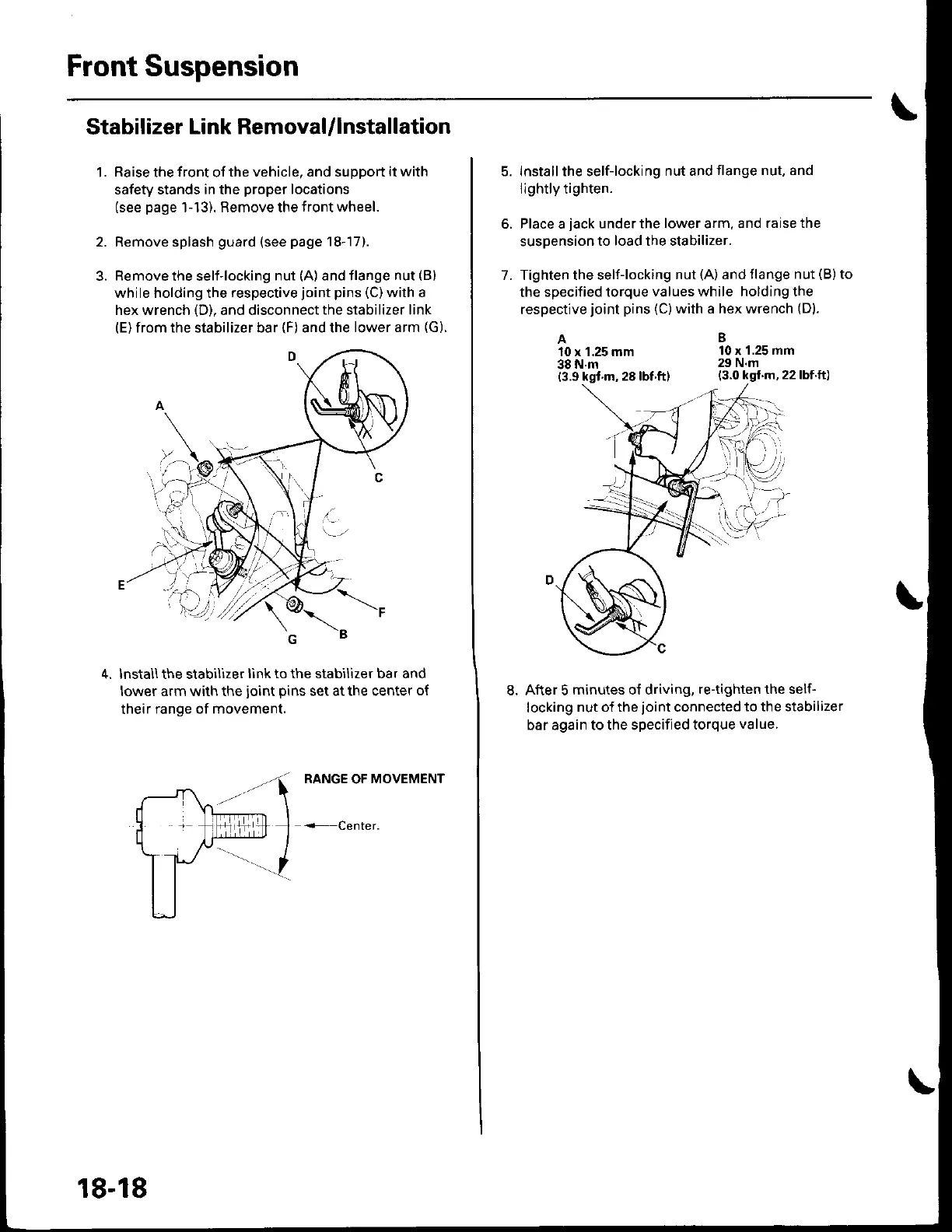
Remove splash
guard
(see
page
18-17).
Remove
the self-locking
nut
(A)
and flange
nut
(B)
while holding the
respeclive
joint
pins
(C)
with a
hex wrench
(D).
and disconnect
the stabilizer link
(E)
from the stabilizer bar
(F)
and the
lower arm
(G).
lnstall the stabilizer
link to the stabilizer bar and
lower arm with the
joint
pins
set at the center
of
their
range of movement.
18-18
5. lnstall the self-locking
nut and
flange nut, and
lightly tighten.
6, Place a
jack
under the lower arm, and
raise the
suspension
to
load
the stabilizer.
7. Tighten the self-locking
nut
(A)
and
tlange nut
(B)
to
the
specified torque
values while holdingthe
respective
joint
pins
(C)
with a hex wrench
(D).
A
10 x 1.25 mm
38
N.m
10 x
'1.25
mm
29 N.m
8.After 5
minutes o{ driving,
re-tighten the self-
locking
nut of the
joint
connected
to the stabilizer
bar again to the specified
torque
value.

Table of Contents

Other manuals for Honda S2000

Related product manuals