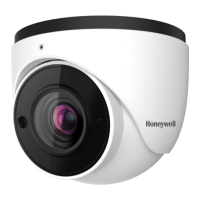
This document provides an operation manual for the Honeywell HIDC-1600TVI and HIDC-2600TVI HD Network IR Dome Cameras.
Function Description
The Honeywell HD Network IR Dome Cameras are designed for surveillance applications, offering high-definition video capture with infrared capabilities for day and night monitoring. They support various network configurations and provide a comprehensive set of features for video management, alarm handling, and system maintenance. The cameras are compatible with Honeywell Universal Surveillance (HUS) Platform and NVRs, and are ONVIF Profile S compliant, ensuring interoperability with other surveillance systems.
Important Technical Specifications
Camera:
- Image Device:
- HIDC-1600TVI: Sony 1/3" Exmor™ image sensor
- HIDC-2600TVI: Sony 1/2.9" Exmor™ image sensor
- Effective Pixels:
- HIDC-1600TVI: 1280 x 720 pixels (720P)
- HIDC-2600TVI: 1920 x 1080 pixels (1080P)
- Lens:
- HIDC-1600TVI: 2.8-12mm 2M DC-IRIS
- HIDC-2600TVI: 2.8-12mm 3M DC-IRIS
- Iris: DC Iris
- ICR: Mechanical, TDN
- Min. Illumination:
- IR LED ON: 0 lux
- IR LED OFF (HIDC-1600TVI): Color: 0.01 lux/F1.4 (AGC ON), B/W: 0.001 lux/F1.4 (AGC ON)
- IR LED OFF (HIDC-2600TVI): Color: 0.02 lux/F1.4 (AGC ON), B/W: 0.005 lux/F1.4 (AGC ON)
- IR LED: 18 IR LEDs, about 3 Lux (IR ON)
- IR Beam Distance: 10-20m
IP Video:
- Video Compression: H.264 and MJPEG simultaneously (Dual-encoders), H.264 high profile
- Video Profile: Every video profile has independent CBR/VBR/GOP/Frame rate setting
- Frame Rate:
- 1280x720, 720x576, 320x240 @ 30/25fps
- 1920x1080, 1280x720, 720x576, 320x240 @ 30/25fps
- Electronic Shutter: Auto mode / Manual mode 1/25~1/30000 Second
- Iris Exposure Control: Auto mode / Manual mode
- AGC: LOW/MID-LOW/MID/MID-HIGH/HIGH
- WDR: OFF/LOW/MID/HIGH
- 3-DNR: OFF/LOW/MID/HIGH
- Color Mode: Normal/Natural/Bright
- Image Setting: AE, AWB; 3D Noise reduction; Digital WDR; Color, brightness, sharpness, contrast, Hue; Mirror/Flip; Privacy Masks; Text, time and date overlay
- Streaming: Simultaneously multi-profile streaming; Streaming over UDP, TCP, HTTP, or HTTPS; M-JPEG streaming over HTTP (server push); Controllable frame rate and bandwidth; Constant and variable bit rate (MPEG4 / H.264); Text, time and date overlay
Audio:
- Audio Encoder: RTSP: G.711 64kbps
- Audio Streaming: One-way or two-way
- Audio Input: External audio in
- Audio Output: Speaker Out
Network:
- Ethernet: 10/100M auto negotiation
- Supported Protocols: IPv4, IPv6, TCP, UDP, HTTP, HTTPS, SMTP, FTP, NTP, DNS, DDNS, DHCP, ARP, Bonjour, UPnP, RTSP, RTP, RTCP, IGMP, PPPoE, ICMP, SNMP
- Security: Password protection, HTTPS encrypted data transmission, user access log
- Users: 8 simultaneous unicast users
System Integration:
- Supported Interface: ONVIF Profile S
- Event Detection: Alarm in, motion detection, Network Lose detection, camera tampering, Video lose
- Motion Detection: 1-zone video motion detection with Sensitivity options
- Privacy Mask: 4-Zone
- Camera Tampering: Camera Cover or Mask
- Events Action: SNAP, Record video in TF, send to FTP, send to Email, External output activation, voice alert, go preset and tour, notify to CMS.
General:
- OS: Windows XP or later
- Browser: IE 8.0 or later
- Supported Platform: Honeywell Universal Surveillance (HUS) and NVRs
- Power Supply: 12V DC or 24V AC ±10% external power adapter
- PoE: IEEE 802.3af
- Power Consumption: Max 5W (HIDC-1600TVI), Max 6W (HIDC-2600TVI)
- Connectors: RJ-45 10Base-T/100Base-TX; 1 power jack; 2 alarm input and 1 output; Audio out; Audio input; Video out; TF card, and RS485
- Operating Temperature: -20°C to 55°C
- Operating Humidity: 0% - 90% (non-condensing)
- Dimensions: Ø133mm x 118mm
- Certificate: CE, FCC
Usage Features
The camera offers a user-friendly web interface for configuration and live viewing.
- Live View: Provides real-time video display with controls for voice intercom, snapshot, full-screen preview, video recording, alarm information, PTZ control (zoom, focus, iris, speed), brightness, contrast, and preset settings.
- PTZ Control: Supports 255 presets, adjustable cruise time (1-255s), and cruise speed (1-10 levels). Tracking paths can be set, cleared, and called.
- Display Settings: Allows modification of channel name, time and date formats, brightness, contrast, saturation, hue, and OSD (On-Screen Display) visibility.
- Encoding Settings: Configurable compression type (Main Stream/Sub Stream/Main Stream (Event)), stream type (complex/video), resolution, bitrate type (constant/variable), bitrate, frame rate, quality, video encode format (H.264/MJPEG), and I-frame interval.
- Video Parameters: Offers various Day&Night modes (Outside Trigger/Auto/Color/Black White), adjustable switch time, Day-Ni/Ni-Day thresholds, color settings, mirror options, WDR, 3DNR, sharpness, gain, shutter, aperture, gamma, and anti-flicker settings.
- Motion Detection: Enables motion detection with configurable sensitivity, alarm schedules, and detective areas. Actions upon detection include email notification, snapshot, video recording, alarm output activation, and PTZ preset linkage.
- Video Tampering: Detects camera tampering with similar configurable actions as motion detection.
- Video Mask: Allows users to define up to 4 privacy mask zones to obscure sensitive areas in the video feed.
- Network Settings: Comprehensive network configuration including IPv4/IPv6, Static IP/DHCP, IP address, subnet mask, gateway, DNS, MAC, SNMP, HTTP/HTTPS ports, PPPoE, Multicast address/port, and device port.
- DDNS Setting: Supports dynamic domain name resolution with various server types (Dyndns, PeanutHull, NO-IP, 3322, DnsDynamic) for remote access via domain name.
- NTP Settings: Configurable NTP server address, port, time interval, and time zone for accurate time synchronization.
- Email Settings: Allows configuration of email server details (sender/receiver address, SMTP server/port, password) for sending alarm notifications.
- FTP Settings: Enables FTP upload for event-triggered snapshots or video recordings, with configurable server address, port, username, password, and file path.
- Alarm Input/Output: Configurable alarm input (Normal Open/Normal Close) with alarm name, schedule, and linked actions (email, snap, record, alarm output, PTZ preset). Alarm output with adjustable delay.
- Exception Settings: Defines actions for various exceptions like disk full/fault, network broken, IP address conflict, illegal access, and video signal loss.
- User Info: Manages user accounts (admin, guest) with customizable permissions, IP/MAC binding, and the ability to add/delete users.
- Local Setting: Configures preview window mode (Full/4:3/16:9), and storage paths for preview captures and video recordings, and record file type.
Maintenance Features
- System Update: Allows firmware upgrades by selecting an upgrade kit file. A caution is provided against turning off power during the upgrade process.
- Storage Management: Provides information on current HDD capacity, free space, and status. Supports HDD formatting. Note: Power must be off when inserting or removing the TF card.
- Restore: Options to restore factory settings or reboot the device.
- Log Search: Provides a detailed log of camera events, including main type (All/Alarm/Exception Settings/Operation/Additional Information), start/end times, and page navigation.
- Troubleshooting: Includes solutions for common issues such as forgotten passwords (RESET button), audio/video function failures after power cuts (backup programmer), no video image in IE browser (ActiveX installation), failure to visit IP camera after upgrade (clear browser cache), and images not flowing (frame rate, user count, bandwidth).
- Network Interface of IP Camera: Lists default network ports for various services (Web, Communication, Audio/Video, Multicast, Onvif, RTSP, Search, Telnet, Playback, Mobile visit, Https).
- Hardware Installation Steps: Detailed instructions for unpacking, taking out goods, and installing the SD card, emphasizing clean hands and dry conditions.
- Installation Environment: Guidelines for avoiding high temperatures, ensuring proper ventilation, and stable mounting.
- Caution: Important safety warnings regarding non-technician operation, power disconnection, handling of precision instruments, operating conditions, and default login credentials.

 Need help?
 General

 To Next Page