Need help?
Do you have a question about the Honeywell SRX and is the answer not in the manual?
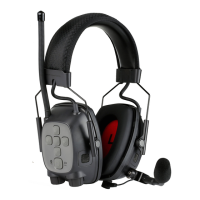
The Honeywell SRX/SRX2 Quick Start Guide provides instructions for setting up and enabling Vocollect SRX and SRX2 Wireless Headsets for use with Talkman devices, as well as connecting and using a listening kit. This guide focuses on the integration of these wireless headsets with Talkman devices, specifically excluding pairing with handheld devices.
The SRX/SRX2 Wireless Headsets are designed to provide wireless audio communication for operators using Talkman devices in various work environments. They facilitate hands-free operation, enhancing productivity and safety. The headsets connect to Talkman devices via Bluetooth, enabling voice-directed workflows. The system supports both automatic and manual pairing methods, offering flexibility depending on the operational setup. A key feature is the ability to integrate with VoiceConsole, a management tool that allows for the creation and loading of device profiles, enabling centralized control over headset settings and functionalities. The TouchConnect feature simplifies the pairing process for A700 Talkman devices and SRX2 headsets, especially in environments where headsets are shared among operators. Additionally, the system supports the use of a listening kit, which allows supervisors or trainers to monitor audio output or operator-device dialogue for training or demonstration purposes.
While specific technical specifications like frequency ranges or battery life are not explicitly detailed in this quick start guide, the document highlights several critical parameters and functionalities:
Bluetooth_IsEnabled=true and Bluetooth_IsDiscoverable=true.SrxHeadsetEnable=1 parameter is crucial for activating the SRX/SRX2 headset functionality on the Talkman device.SrxAutoPairEnable=1 parameter, when set to true, enables automatic pairing of headsets with Talkman devices after the initial manual pairing. This streamlines the process for subsequent uses.Bluetooth_IsEnabled to be true and SrxHeadsetEnable to be "1."SrxSupervisorAudioEnable parameter controls the listening kit functionality. Setting it to "1" enables listening to both device and operator dialogue, while "2" allows listening to only device output. The default setting is "0" (off) for optimal performance when a listening kit is not in use.The guide implicitly suggests several maintenance-related practices, primarily through the setup and pairing instructions:
SrxHeadsetEnable and SrxAutoPairEnable.

 To Next Page
 General