2
4a
4b
3
1
2
5
8
6
7
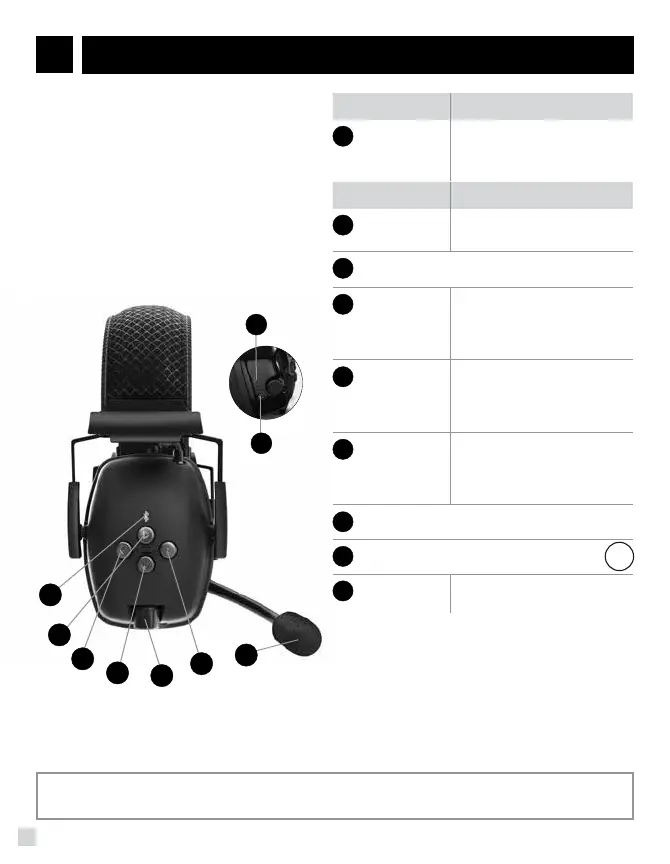
FEATURES DESCRIPTION
2
POWER
BUTTON
• Power On/Off
• Pairing Mode
3
VOLUME CONTROL KNOB
4a
PREVIOUS
BUTTON
• Previous Song
• Rewind (if supported)
• Reject Incoming Call
• Mute/Unmute Mic (during call)
4b
NEXT
BUTTON
• Next Song
• Fast Forward (if supported)
• Reject Incoming Call
• Mute/Unmute Mic (during call)
5
PLAY
BUTTON
• Play / Pause
• Accept/End Call
• Cancel Dialing
• Redial Last Number
6
AUX (3.5MM) INPUT JACK
7
USB CHARGING PORT
for lithium ion battery
8
BOOM MIC
• Pivot Flex Boom Microphone
with Windsock
LED DESCRIPTION
1
LED LOGO
BLUE: Active Phone Call
GREEN: Paired, Streaming
RED: Connectable (not-paired)
Bluetooth software 4.1, profiles supported:
• HFP 1.6 (Hands Free Profile)
• HSP 1.2 (Headset Profile)
• A2DP 1.2 (Advanced Audio Distribution Profile)
• AVRCP 1.4 (Audio Video Remote Control Profile)
Please charge fully before first use.
QUICK START
• Turn Bluetooth* on (device)
• Hold Power button on earmuff until LED
blinks blue/red (if earmuff already on,
double press power button until LED blinks)
• Select “Sync Wireless” from available
devices (or “SCAN” if not listed)
• If device requests a PIN please use 0000
• LED will turn green once paired
Bluetooth performance can be impacted by several factors including: environmental surroundings
such as walls, other wireless devices, and distance from paired device.
Move paired device closer to headset and/or move to another area and
re-pair device. Make sure no other Bluetooth devices are in range while
pairing, to ensure no intruder pairs to the earmuff device.
TROUBLESHOOTING TIP:
SYNC WIRELESS EARMUFF USER GUIDE
EN
BC


 To Next Page