
 Need help?
Do you have a question about the Honeywell T7270B1009 and is the answer not in the manual?
Lists the six basic functions of the wall module in operating mode.
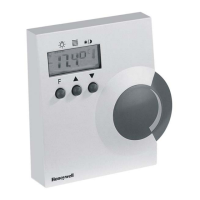
Describes the control buttons and setpoint wheel for adjusting settings.
Highlights key features like easy mounting, combined functions, and wireless control.
Explains how to cycle through and adjust selected functions.
Details how to select and adjust the SETPOINT OFFSET function.
Describes the default LIGHT function and its control.
Explains control for single and dual light groups.
Describes how to select and operate the SUNBLINDS function.
Explains how to raise or lower sunblinds using buttons.
Explains how to select and interpret occupancy states.
Explains how to select and interpret fan modes.
Describes the default screen and the LIGHT function.
Details the LCD test and teach commands upon power-up.
Outlines the steps to enter configuration mode.
Details parameters P1-P9, PA-PC for customization.
Provides guidelines and warnings for wireless transmission range and interference.
Instructs on the recommended location and method for mounting the wall module.
Explains the procedure for removing the housing cover.
Details battery insertion and low battery indication.
Provides the physical dimensions of the T7270B1009 wall module in millimeters.
 General
| Sensor Element | Thermistor |
|---|---|
| Color | White |
| Type | Wireless |
| Voltage | 24 Vac |
| Operating Humidity Range (% RH) | 0-90% (non-condensing) |
| Operating Temperature Range (F) | 32 F to 120 F |
| Operating Temperature Range (C) | 0 C to 48.9 C |
| Switch Positions (System) | Heat, Off, Cool |
| Switch Positions (Fan) | Auto, On |
| Electrical Ratings | 24 Vac |
| Power Supply | 24 Vac |
| Communication Protocol | RedLINK™ |
| Range | Up to 200 ft |

 To Next Page