
 Need help?
Do you have a question about the Honic HN-IA60E200FS and is the answer not in the manual?
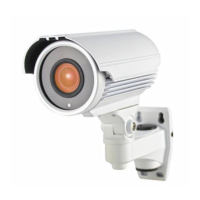
The Honic HN-IA60E200FS is a high-definition varifocal outdoor camera designed for surveillance applications, offering a cost-effective solution for various budgets. This camera is built around a 1/2.9" Sony IMX323 2.19MP image sensor, providing clear and detailed imagery. Its infrared capabilities are supported by 42μ x 4pcs IR LEDs, extending its vision up to 130 feet in low-light conditions. The camera features a 2.8-12mm manual zoom lens, allowing for a horizontal angle of view ranging from 26 to 90 degrees, which provides flexibility in capturing a desired field of view. A key advantage of this camera is its ability to transmit HD video over coaxial cable, simplifying installation and integration with existing surveillance systems.
The primary function of the HN-IA60E200FS is to capture and transmit high-definition video for security and monitoring purposes. It supports multiple video output modes, including 1080P AHD, CVI, TVI, and 1200TVL (analog), making it highly versatile and compatible with various DVR systems. The camera's default output mode is 1080P AHD, but users can easily switch between modes using the OSD (On-Screen Display) joystick. This flexibility ensures that the camera can be integrated into different surveillance infrastructures, whether they utilize TVI, CVI, or analog DVRs.
The camera's varifocal lens allows for manual adjustment of both zoom and focus. This feature is crucial for optimizing the field of view and image clarity based on the specific surveillance area and environmental conditions. By turning the zoom screw counter-clockwise, users can increase magnification, and then adjust the focus screw until the image is sharp and clear. This manual adjustment ensures that the camera captures the most relevant details with optimal clarity for the intended monitoring location.
Infrared (IR) capability is a significant feature, enabling the camera to operate effectively in low-light or complete darkness. The 42μ x 4pcs IR LEDs provide an infrared distance of 100-130 feet, ensuring comprehensive coverage even at night. The IR status is activated under 10 Lux by a CDS (Cadmium Sulfide) sensor, and IR power is controlled automatically by the CDS, ensuring seamless transition between day and night modes.
The camera also incorporates an OSD menu, which provides access to a range of settings for fine-tuning image quality and operational parameters. This menu is accessible via the OSD joystick and includes options for adjusting exposure, white balance, day/night mode, image enhancement, video settings, and language. These customizable settings allow users to optimize the camera's performance for specific environmental conditions and surveillance requirements.
The HN-IA60E200FS offers several usage features that enhance its adaptability and performance in various surveillance scenarios.
Video Output Mode Switching: The camera's ability to switch between 1080P AHD, CVI, TVI, and 1200TVL (analog) modes is a key usage feature. This is achieved by using the OSD joystick:
Zoom and Focus Adjustment: The manual zoom and focus screws allow for precise adjustment of the lens. This is particularly useful during installation to achieve the desired field of view and image sharpness. For optimal adjustment, it is recommended to have a second person monitoring the DVR display or use a smartphone app or LCD camera tester to view the camera's output in real-time. This ensures that the adjustments are made accurately at the camera's intended location.
OSD Menu for Configuration: The OSD menu provides comprehensive control over various camera settings, allowing users to customize its performance.
Troubleshooting Guidance: The manual provides clear troubleshooting steps for common issues:
The HN-IA60E200FS is designed for robust outdoor use, but proper maintenance ensures its longevity and optimal performance.
Physical Inspection: Regular inspection of the camera for any shipping damage, cleanliness, and secure connections is recommended. Users should check for broken, damaged, or loose connectors. If any damage or defect is observed, contacting the manufacturer for assistance is advised.
Cleaning: For cleaning the camera, only a dry cloth should be used. If dirt is difficult to remove, a mild detergent can be applied gently. Strong or abrasive detergents should be avoided as they can damage the camera's surface or components.
Environmental Considerations: The camera is designed to operate within a specific temperature range (14°F ~ 122°F). It should not be installed in environments where temperatures are too high or too low. Additionally, it should not be placed near magnetic fields or high-power motors, which could interfere with its operation. To prevent damage and ensure proper operation, the camera should not be pointed directly at the sun or strong light sources.
Power Supply Requirements: A stable 12V DC 1A or 2A power supply is crucial. AC power should never be applied, as it will damage the camera and void the warranty. Users must ensure that the power supply's output voltage, current, voltage polarity, and operating temperature match the camera's requirements. Before connecting the power supply, it is important to check its output voltage.
Installation and Grounding: Only qualified installers are permitted to install, test, and disassemble the camera. As a low-voltage product, proper safety and lightning grounding are required, especially when installed outdoors, to protect the device from electrical surges and environmental hazards.
By adhering to these usage and maintenance guidelines, users can ensure the reliable and effective operation of the Honic HN-IA60E200FS camera, maximizing its lifespan and performance in various surveillance applications.
 General
| Model | HN-IA60E200FS |
|---|---|
| Category | Bullet camera |
| Image Sensor | 1/2.8" Progressive Scan CMOS |
| Sensor Type | CMOS |
| Lens | 4mm |
| IR Range | Up to 30 m |
| IP Rating | IP67 |
| Resolution | 2MP |
| Lens Type | Fixed lens |
| Focal Length | 4mm |
| IR Distance | 30 meters |
| Operating Temperature | -30°C ~ 60°C |

 To Next Page