EasyManua.ls Logo

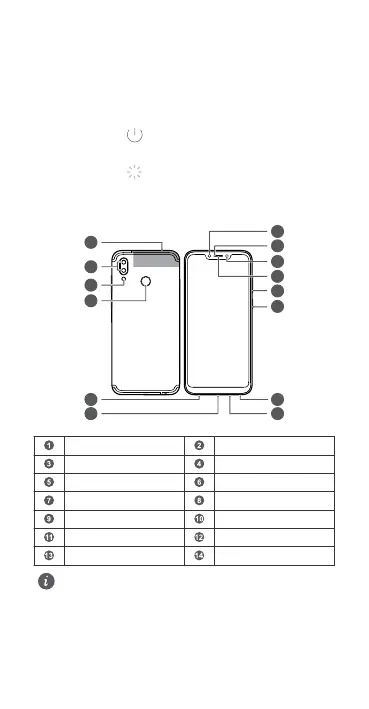
honor COR-L29 - Your Device at a Glance; Before you start, lets take a look at your new device.; lTo power on your device, press and hold the power button until the screen turns on.lTo power off your device, press and hold the power button, and then touch.lTo restart your device, press and hold the power button, and then touch.lPress and hold the power button for 10 or more seconds to forcibly restart your device.; Secondary microphoneRear cameraFlashFingerprint scannerHeadset jackUSB-C portPrimary microphoneSpeakerPower buttonVolume buttonEarpieceLight sensorStatus indicatorFront camera

honor COR-L29
116 pages
Print Icon
To Next Page IconTo Next Page
To Previous Page IconTo Previous Page
Loading...
Your Device at a Glance
Before you start, let's take a look at your new device.
l To power on your device, press and hold the power button
until the screen turns on.
l To power off your device, press and hold the power button,
and then touch .
l To restart your device, press and hold the power button,
and then touch .
l Press and hold the power button for 10 or more seconds to
forcibly restart your device.
NFC
1
14
13
12
11
10
9
8
7
2
3
4
5
6
Secondary microphone Rear camera
Flash Fingerprint scanner
Headset jack USB-C port
Primary microphone Speaker
Power button Volume button
Earpiece Light sensor
Status indicator Front camera
l Please keep the NFC area close to other devices or
objects while using the NFC function.
English (United Kingdom)
1

Table of Contents

Related product manuals