English
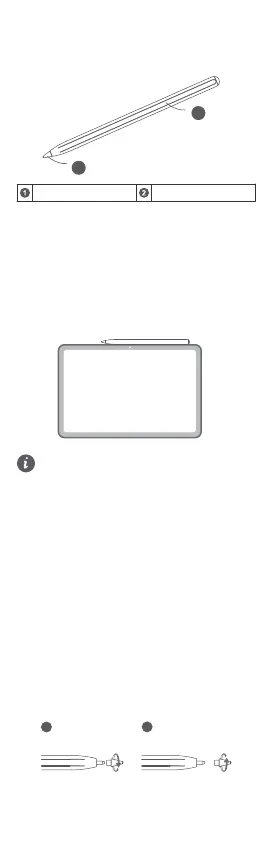
Appearance
Pen notch Pen tip
Pairing and Charging
When using the stylus pen for the rst time, pair it
with the tablet.
Method:
Attach the notch of the stylus pen to the top of the
tablet for pairing or charging. Use this method if the
tablet suppos attaching styluses.
e attachment position may va by model. You can
place the stylus pen per the illustration below until a
prompt pops up on the tablet screen.
• If you want to connect the stylus pen to
another tablet, please pair the stylus pen with
the new tablet per the above pairing method.
• e stylus pen does not work during charging.
• e stylus pen will go into a deep sleep state
after sitting for a period to reduce power
consumption. To wake it up, please follow the
above charging method.
• When the stylus is unused for long, the power
will slowly deplete until it enters a batte
protection state. en you need to charge it
for 5 to 10 minutes before using it again.
Replacing the Pen Tip
Method:
1 Pinch the tip and rotate it counterclockwise until it
is removed from the pen body.
2 Pinch the top of the new tip and inse the lower
pa into the pen. en, rotate the tip clockwise to
lock it into place. Make sure that the tip is secure
to prevent it from becoming loose and falling out.
1


 To Next Page