36
ENGLISH
Part 2: For the operator
2.1 WASHING PHASES HD/LB
2.1.a Switching on and Preparing the machine (Fig.1)
To switch on the machine,press and hold the power
switch (Q1) into the ON position button for a few secon-
ds, then release.
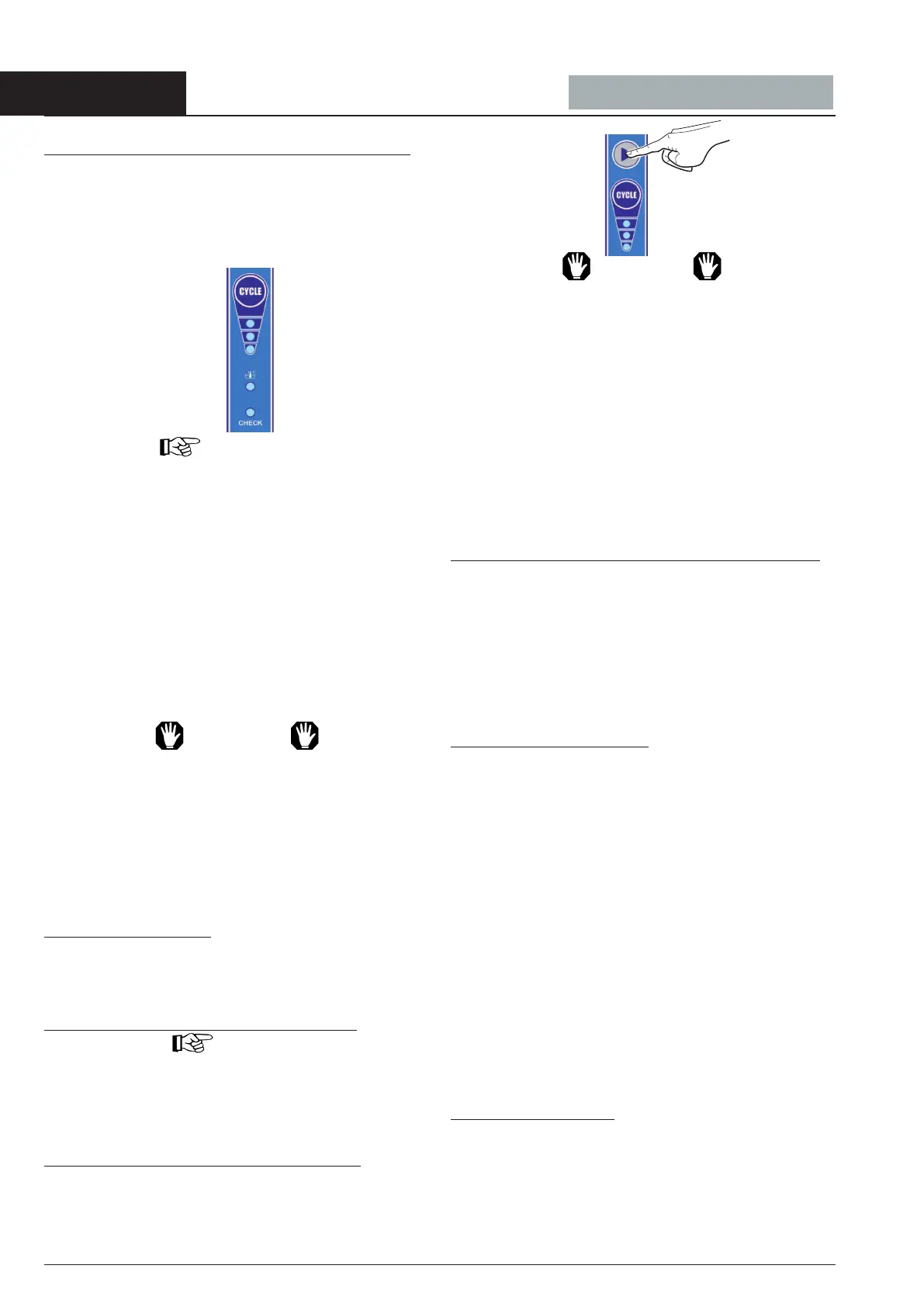
The LED indicating the last cycle selected will become
CONSTANTLY LIT (LC1, LC2, LC3 or LC1+LC2+LC3) ,
as will the CHECK LED .
IMPORTANT
On rst switching on, LED LC2 will light up.
The boiler, and then the tank, will start to ll automatically.
Once the water level has been reached, the heating ele-
ments will switch in, rst in the boiler, then in the tank.
Once the water in the tank reaches the correct tempera-
ture, the tank temperature LED (LTV) will go ON.
The thermometers P3 (55°C) and P2 (85°C) reect the tank
and boiler values of temperature.
WASHING OPERATION
If not equipped with an automatic dosing system, pour
into the tank a quantity of detergent suitable for the volu
me and hardness of the water. For quantities, refer to the
specic instructions for the detergent in use.
ATTENTION
When items to be washed are encrusted with burnt
on matter, or a long time has passed between use
and washing, it is essential to carry out a pre-was
soak using a suitable softening agent.
The use of hand-washing products is to be avoided
as they could produce foam inside the machine.
IPlace the basket of items to be washed inside the machine,
having rst removed any solid waste.
2.1.b Selecting a Cycle
The duration of the washing cycle can be chosen from
4 different lengths of time, to be selected using the
“CYCLE” button.
Each time the “CYCLE” button is pressed, the LEDs
2.1.c STARTING UP THE WASHING CYCLE
IMPORTANT
The selection of MANUAL orAUTOMATIC start to be
made with machine in stand-by mode
Before to start the washing to make sure that the tempe
ratures are those cited, 55°C for the washing and 85°C
for I rinse P3 and P2 .
STARTING the MANUAL WASHING CYCLE
To start the washing cycle, press and hold the START
(S3) button for a few seconds, then release.
Throughout the washing cycle the LED(s) for the selected
cycle (LC1, LC2 or LC3 or LC1+LC2+LC3) will FLASH.
ATTENTION
We recommend that you top up the detergent used up
by washing grease or dispersed during rinsing every
4-5 complete cycles.
The use of the machine ensures rinsing at the ideal
temperature for hygienic purposes every time;
Indeed, if the temperature is not sufcient the wash will
be automatically prolonged so as to ensure the neces-
sary conditions of optimum rinsing at 85°C.
The waiting time required to attain optimum temperatu-
re can extend to a maximum of 8 minutes.
While this is taking place, the CHECK LED will FLASH
RAPIDLY until the end of the cycle. To reset the
ashing, switch the machine off and back on using the
power switch (Q1) .
STARTINGUPTHEWASH. CYCLEAUTOMATICALLY
To start up the cycle AUTOMATICALLY (by opening and
closing the door), you will need to change the cycle
start up mode. Press and hold the “CYCLE” button until
the pre-selected cycle LED remains BLINKING LIT
(approx. 10 sec.) and the washing cycle will then start
up AUTOMATICALLY when the door is closed.
The functioning of the led (CONTINUOUS or BLINKING)
depends on the chosen type of functioning(MAN. or AUT)
2.1.d Interrupting the cycle
1) It is possible to interrupt the washing cycle momen-
tarily by opening the door, this is an EMERGENCY
measure:
the cycle LEDs (LC1, LC2,LC3 or or LC1+LC2+LC3)
will start to FLASH, alternating with the CHECK LED .
On closing the door, operations will resume from the
point in which they stopped.
2) The cycle can also be interrupted by SWITCHING
the machine’s power switch (Q1) to the OFF position.
3) On switching the machine back on, the LED indica-
ting the last cycle selected will light up.
At the end of the washing cycle, take out the basket and
shake it gently so as to remove the last drops left on the
washed items.
Allow items to dry and remove them from the basket
with clean hands.
Store all items on hygienic and completely stable surfa-
ces.
2.1.e Manual Draining
It is possible to drain the water from the tank at any time
during the day, according to the waste accumulated.
To carry out this operation, proceed as follows:
- SWITCH the machine’s power switch (Q1) to the OFF
position and release the overow, allowing all the water
to drain from the tank;
- Remove the tank lters (19) and clean;


 To Next Page
 Loading...