EasyManua.ls Logo

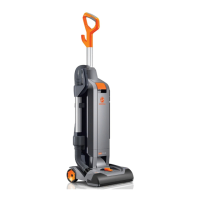
Hoover ch53010 - User Manual

Hoover ch53010
43 pages
Print Icon
To Next Page IconTo Next Page
Loading...
www.hoover.com
OWNER’S MANUAL
Operating and Servicing Instructions
©2012 Techtronic Floor Care Technology Limited. All Rights Reserved. #961151044 ID104830-R0
Español - página E1
THIS PRODUCT IS INTENDED FOR COMMERCIAL USE ONLY.
IMPORTANT: READ CAREFULLY BEFORE ASSEMBLY AND USE.
Questions or concerns? For assistance, please call Customer Service at
1-800-321-1134 Mon-Fri 8am-7pm EST.

Questions and Answers

  • K
    Kimberly JimenezJul 27, 2025
    What to do if my Hoover ch53010 won’t pick up or has low suction?
    • C
      Colleen BennettJul 28, 2025
      If your Hoover Vacuum Cleaner won’t pick up or has low suction, or the System Check Indicator has turned red, several factors could be at play. The rinsable filter or HEPA media filter might be dirty and needs cleaning. Alternatively, the dirt cup could be full or clogged, requiring emptying. A broken or worn belt would need replacement. Also, the brushroll or hose may be clogged, so check and clear them. Lastly, ensure the carpet height setting is correct for the carpet you're cleaning.
  • J
    John DicksonAug 3, 2025
    Why my Hoover ch53010 won’t run?
    • D
      Dennis VangAug 3, 2025
      If your Hoover Vacuum Cleaner won't run, make sure the power cord is firmly plugged into the outlet. Check your home's fuse or breaker and replace the fuse or reset the breaker if necessary. It's also possible that the thermal protector has been activated; unplug the vacuum and allow it to cool for 30 minutes to reset it.
  • V
    Veronica LewisAug 8, 2025
    How to fix dust escaping from Hoover Vacuum Cleaner?
    • I
      Ian LaneAug 8, 2025
      If you notice dust escaping from your Hoover Vacuum Cleaner, the dirt cup might be full and needs emptying. Alternatively, the dirt cup or the hose might not be installed correctly. Another possible cause is that the rinsable filter or HEPA media filter isn't completely installed.
  • A
    anthony63Aug 14, 2025
    What does it mean if my Hoover ch53010 Vacuum Cleaner has a smoky/burning smell?
    • B
      bryanfigueroaAug 14, 2025
      A smoky or burning smell from your Hoover Vacuum Cleaner could indicate a broken or stretched belt, which would need replacing. It could also mean the brushroll is clogged and needs to be cleared of debris.
  • S
    scott73Aug 21, 2025
    What to do if my Hoover ch53010 Vacuum Cleaner is difficult to push?
    • M
      Michael ScottAug 21, 2025
      If your Hoover Vacuum Cleaner is difficult to push or won’t move forward, the carpet height setting might be incorrect. Adjust the carpet height adjustment knob to the appropriate setting for the carpet you are cleaning.

Summary

IMPORTANT SAFETY INSTRUCTIONS

CAUTIONS AND GROUNDING

CAUTION: TO REDUCE THE RISK OF DAMAGE

Advises on preventing product damage during use.

GROUNDING INSTRUCTIONS

Explains the importance and procedure for grounding the appliance.

1. VACUUM ASSEMBLY

CARTON CONTENTS

Lists all parts included in the product packaging.

ATTACH HANDLE

Step-by-step guide for attaching the vacuum handle.

ATTACH DIRT CUP

Instructions for securely attaching the dirt cup.

POSITION TOOLS

Guidance on placing and storing the vacuum accessories.

2. HOW TO USE

VACUUM DESCRIPTION

Identifies and explains the different parts of the vacuum cleaner.

ON-OFF SWITCH

Details on operating the vacuum's power switch.

CORD STORAGE

Method for neatly storing the power cord.

CARPET HEIGHT ADJUSTMENT

How to adjust the vacuum for optimal cleaning on various carpets.

3. TOOLS

SELECT PROPER TOOL

Guidance on choosing and using the appropriate vacuum attachments.

REMOVING HOSE

Instructions for detaching the hose for accessory use.

ATTACH WAND AND TOOLS

Steps for connecting wands and tools to the hose.

STAIR CLEANING

Safety precautions and methods for cleaning stairs.

HOW TO CLEAN TOOLS

Procedures for cleaning vacuum tools and accessories.

4. MAINTENANCE

System Check Indicator & Thermal Protector

Explains indicator lights, overheating protection, and basic troubleshooting.

DIRT CUP Maintenance

Guidance on emptying and maintaining the dirt cup.

FILTERS Maintenance

Instructions for cleaning rinsable and HEPA filters.

Cyclonic Filter Assembly Cleaning

Steps for cleaning the cyclonic filter assembly.

BRUSHROLL & HOSE Cleaning

Procedures for cleaning the brushroll and hose.

BELT Replacement

Information on checking, replacing, and buying vacuum belts.

5. TROUBLESHOOTING

Vacuum wont run

Diagnosing and resolving power issues.

Indicator Red; Low Suction

Solutions for system check errors or poor suction.

Dust Escaping; Difficult Push

Addressing dust leaks and mobility problems.

Smoky;burning smell

Troubleshooting unusual operational smells.

6. SERVICE & 7. WARRANTY

Obtaining Service

How to find authorized service centers and customer support.

Limited One Year Commercial Warranty

Details of the product's warranty coverage and claim process.

Hoover ch53010 Specifications

General IconGeneral
BrandHoover
Modelch53010
CategoryVacuum Cleaner
LanguageEnglish

Related product manuals