EN
8
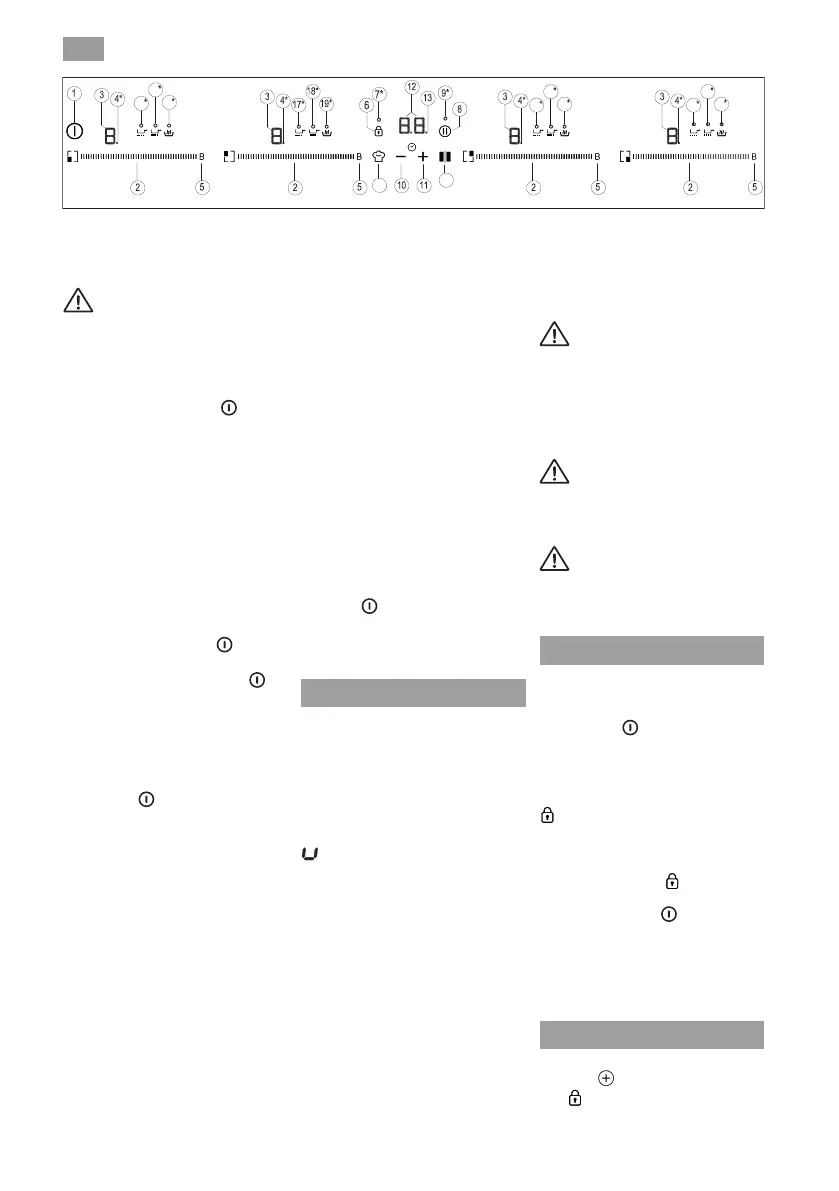
directly on a desired point of the cursor
In order to select a plate on
these models, directly touch the
cursor slider (2).
SWITCHING ON THE DEVICE
1 Touch the On touch key
least one second. The touch control
If you do not take any action in the
next 10 seconds the touch control will
always has priority to disconnect the
touch control.
ACTIVATING PLATES
Once the Touch Control is activated
with sensor
1
position of one of the cursors
2
TURNING OFF A PLATE
the power to level 0. The hotplate will
H will appear in its power indicator
TURNING ALL PLATES OFF
Pan detector
previously selected.
previously selected.
When nished, turn o the
cooking zone by using the touch
controls. Otherwise an undesired
operation could occur if a pan is
accidentally placed on the cooking
zone during the three minutes.
Avoid possible accidents!
Warning : Burn Hazard: don't
place or leave the pot/pan outside
the cooking zones and/or over the
Control panel.
Warning: The bottom surface
of the pot / pan must be at and
must not show any damage or wear.
Child lock Function
undesired operations. This function is
useful as a childproof safety.
Silencer of the beep
touch key
key
Fig.2


 To Next Page
 Loading...