EasyManua.ls Logo

Horizon Hobby E-FLITE EFLA1010 - User Manual

Horizon Hobby E-FLITE EFLA1010
2 pages
Print Icon
To Next Page IconTo Next Page
Loading...
Thank you for purchasing the E-flite
®
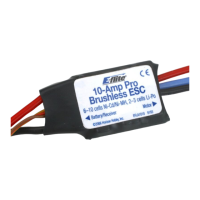
10-Amp Pro Brushless
ESC. This controller has been designed for use in radio control
aircraft and to support continuous currents of up to 10 amps
when using 2-3 cell Li-Po battery packs and up to four sub-
micro servos. Standard features include advance BEC and safe
power arming along with programmable features such as low
voltage cutoff, braking, timing, and throttle input range.
Features:
Up to 10 amps continuous current with proper air flow
Programmable motor braking
Safe power-arm mode prevents accidental starts
Programmable low voltage cut-off with settings for 2-cell Li-Po (6V),
3-cell Li-Po (9V) or 70% of battery starting voltage
Programmable throttle input range (1.1ms-1.9ms or Auto Select)
Soft start
Auto motor shut down if signal is lost or there is interference
Programmable timing—2 user selectable ranges for use with a large
variety of brushless motors
Pre-wired connectors—JST on battery input and 2mm female gold
bullets on motor output leads
Specifications:
Continuous Current: 10A
Max Burst Current: 12A (15 sec)
Length: 30mm (1.2 in)
Width: 17.5mm (.7 in)
Height: 10mm (.4 in)
Weight: 10 g (.35 oz)
Cells: 2-3S Li-Po or 6-10 Ni-MH/Ni-Cd
Battery Input Leads: 20 AWG with JST Connector
Motor Output Leads: 20 AWG with 2mm Female Gold Bullet Connectors
Servo Ratings with BEC Enabled:
High Torque Standard Sub-Micro
Cells Servos Servos Servos
6 - 8 Ni-Cd/Ni-MH 3 4 4**
9 - 10 Ni-Cd/Ni-MH 2 3 4**
2 Li-Po 3 4 4**
3 Li-Po 2 3 4**
** Sub-Micro Servos tested 4 at a time include E-Flite S-60, and S-75, JR 241, and ParkZone 3W servo.
Some other brands of servos have significantly higher current draw. Digital sub-micro servos, micro, and
mini-servos have higher current draw, use the 'standard servos' column. Always be sure to position the ESC
for maximum airflow since cooling can significantly aid in the performance of the BEC.
Before first use, please refer to Chart A for BEC usage and input
voltage/cell count guidelines. You must follow these guidelines for safe
operation. If you are using four servos with higher current draw, or more
than four servos for a quad flap option (for example), you will need to
disable the BEC. If you wish to disable the BEC, you must remove the red
receiver wire lead and connector from the receiver lead housing, and then
insulate it properly to prevent shorting.
When operating with the BEC disabled, E-flite recommends the use of a
separate, high power, external, BEC (like the Ultimate BEC), or receiver
pack and switch using the following items to ensure trouble-free operation:
1. Expert 720mAh Ni-MH 4.8V receiver battery (EXRB100), or similar
2. Expert Standard Switch (EXRA050), or similar
PLEASE READ THESE INSTRUCTIONS
IN THEIR ENTIRETY BEFORE USE
Before you connect your ESC and begin flying, take a moment to look it
over. The input power side has a black (negative) and red (positive) wire
along with a female JST Connector. The motor side has three, 2mm female
gold bullet connectors.
The black and red wires with the female JST connector will connect to your
power battery. The red wire connects to the red wire on your battery pack,
the black wire to the black wire on your battery pack. If the wires are
reversed, the ESC may be damaged. YOU MUST ENSURE THAT YOU CONNECT
THE BATTERY POLARITY PROPERLY TO PREVENT DAMAGE TO THE ESC.
Reversing polarity will void your warranty, so always double-check this
connection. You may need to solder a male JST Connector (EFLA242) to the
battery so it matches this speed control. The throttle lead connects to the
throttle channel on your radio receiver.
WARNING: For your safety, when checking the startup function of the ESC
or making programming changes, please remove the propeller to prevent any
potential injury. You should always treat the motor and propeller as live and
dangerous, remembering that it could start at any time, and keep any body parts,
clothing and tools clear of the propeller arc. NEVER LEAVE THE BATTERY
CONNECTED WHEN NOT FLYING THE AIRCRAFT AND ALWAYS REMOVE THE
BATTERY FROM THE MODEL BEFORE CHARGING AND WHEN FINISHED FLYING.
When flying in hot weather, we recommend checking on the condition
of the ESC, battery, and motor after each flight, and you may want to
consider letting the electronic components cool to near ambient tempera-
ture between flights.
We also recommend throttle management when running near maximum
levels of current draw. It is not recommended that you fly an entire flight
at full throttle. If this is done, it is possible to cause permanent damage
to your motor, battery, and ESC.
Using Your 10-Amp Pro Brushless Controller
This controller is very simple to use, and for safety, will not arm the motor
until the throttle stick has been held in the Idle/OFF position for more than
1 second. The controller will indicate the soft cut-off voltage setting every
time you plug the battery in by first emitting a low, long tone, to show
startup. You will then hear 2 (for 2-cell Li-Po) or 3 (for 3-cell Li-Po) medium
length, mid tones to indicate the cell count (or 7 beeps if 70% Smart Cut is
selected), helping you to confirm the setting before every flight.
Connecting the ESC to the Motor
The three wires from your motor connect to the three female gold bullet
connectors on the ESC. The order of connection to the motor is not
important; you can plug any motor wire into any connector. If, when you
test the system, the motor runs backwards you can simply unplug and
switch any two of the motor wire plugs connected to the ESC.
Mounting the ESC
Choose a location that has good airflow and offers good protection.
The plastic case area next to the small BEC heat sink is designed to accept
Velcro® or 2-sided tape. Do not cover the heat sinks as this will greatly
reduce their effectiveness.
Mount the ESC with a combination of Velcro®, 2-sided foam tape, and/or
tie wraps.
Starting Your Power System
1. Turn on your transmitter and ensure the position of the throttle stick
is set to Idle/Off.
2. Plug in the flight pack to the controller and listen for the tones to
indicate voltage cut-off.
3. After the controller has indicated the cell count, you will here a series
of 3 medium length rising tones to indicate the controller is armed,
and ready to fly.
4. When you move the throttle stick upward, the motor will run. If you
continue to move the throttle stick upward to Full throttle (high
position), the motor will run faster. If you lower the throttle
stick below the start-up position, the motor will stop running.
5. Check servo motion as part of your preflight check. It is very important
you make sure linkages are free-moving with no binding.
Entering the Programming Mode
1. With the battery disconnected from the controller, and the transmitter
turned on, first move the throttle stick to full throttle (>1.7ms)
position. Leave it in this position and then connect the battery to the
controller.
2. Wait for 5 seconds, and the ESC will give two sets of fast ringing tones
to indicate you have successfully entered the programming mode.
3. Once you hear these tones, move the stick to center (between 1.4 and
1.6ms), and the controller will beep 1 time, this indicates menu item 1
4. The controller will now wait 5 seconds for you to make your selection;
your programming options are either full throttle (>1.7ms), or idle
(<1.3ms).
(continued on back)
10-Amp Pro Brushless ESC
Instructions
(Chart A)

Question and Answer IconNeed help?

Do you have a question about the Horizon Hobby E-FLITE EFLA1010 and is the answer not in the manual?

Summary

Please Read These Instructions In Their Entirety Before Use

Using Your 10-Amp Pro Brushless Controller

Connecting the ESC to the Motor

Details on how to connect the ESC's wires to the brushless motor for proper operation.

Mounting the ESC

Recommendations for securely mounting the ESC for optimal performance and protection.

Starting Your Power System

Steps to safely power up the ESC and motor system for initial operation.

Entering the Programming Mode

Programming Menu 1 - Voltage Cut-off

Sets the voltage at which the controller shuts down the motor to protect the battery.

Programming Menu 2 - Braking

Allows selection between having the ESC stop the propeller or allow it to windmill.

Programming Menu 3 - Timing

Adjusts motor timing for optimal performance based on motor pole count.

Programming Menu 4 - Throttle Input Range

Configures the ESC's throttle signal range for compatibility with different radios.

Error Codes

Limited Warranty and Safety Precautions

Limited Warranty Period

Covers the product's warranty against defects in material and workmanship.

Limited Warranty & Limits of Liability

Details the scope of warranty, limitations, and user liability for product use.

Safety Precautions

Highlights necessary caution and common sense for operating the hobby product.

Overview

The E-flite 10-Amp Pro Brushless ESC is a radio control aircraft component designed to manage the power delivery to a brushless motor. It supports continuous currents of up to 10 amps and is compatible with 2-3 cell Li-Po battery packs and up to four sub-micro servos.

Function Description

The ESC (Electronic Speed Controller) regulates the speed of a brushless motor in an RC aircraft. It incorporates an advanced BEC (Battery Eliminator Circuit) to power the receiver and servos, eliminating the need for a separate receiver battery in many setups. A key safety feature is the safe power-arm mode, which prevents accidental motor starts by requiring the throttle stick to be held in the Idle/OFF position for more than one second before arming. The controller also includes an auto motor shut-down feature in case of signal loss or interference, enhancing flight safety.

Important Technical Specifications

  • Continuous Current: 10A
  • Max Burst Current: 12A (for 15 seconds)
  • Dimensions:
    • Length: 30mm (1.2 in)
    • Width: 17.5mm (0.7 in)
    • Height: 10mm (0.4 in)
  • Weight: 10g (0.35 oz)
  • Cell Compatibility: 2-3S Li-Po or 6-10 Ni-MH/Ni-Cd
  • Battery Input Leads: 20 AWG with JST Connector
  • Motor Output Leads: 20 AWG with 2mm Female Gold Bullet Connectors

The BEC (Battery Eliminator Circuit) has specific servo ratings depending on the battery type:

  • 6-8 Ni-Cd/Ni-MH: Supports 3 High Torque, 4 Standard, or 4 Sub-Micro Servos.
  • 9-10 Ni-Cd/Ni-MH: Supports 2 High Torque, 3 Standard, or 4 Sub-Micro Servos.
  • 2 Li-Po: Supports 3 High Torque, 4 Standard, or 4 Sub-Micro Servos.
  • 3 Li-Po: Supports 2 High Torque, 3 Standard, or 4 Sub-Micro Servos.
    • Note: Sub-micro servos like E-Flite S-60, S-75, JR 241, and ParkZone 3W servo were tested. Digital sub-micro, micro, and mini-servos with higher current draw should use the 'standard servos' column. If using more than four servos or servos with significantly higher current draw, the BEC should be disabled, and an external BEC or receiver pack should be used.

Usage Features

The ESC offers several programmable features to optimize performance and safety:

  • Programmable Motor Braking: Allows the user to choose between "Brake On" (for gliders, stopping the propeller during flight) or "Brake Off" (allowing the propeller to windmill).
  • Programmable Low Voltage Cut-off: Settings include 2-cell Li-Po (6V), 3-cell Li-Po (9V), or a 70% Smart Cut-off of the battery's starting voltage. The Smart Cut-off option activates a soft cut-off at 70% of the startup voltage, but users must be aware that it cannot protect Li-Po batteries if a partially charged pack is used. The motor will "pulse" repeatedly when the cut-off voltage is reached, signaling the need to land the model.
  • Programmable Throttle Input Range: Can be set to 1.1ms-1.9ms or "Auto Select." The "Auto Select" option learns the minimum throttle position at startup and stores this value, then adds 0.6ms for the full throttle setting. This helps ensure proper operation with various radio systems.
  • Soft Start: Provides a smoother initial power delivery to the motor.
  • Programmable Timing: Offers two user-selectable ranges for different brushless motors (4-pole and greater, or 2-pole motors), which can be adjusted based on motor specifications.

Startup Procedure:

  1. Turn on the transmitter and ensure the throttle stick is at Idle/Off.
  2. Plug in the flight pack to the controller. The ESC will emit a low, long tone to indicate startup, followed by 2 or 3 medium-length, mid-tones to indicate the cell count (or 7 beeps for 70% Smart Cut).
  3. A series of 3 medium-length rising tones will then indicate the controller is armed and ready.
  4. Moving the throttle stick upward will activate the motor.

Programming Mode Entry:

  1. With the battery disconnected and the transmitter on, move the throttle stick to full throttle (>1.7ms).
  2. Connect the battery to the controller and wait 5 seconds.
  3. The ESC will emit two sets of fast ringing tones, indicating entry into programming mode.
  4. Move the stick to center (between 1.4 and 1.6ms) to hear one beep, indicating menu item 1.
  5. Selections are made by moving the stick to full throttle (>1.7ms) or idle (<1.3ms) within 5 seconds. A valid selection is confirmed by a single low-tone beep. If no selection is made, the controller moves to the next menu item.
  6. To exit programming mode, move the throttle stick to Idle after making a selection, or leave it in Idle for approximately 8 seconds until the controller arms, or simply unplug the battery.

Error Codes:

  • Continuous beeping indicates that the input voltage is below the cut-off voltage. Users should check the battery voltage or the programmed cut-off setting.
  • If the controller has trouble arming (and the throttle trim is at minimum), entering programming mode and trying the "Auto Select" throttle input range (Menu 4) may resolve the issue. Increasing high and low throttle ATV (endpoint) percentages on computer radios may also help.
  • Some Futaba systems may require the throttle channel to be "reversed."

Maintenance Features

  • Cooling: The ESC should be mounted in a location with good airflow, and the heat sinks should not be covered, as this significantly reduces their effectiveness.
  • Post-Flight Checks: In hot weather, it's recommended to check the condition of the ESC, battery, and motor after each flight and allow components to cool to ambient temperature between flights.
  • Throttle Management: It is advised to manage throttle when running near maximum current draw. Flying an entire flight at full throttle is not recommended as it can cause permanent damage to the motor, battery, and ESC.
  • Polarity Protection: Users must ensure correct battery polarity when connecting the ESC, as reversing polarity will damage the ESC and void the warranty.
  • Propeller Removal: For safety, the propeller must be removed when checking the startup function or making programming changes to prevent injury. The motor and propeller should always be treated as live and dangerous.
  • Battery Disconnection: The battery should always be disconnected from the model when not flying, before charging, and when finished flying.

The product comes with a 1-year limited warranty from Horizon Hobby, Inc., covering defects in material and workmanship. This warranty does not cover cosmetic damage, damage due to acts of God, accident, misuse, abuse, negligence, commercial use, modification, improper installation, operation, maintenance, or attempted repair by unauthorized service centers. Horizon Hobby's liability is limited to the original cost of the product and does not cover consequential, incidental, or collateral damage.

Horizon Hobby E-FLITE EFLA1010 Specifications

General IconGeneral
BrandHorizon Hobby
ModelE-FLITE EFLA1010
CategoryController
LanguageEnglish

Related product manuals