Horizon 202 User manual, 1991 year
– 6 –
4.6. Camera Unloading
When the exposure counter shows figure 22, the film should be rewound back into the cassette and
the camera unloaded. To do this:
— Press button 21 on the camera bottom.
— Flip open crank 8 and rotate it in the arrow direction till the film leader leaves the take-up spool.
Try to rotate the crank smoothly, without jerks and not too fast to avoid traces of static electricity on
film.
— Pull film rewind knob 5 all the way out; open the back door. Remove the cassette, holding the
film rewind knob.
If necessary, the camera can be unloaded after exposing any number of frames, having rewound the
film into the cassette beforehand.
4.7. Mounting the Light Filters
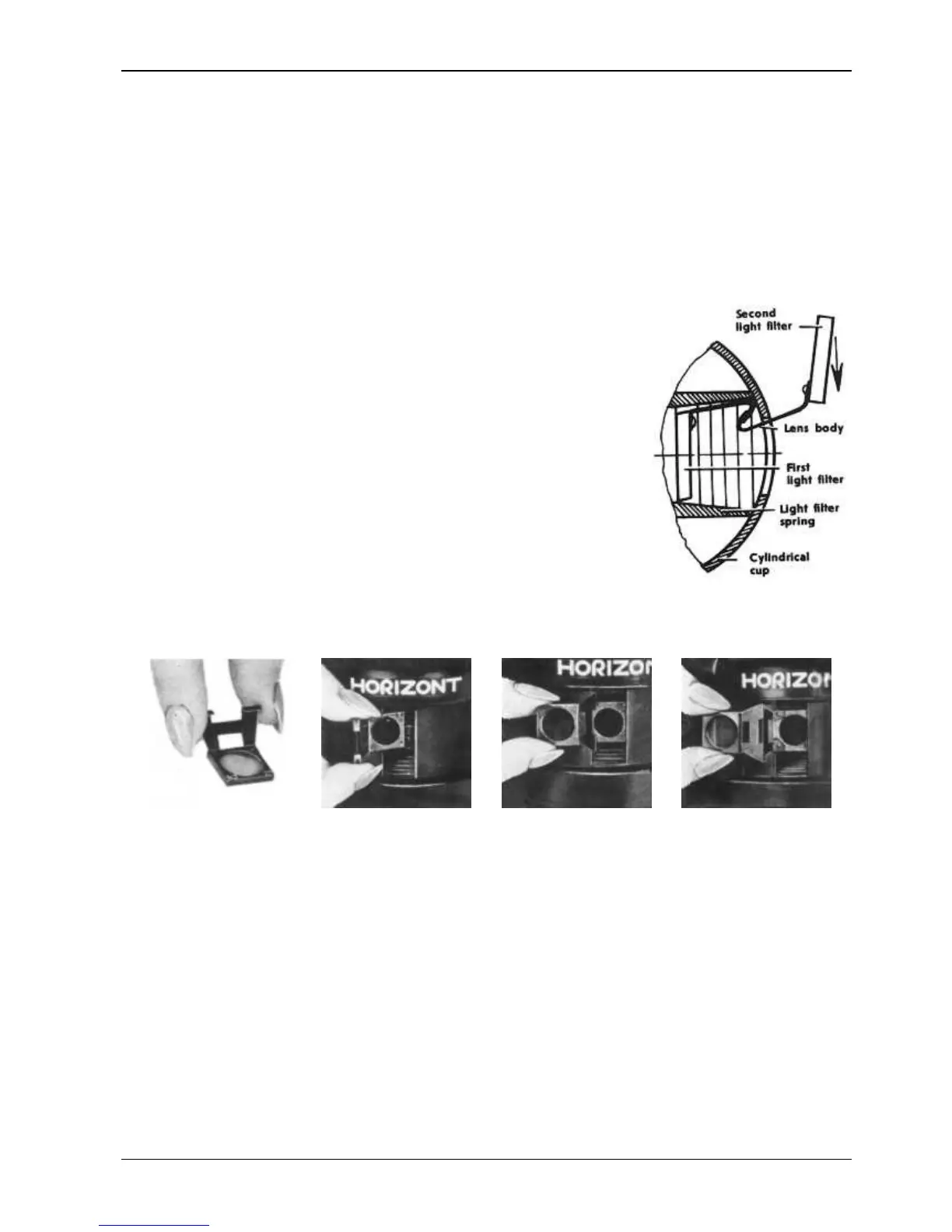
Mount the light filter on the camera. To do this, with the help of the
shutter cocking lever, align the lens axis with the film gate center in
body. Through the cylindrical cup window put the light filter mount into
the lens body socket. In so doing, press the light filter spring and put it
behind the cup window (see the diagram).
To remove the light filter, take the second one delivered with camera,
and coupling the hooks, slightly draw the light filter in the direction
indicated by an arrow in the above mentioned diaphragm.
Second light filter — Lens body — First light filter — Light filter spring — Cylindrical cup
http://eugigufo.net/it/download/photovideo/


 To Previous Page
 Loading...