•
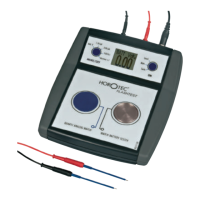
Switch ON the HOROTEC
©
Flashtest
with the right button
then press down the two buttons simultaneously and release
simultaneously. The display shows the INFO menu.
•
Press once the right button and select the CALIBRAT menu.
•
Connect the optionally available “calibrator” unit to the
HOROTEC
©
Flashtest
.
•
Wait a few seconds and the calibrator automatically calibrates
the device.
• When the calibration process is finished the display shows a
value, like -00.19, etc (we recommend performing 3-4 cycles
before saving the result).
•
After the finishing of the calibration process press down the
right button until the value is saved. With this, the calibration
is finished.
•
Press the left button to return to the measurement menu.
B) ‘ZEROING’
Zero adjustment is a process like to tare a scale. The “zeroing” is
also easy and simple :
• Switch ON the
HOROTEC
©
Flashtest with the right button
then press down the two buttons simultaneously and release
simultaneously. The display shows the INFO menu.
• Press twice the right button and select the ZEROING menu.
(The menu shows a value, like -017.)
• Press down the right button and a same new value will appear
with opposite sign, so the sum of values will be zero and the
“zeroing” is already finished. (The INFO menu shows the saved
new value.)
• Press the left button to return to the measurement menu.
6



 To Previous Page