EasyManua.ls Logo

HOTO QWLDZ001 - User Manual

HOTO QWLDZ001
16 pages
Print Icon
To Next Page IconTo Next Page
Loading...
15
01 Product Overview
Read this manual carefully before use, and retain it for future reference.
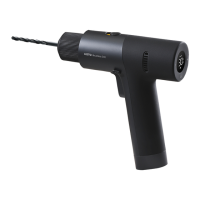
Thank you for choosing HOTO 12V Brushless Drill.
3
1
4
1
2
3
4
5
6
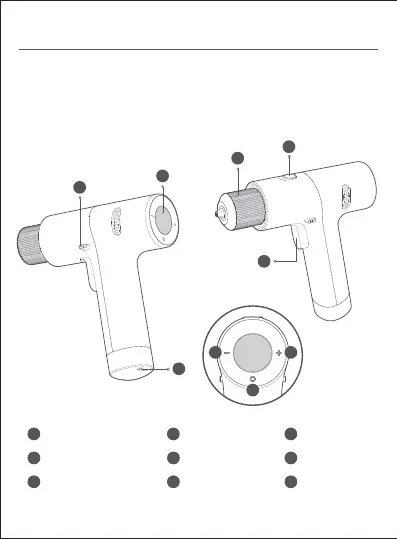
Chuck
Function Switch
Major Switch/Switch Flip
7
8
9
Gear-up Buon
Mode Switch
Screen
Gear-off Buon
Reverse/
Lock-up Pushbuon
Type-C Charging
Mouth
The product is for tightening and loosening screws, and drilling holes on wood,
metal, plastic and bricks. Not suitable for drilling on hard materials like concrete or
stone. Please choose the right bit or drill according to the material you will drill on.
5
9
2
6 7
8

Questions and Answers

  • A
    Alexander PriceAug 10, 2025
    Why HOTO QWLDZ001 does not operate after pressing the switch?
    • M
      Melissa HarrisonAug 10, 2025
      If your HOTO Drill doesn't operate when you press the switch, the 'Switch Flip' might be locked in the middle. To resolve this, push the 'Reverse Pushbutton' to the left or right, looking from the rear of the machine towards the chuck.
  • J
    Jillian SheppardAug 25, 2025
    What to do if HOTO QWLDZ001 stops spinning?
    • L
      Lynn RobinsonAug 25, 2025
      If your HOTO Drill stops spinning during operation, it could be due to several reasons: * Continuous use under heavy load might cause the drive board to overheat, or the battery to overheat or undervoltage. Solution: Allow the drill to cool down, and charge if necessary. * The lithium battery might be out of power. Solution: Charge the battery.

HOTO QWLDZ001 Specifications

General IconGeneral
ModelQWLDZ001
TypeCordless Drill
Rated Voltage12V
Battery Capacity2000mAh
Speed Settings2
Chuck Size10mm
Charging Input5V/2A
Charging Time1.5 hours
Battery TypeLithium-ion
Max Torque30Nm