How to
opemte
your dryer
—
WARNING—TO reduce the risk of fire, electric
shock, or injury to persons,
read the IMPORTANT SAFETY INSTRUCTIONS before operating this appliance.
(.
\
~m
AUTOMATIC
SENSI
D8Y
,,,
TIMEO CYCLES
6
:=~q
\’
.,,
“,,,,,,
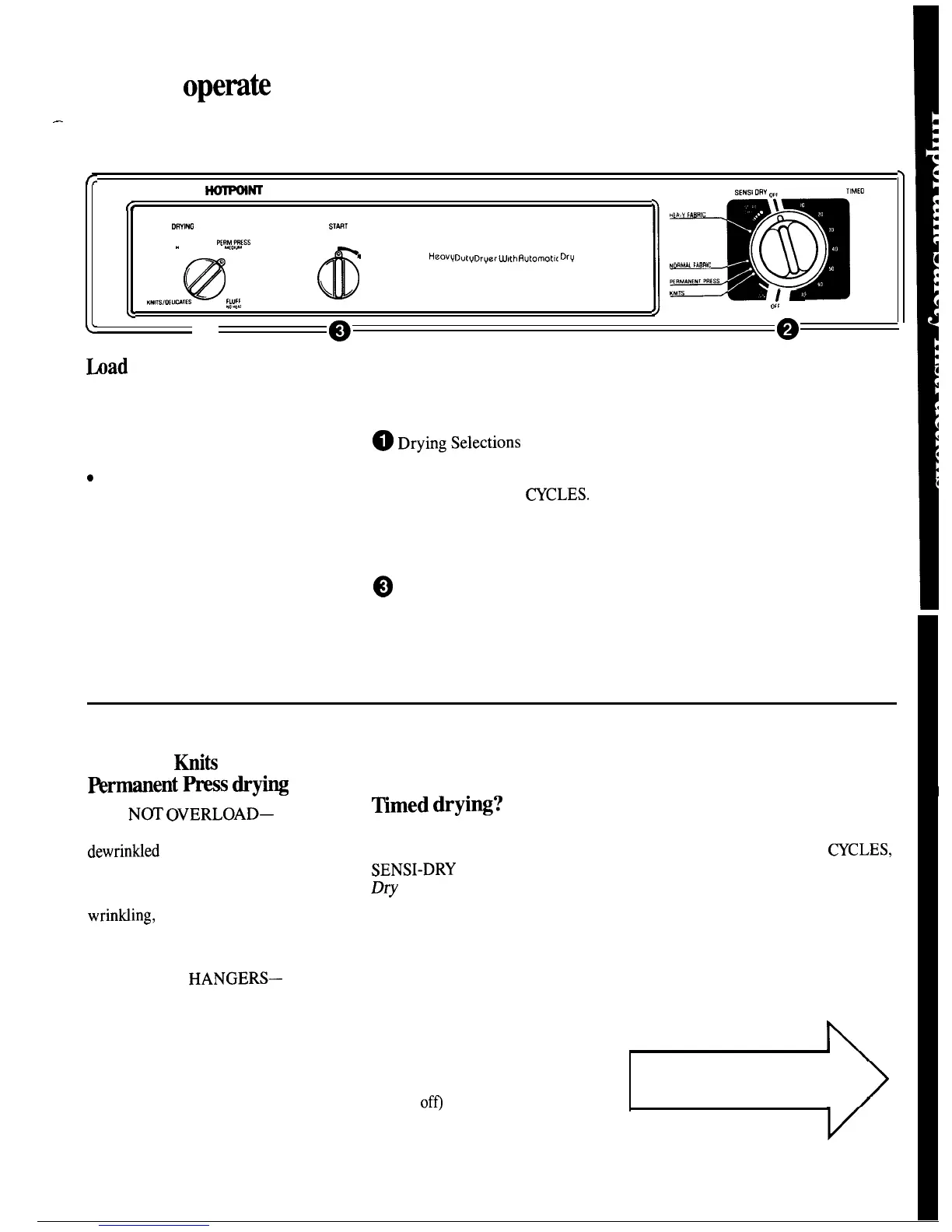
OWING
SELECTIONS
ST~T
COTTONS
KRMPRESS
. .
.
wow
w,
0
’
@
@
HeO.V
D“tv
Dr~er
W!th fl”tomot,c Drv Control
(0
NDRMALFA8RIC
\
Permanent PRESS
,.(TS
K“,TSIOEUWIES
FLUFF
1’
.
066
e
<’
o
““””
Q
@
bad
Your Dryer Properly
Set the Controls
●
Clean the lint filter each time the
See the Controls Setting Guide on
dryer is used. Always be sure the
pages 6 and 7.
lint filter is in place. Don’t use the
dryer without it.
~DryingSele~tions
Select the proper heat for your load.
c
Good sorting for the dryer begins
Note: “FluffNo-Heat” is to be used
at the washer. Generally, if clothes
only with the TIMED
~CLES.
are sorted right for washing, they’re
sorted right for drying. See page 8
@Turn Cycle Selector to desired
for sorting help. (If you do mix
cycle setting. The selector may be
various types of fabrics in your
turned in either direction.
load, set the controls for the
~
Turn START knob to start
—
lighter-weight fabrics and remove
dryer.
when dry. Reset controls for the
(Opening the door during operation
remaining heavier fabrics.)
stops the dryer. To restart, close the
door and turn the START knob.)
Polyester
Kniti
&
Rrmanent
_
_
tips
● DO
N~
OVERLOAD—
Garments being dried or
dewrintied
should tumble freely.
●
REMOVE CLOTHES
PROMPTLY-TO help prevent
wrintiing,
remove from the dryer
promptly at the end of the drying
cycles.
●
PLACE ON
HANGERS—
Permanent Press and Polyester
Knit garments look best if placed
on hangers after drying.
What is the difference
between Automatic &
~med
dryi~?
Automatic Drying
When using the AUTOMATIC
SENSI-DRY
cycles, the
Automatic
Dry
Control system
continually
senses the temperature of the air in
the dryer drum. Wet laundry keeps
this air cool. When laundry is dry
enough (and the drum air warm
enough) the heat turns off. When
the air cools, the heat turns back
on. This off and on cycling may
happen a number of times
(depending on the fabric, load size,
and Cycle Selector setting). The
Cycle Selector advances (when the
heat is
of~
until it automatically
turns off dryer.
Timed Drying
When using the TIMED
~CLES,
you select the number of minutes
you wish the dryer to run and it
turns off at the end of this time
period.
TURN THE PAGE
for Controls Setting Guide
5



 To Next Page