About the drger control panel. Hotpoint.com
A WARNING!
To reduce the risk of fire, electric shock, or injurg to persons, read the/HPORTANT SAFETYINSTRUCTIONSbefore
operating this appliance.
You can locate Four model number on the label on the front of the dryer behind the door. Throughout this manual,
features and appearance ma F var F from Four model.
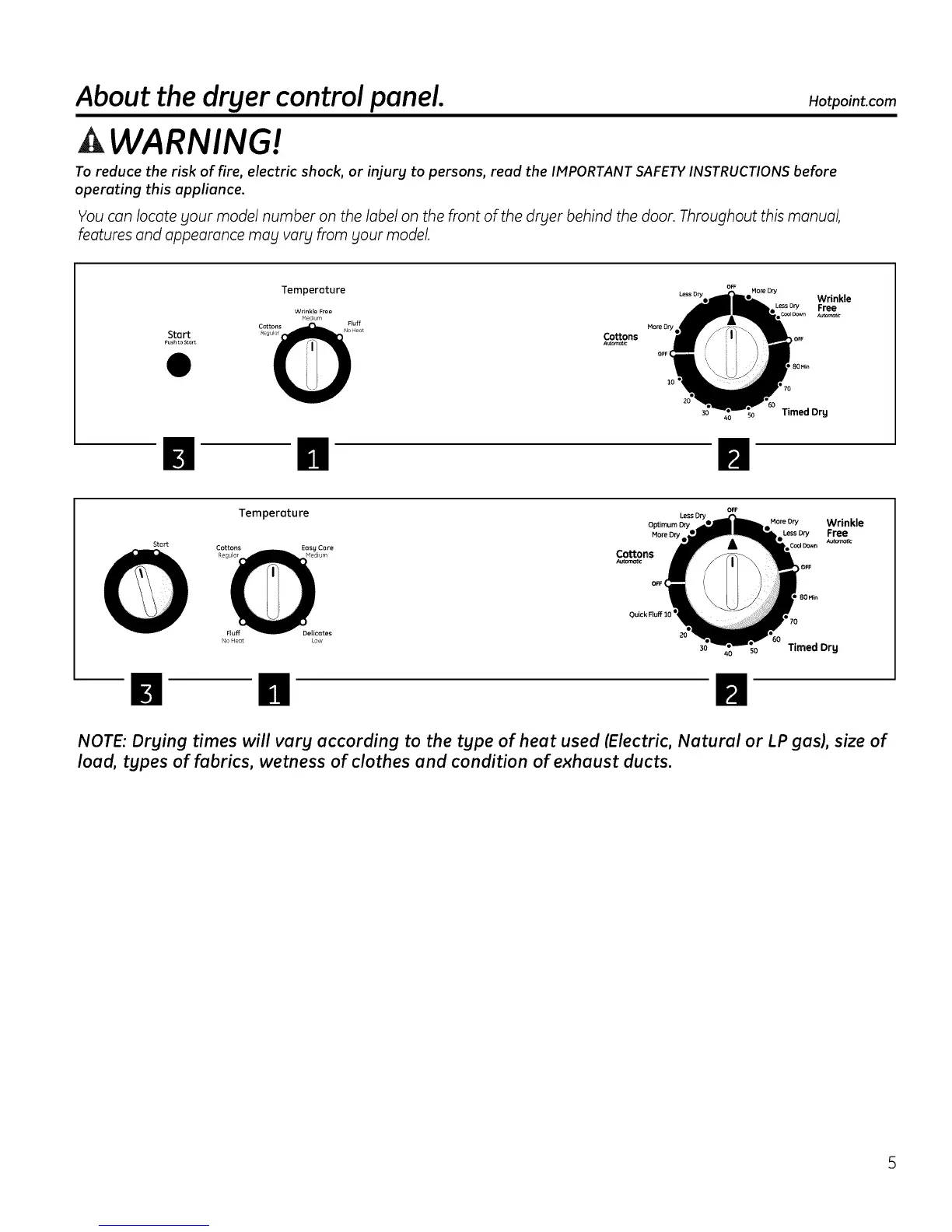
Start
Pushto Stort
Temperature OFF More Dry
Wrinkle
Wrinkle Free =e_ D_y Free
Medium Au_c
Colons
A_oma_:
Timed Drg
Temperature o.
Optimum Dry MoreDry Wrinkle
More Dry I Lessory Free
Autema_c
Start Cottons Easy Care
RegulaF edium Cottons
Autorr_t_
OFF (
Quick FLUff10 q
' 70
Timed Drg
NOTE: Drying times will vary according to the type of heat used (Electric, Natural or LP gas), size of
load, types of fabrics, wetness of clothes and condition of exhaust ducts.



 To Next Page