3
!The indicator lights are also used to indicate an unusual
temperature increase in the freezer compartment (see
Troubleshooting).
Description of the appliance
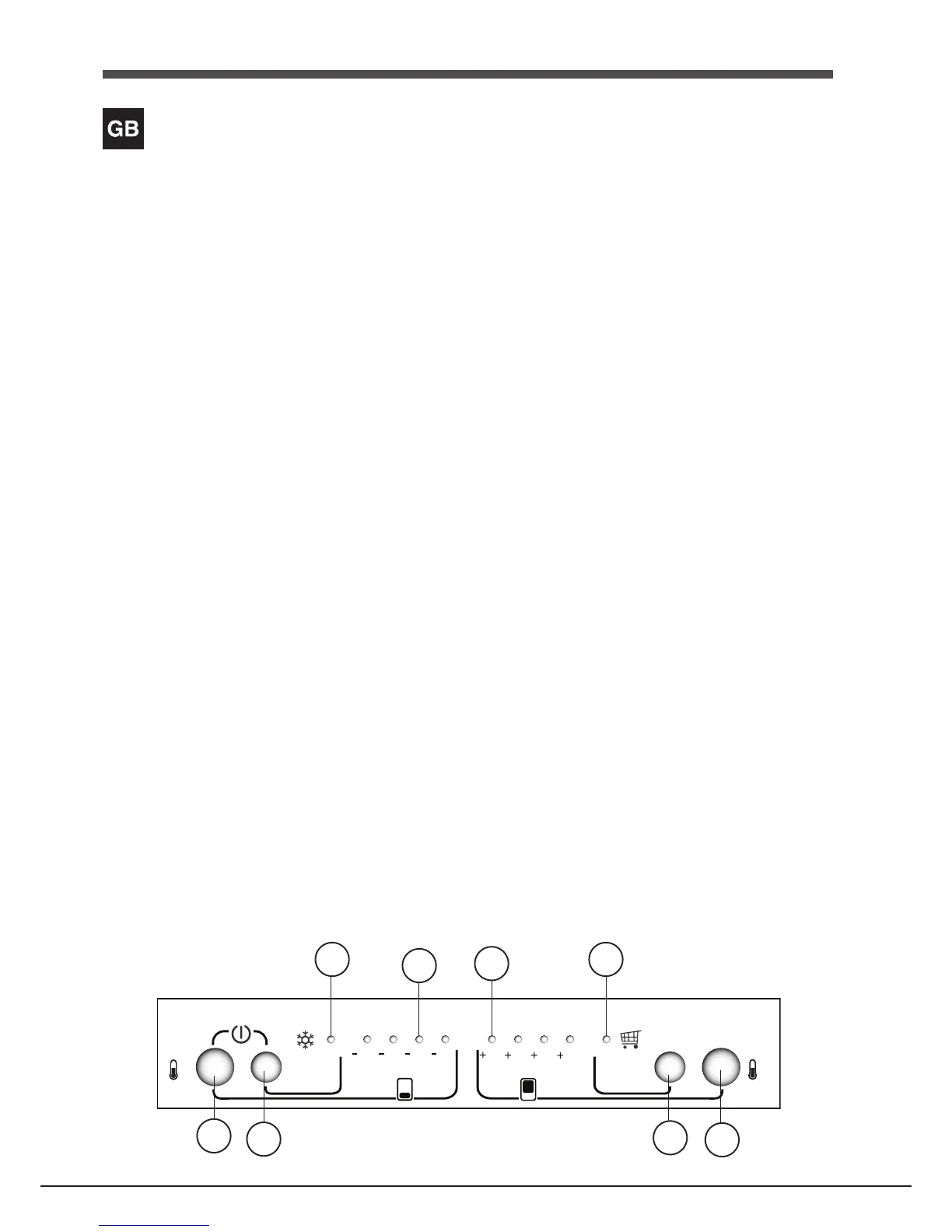
Control panel
1 FREEZER OPERATIONButtontoregulatethetemperature
thefreezercompartment.ButtonisusedwithSUPER FREEZE
Buttontoswitchon/switchofftheproductbypressingboth
3seconds
2 SUPER FREEZEButton(rapidfreezing)tofreezefreshfood.
Pressbuttonfor3secondstoswitchontheproductwhileit
isswitchedoff
3 SUPER FREEZEBluelightilluminateswhenSUPER FREEZE
buttonispressed.
4 FREEZER TEMPERATUREYellowlightThetemperatureofthe
Freezerisconsistedwith4levelsasindicatedonserigraphy
5 FRIDGE TEMPERATUREYellowlightThetemperatureofthe
Fridgeisconsistedwith4levelsasindicatedonserigraphy
6 WhentheSUPER COOL buttonispushed,thebluelightof
theSUPER COOL lightsup.
7SUPER COOLButton(quickcool)tolowerthetemperatureof
therefrigeratorcompartmentrapidly.
8 REFRIGERATOR OPERATION button to regulate the
temperatureoftherefrigeratorcompartment.
2
4
5
3
7
8


 To Next Page