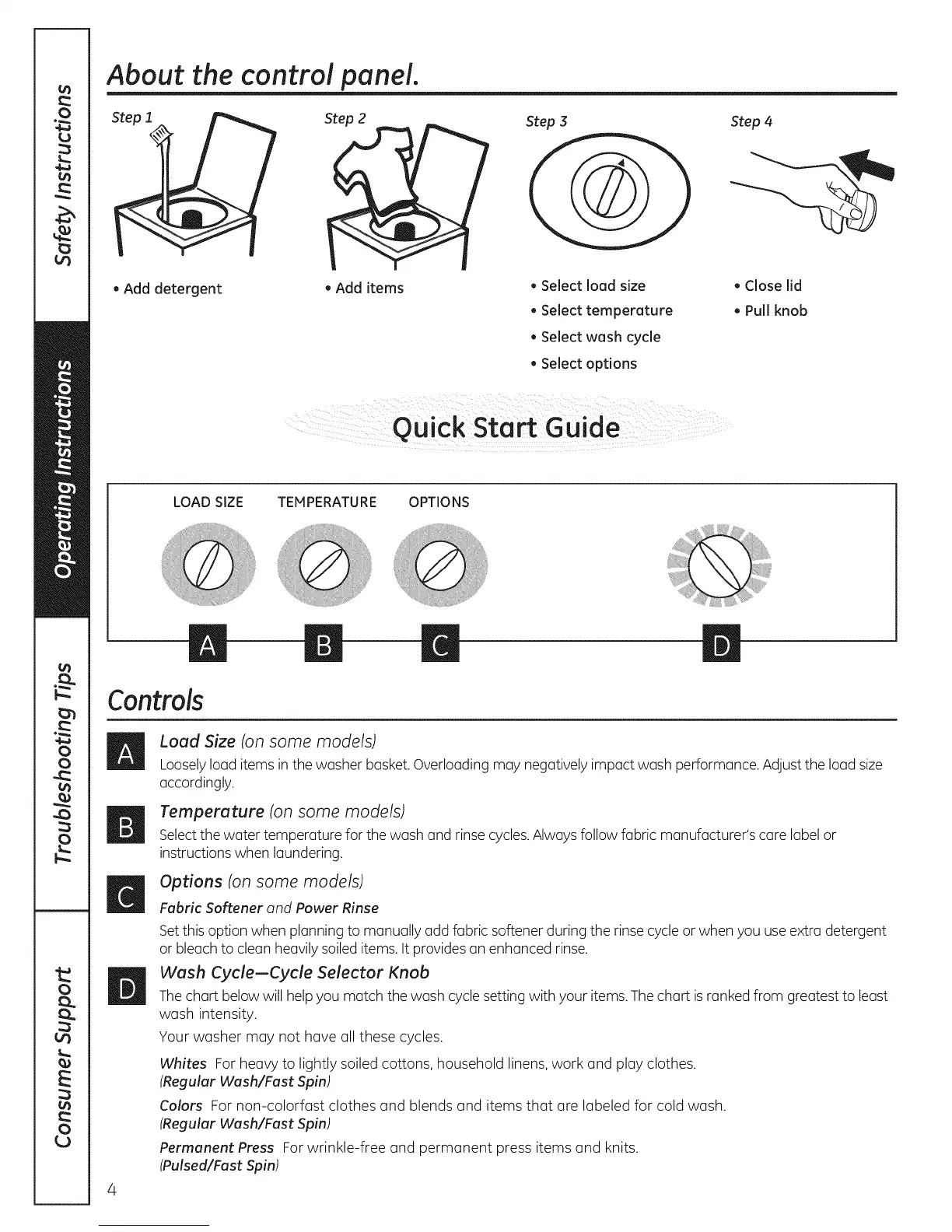
About the control panel.
. Add detergent
7
. Add items
, Select load size
• Select temperature
• Select wash cycle
• Select options
Step 4
. Close lid
. Pull knob
LOAD SIZE TEMPERATURE OPTIONS
m m m
Controls
Load Size (on some models)
Looselyload items inthe washer basket.Overloading may negatively impact wash performance. Adjustthe load size
accordingly.
Temperature (on some models)
Selectthe water temperature for the wash and rinse cycles.Always follow fabric manufacturer's care label or
instructions when laundering.
Options (on some models)
Fabric Softener and Power Rinse
Setthis option when planning to manually add fabric softener during the rinse cycleor when you useextra detergent
or bleach to clean heavily soiled items. It provides an enhanced rinse.
Wash Cycle-Cycle Selector Knob
Thechart belowwill help you match the wash cyclesetting with your items. The chart isranked from greatest to least
wash intensity.
Your washer may not have all these cycles.
Whites For heavy to lightly soiled cottons, household linens, work and play clothes.
(Regular Wash/Fast Spin)
Colors For non-colorfast clothes and blends and items that are labeled for cold wash.
(Regular Wash/Fast Spin)
Permanent Press Forwrinkle-free and permanent press items and knits.
(Pulsed/Fast Spin)



 To Next Page