29
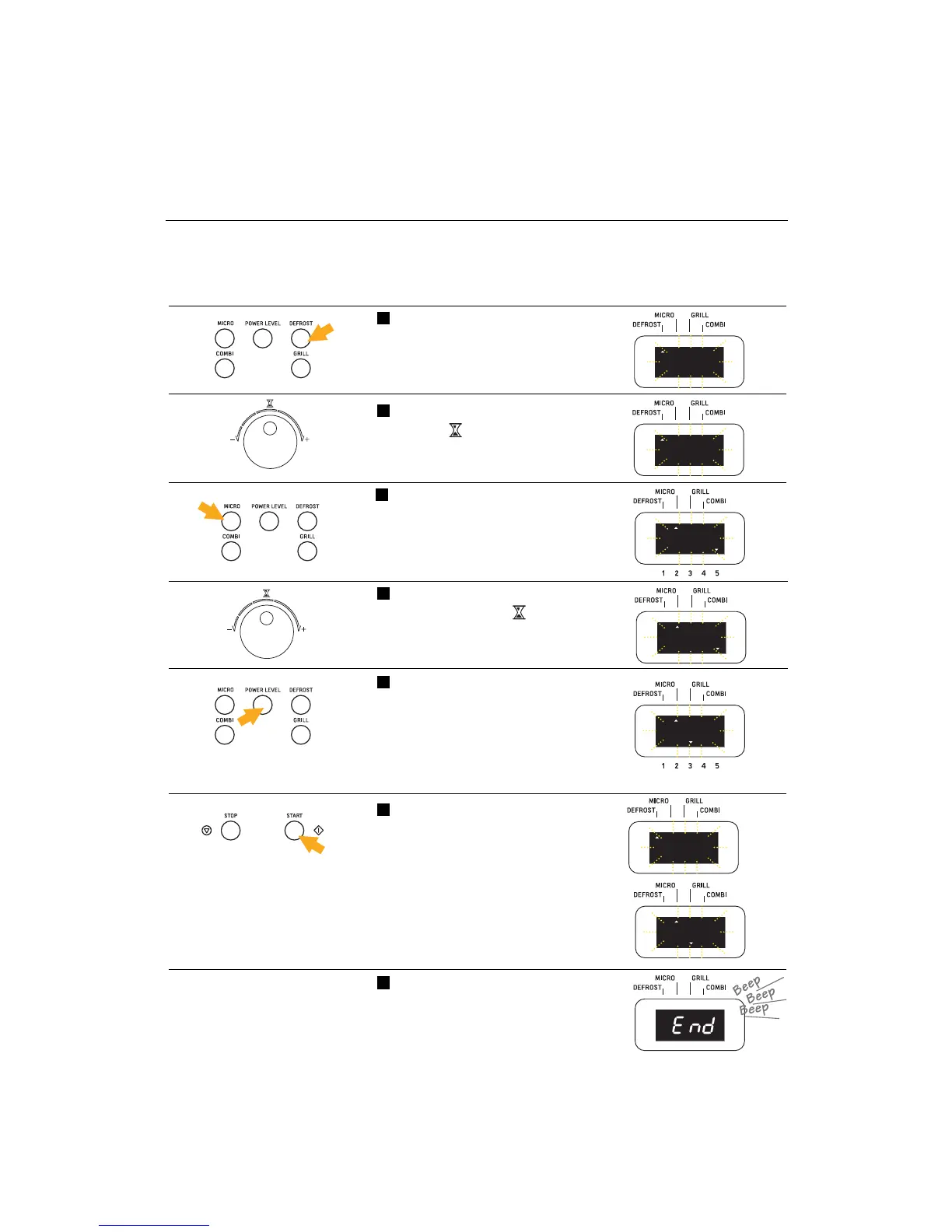
Push down on the button
POWER LEVEL (6) until you have
selected the power desired (5 =
maximum, 1 = minimum). (The
indicator at the bottom of the dis-
play will show the power level
selected.)
5
Set the time you wish by turning
the knob (7).
(The display will start blinking)
2
•You can set up the following sequences:
- defrosting + cooking
- cooking 1 + cooking 2
- defrosting + cooking 1 + cooking 2
Example: Setting up a defrosting + cooking sequence
At the end of the sequence set
up, you will hear three long
beeps, and the word End will
appear on the display.
7
Push the button DEFROST (11).
(The figure 0:00 will start blinking
and the defrost-function
indicator at the upper left will
come on).
1
Push the button MICRO (4).
(The display will start blinking at
0:00, and the second microwave-
function indicator at the upper
left will come on as well as the
first microwave-level indicator at
the lower right.)
3
Set the time you wish to employ
by turning the knob (7).
(The display will start blinking)
4
Push the START button (14) to
begin the sequence.
(The display will show in order
the time of the function selected).
6



 To Next Page