combustion.
• Fabric soener or similar products should not be
used in a tumble dryer to eliminate the eects of
static electricity unless the practice is specically
recommended by the manufacturer of the fabric
soener product.
• Do not tumble dry undergarments that contain
metal reinforcements eg. bras with metal reinforcing
wires. Damage to the tumble dryer can result if the
metal reinforcements come loose during drying.
• Do not tumble dry rubber, plastic articles such as
shower caps or babies waterproof covers, polythene
or paper.
• Do not tumble dry rubber backed articles, clothes
tted with foam rubber pads, pillows, galoshes and
rubber coated tennis shoes.
• Remove all objects from pockets, especially lighters.
WARNING: Never stop the dryer before the end of the
drying cycle unless all items are quickly removed and
spread out so that the heat is dissipated.
Dryer Description
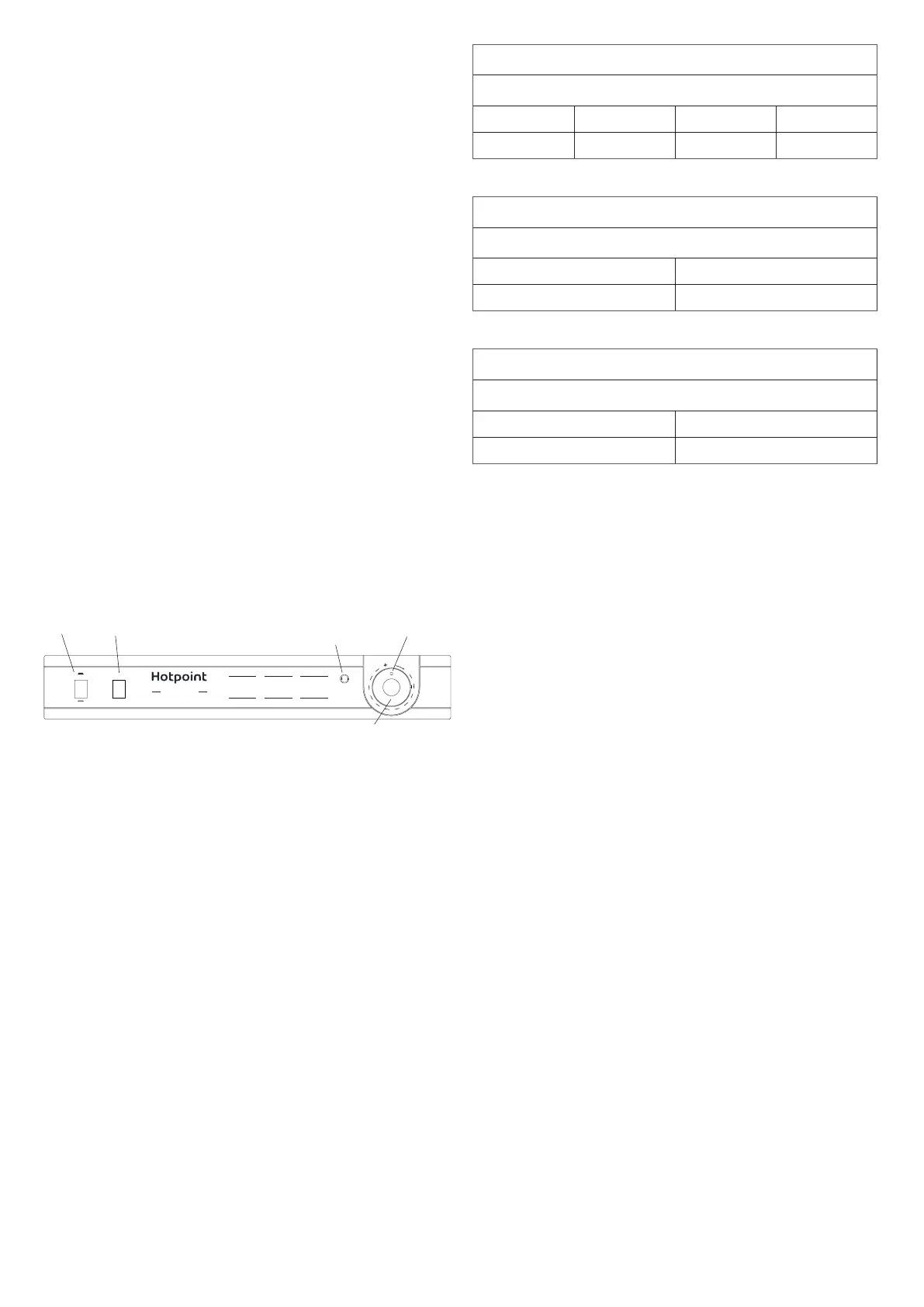
Control panel
DRYING
OFF
120’
110’
100’
90’
80’
70’
60’
50’
40’
30’
20’
10’
HIGH HEAT
LOW HEAT
1 Kg 30’ - 40’
2 Kg 40’ - 55’
3 Kg 60’ - 70’
4 Kg 85’ - 120’
Standard Cotton
HIGH HEAT
1 Kg 20’ - 30’
2 Kg 30’ - 45’
Synthetics
HIGH HEAT
1 Kg 30’ - 50’
2 Kg 50’ - 70’
Acrylics
LOW HEAT
4Kg
Reverse Action
MADE IN GREAT BRITAIN
First Edition
START
Drying Light
Indicator
Timer Knob
e HEAT button selects drying temperature.
OUT: LOW heat IN: HIGH heat
e Start Button has to be pressed to start a programme or to restart a
programme if you open the door during a drying cycle.
e Drying Light is on when a drying programme is running, it goes out
at the end of the drying programme or if you open the door.
e TIMER knob sets the drying time: rotate it clockwise, NEVER
COUNTER-CLOCKWISE, until the indictor is pointing to the drying
time you want to select.
Set the program knob to OFF to switch o the machine.
CHOOSING A PROGRAMME
1. Plug the dryer into the electrical socket.
2. Sort your laundry according to fabric type.
3. Open the door and make sure the lter is clean and in place.
4. Load the machine and make sure items are not in the way of the door
seal. Close door.
5. Set the temperature with the HEAT button. High heat for Cotton
and synthetics. Low heat for delicates and acrylics.
6. Select a drying time by rotating the TIMER knob clockwise.
7. Press to start button and the drying light comes on.
e tables below show APPROXIMATE drying times in minutes.
Weights refer to dry garment weights.
Standard Cotton - High (full) Heat
Drying times 800-1000rpm spin in washing machine
1kg 2kg 3kg 4kg
30-40mins 40-55mins 60-70mins 85-120mins
Synthetics - High (full) Heat
Drying times on reduced spin in washing machine
1kg 2kg
20-30mins 30-45mins
Acrylics - Low (gentle) Heat
Drying times on reduced spin in washing machine
1kg 2kg
30-50mins 50-70mins
Troubleshooting
Before you call the service centre go through the following
troubleshooting suggestions:
PROBLEM:
e dryer won’t start.
POSSIBLE CAUSES/SOLUTION:
• e plug is not in the socket or making contact.
• ere has been a power failure.
• e fuse has blown. Try to plug another appliance into the socket.
• You are using an extension cord? Try to plug the dryer directly into the
socket.
• e timer knob has not been set properly.
• e start button has not been pressed.
• e start button was pressed with the door open. Make sure the door is
closed before pressing the start button.
PROBLEM:
It is taking a long time to dry.
POSSIBLE CAUSES/SOLUTION:
• e lter has not been cleaned.
• e temperature setting is not correct.
• e correct time has not been selected.
• e vent tube or air intake vent is obstructed.
• e items were too wet.
• e dryer was over loaded.


 To Next Page
 Loading...