me
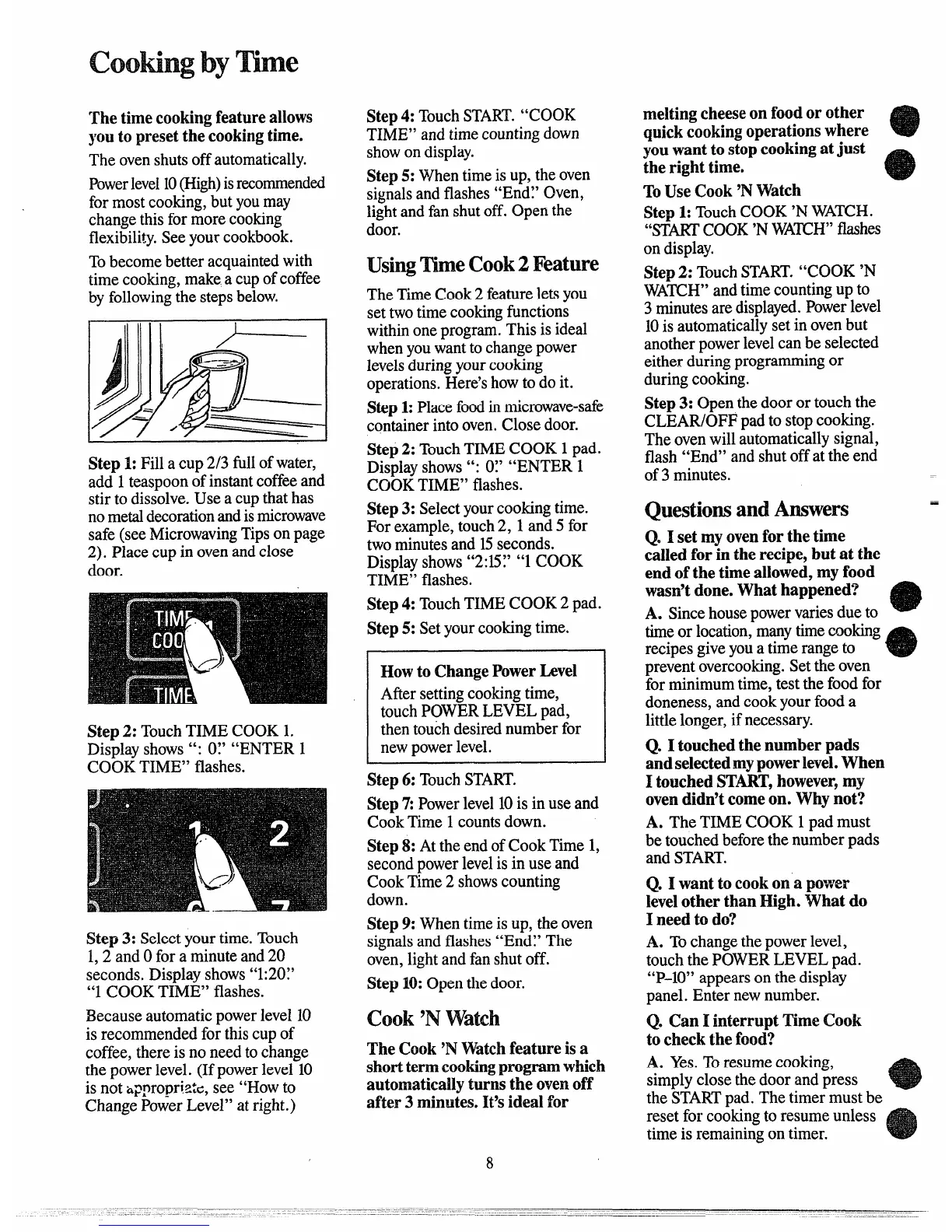
Thetimecookingfeatureallows
youtopresetthecookingtime.
Theovenshutsoffautomatically.
Powerlevel10(High)isrecommended
formostcooking,butyoumay
changethisformorecooking
flexibility.Seeyourcookbook.
Tobecomebetteracquaintedwith
timecooking,makeacupofcoffee
byfollowingthestepsbelow.
‘//
A
II -/J
Step1:Fillacup2/3fill ofwater,
add 1teaspoonofinstantcoffeeand
stirtodissolve.Useacupthathas
nometaldecorationandismicrowave
safe(seeMicrowavingTipsonpage
2). Placecupinovenandclose
door.
Step2: TouchTIMECOOK1.
Displayshows”: 07 “ENTER1
COOKTIME”flashes.
Step3: Selectyourtime.Touch
1,2 andOfora minuteand20
seconds.Displayshows“1:20Y
“1COOKTIME” flashes.
Becauseautomaticpowerlevel10
isrecommendedforthiscupof
coffee,thereisnoneedtochange
thepowerlevel.(Ifpowerlevel10
isnot~ppropriztc,see “HOWto
ChangePowerLevel”atright.)
Step4: TouchSTART.“COOK
TIME”andtimecountingdown
showondisplay.
Step5: Whentimeisup,theoven
signalsandflashes“End~’Oven,
lightandfanshutoff.Openthe
door.
~s@ me ~oo~2
Feature
TheTimeCook2featureletsyou
settwotimecookingfunctions
withinoneprogram.Thisisideal
whenyouwanttochangepower
levelsduringyourcooking
operations.Here’showtodoit.
Step1:Placefoodinmicrowave-safe
containerintooven.Closedoor.
Step2: TouchTIMECOOK1pad.
Displayshows”: O:’“ENTER1
COOKTIME”flashes.
Step3: Selectyourcookingtime.
Forexample,touch2, 1and5 for
twominutesand 15seconds.
Displayshows“2:15;’“1COOK
TIME”flashes.
Step4: TouchTIMECOOK2 pad.
Step5:Setyourcookingtime.
HowtoChangePowerLevel
Aftersettingcookingtime,
touchPOWERLEVELpad,
thentouchdesirednumberfor
newpowerlevel.
Step6:TouchSTART.
Step7:Powerlevel10isinuseand
CookTime1countsdown.
Step8: AttheendofCookTime1,
secondpowerlevelisin useand
CookTime2 showscounting
down.
Step9:Whentimeisup,theoven
signalsandflashes“End~’The
oven,lightandfanshutoff.
Step10:Openthedoor.
~oo~ ‘P4
Watch
The Cook‘NWatchfeatureisa
shorttermcookingprogramwhich
automaticallyturnsthe ovenoff
after3 minutes.It’sidealfor
8
meltingcheeseonfoodorother
quickcookingoperationswhere
youwanttostopcookingatjust
therighttime.
ToUseCook‘NWatch
Step1:TouchCOOK‘NWAKH.
“STAKI’COOK‘NWA~H” flashes
ondisplay.
Step2: TouchSTART.“COOK‘N
WATCH”andtimecountingupto
3minutesaredisplayed.Powerlevel
10isautomaticallysetinovenbut
anotherpowerlevelcanbeselected
eitherduringprogrammingor
duringcooking.
Step3: Openthedoorortouchthe
CLEAR/OFFpadtostopcooking.
Theovenwillautomaticallysignal,
flash“End”andshutoffattheend
of3minutes.
Questionsandhswers ‘
Q. I setmyovenforthetime
calledforintherecipe,butat the
endofthetimeallowed,myfood
wasn’tdone.Whathappened?
A. Sincehousepowervariesdueto
timeor location,manytimecooking
recipesgiveyouatimerangeto
preventovercooking.Settheoven
forminimumtime,testthefoodfor
doneness,andcookyourfooda
littlelonger,ifnecessary.
Q. Itouchedthenumberpads
andselectedmypowerlevel.When
I touchedSTART,however,my
ovendidn’tcomeon. Whynot?
A. TheTIMECOOK1padmust
betouchedbeforethenumberpads
andSTART.
Q. 1wanttocookona power
levelotherthanHigh.Whatdo
I needto do?
A. Tochangethepowerlevel,
touchthePOWERLEVELpad.
“P-10”appearsonthedisplay
panel.Enternewnumber.
Q. CanI interruptTimeCook
tocheckthefood?
A. Yes.Toresumecooking,
simplyclosethedoorandpress
theSTARTpad.Thetimermustbe
resetforcookingtoresumeunless
timeis remainingontimer.



 To Next Page
 Loading...