Sort your laundry into groups by washcare labels.
Load the machine,making sure that clothes are not trapped
in the door.Close the washing machine door by pushing it
until it clicks.
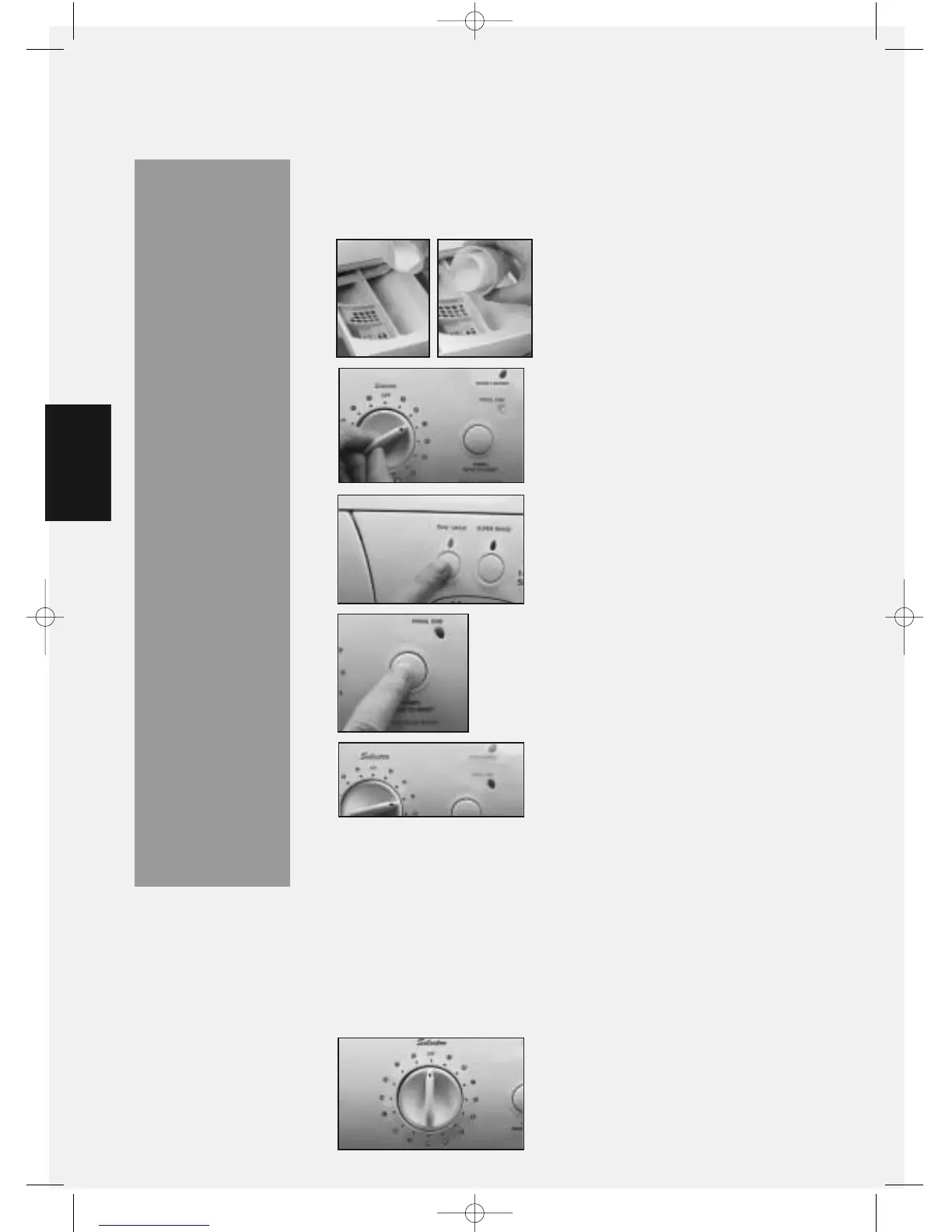
When all selections have been made press
the ‘START/HOLD TO RESET’button. The
‘PROG.END’ light will go out to indicate
the start of a programme. After a short
time the ‘DOOR LOCKED’indicator light
will illuminate.
To cancel a programme once the machine has started,press
and hold in the ‘START/HOLD TO RESET’button for two
seconds,until the ‘PROG.END’light flashes. You can then
re-select the programme you want.Press the ‘START/HOLD
TO RESET’button again to carry on.
3
1
4
2
WARNINGS:
●
Do not allow
children to
play with the
machine or
tamper with
the controls.
●
Do not
overload the
machine! It
may damage
laundry and
reduce the
quality of
the wash.
●
Do not try to
open the door
when the
‘DOOR
LOCKED’
indicator light
is on.
●
Do not open
the dispenser
drawer
during any
programme.
During the wash programme the
‘DOOR LOCKED’indicator light will
remain lit.
5
When the programme has finished the ‘PROG.END‘
indicator light will illuminate and the ‘DOOR LOCKED‘
indicator light will remain lit.
After a short time the ‘DOOR LOCKED‘ indicator light will go
out. You can then open the machine door.
6
7
To switch the machine off,return the
programme selector dial to its ‘OFF‘
position. The ‘PROG.END‘light will
go out.
We also recommend that you switch
off the electricity and water supply.
8
A typical wash programme
12
Select any optional wash feature(s)
that you may require by pressing
the appropriate button(s),indicator
lights will show what you have
chosen.
Add detergent and fabric
conditioner,if required,to the
dispenser drawer.
Refer to the detergent
manufacturer’s dosage instructions.
Turn the programme selector dial to
the programme required.
The ‘PROG.END’ light will illuminate,
indicating that the machine has
power.
A TYPICAL WASH
PROGRAMME



 To Next Page