WARNINGS:
●
Do not allow
children to
play with the
machine or
tamper with
the controls.
●
If you cancel a
programme
part way
through a
wash or there
is a power
cut, take care
when
opening the
door. The
machine may
contain hot
water.
●
In the unlikely
event of
something
not working
see the
Trouble -
shooting
section.
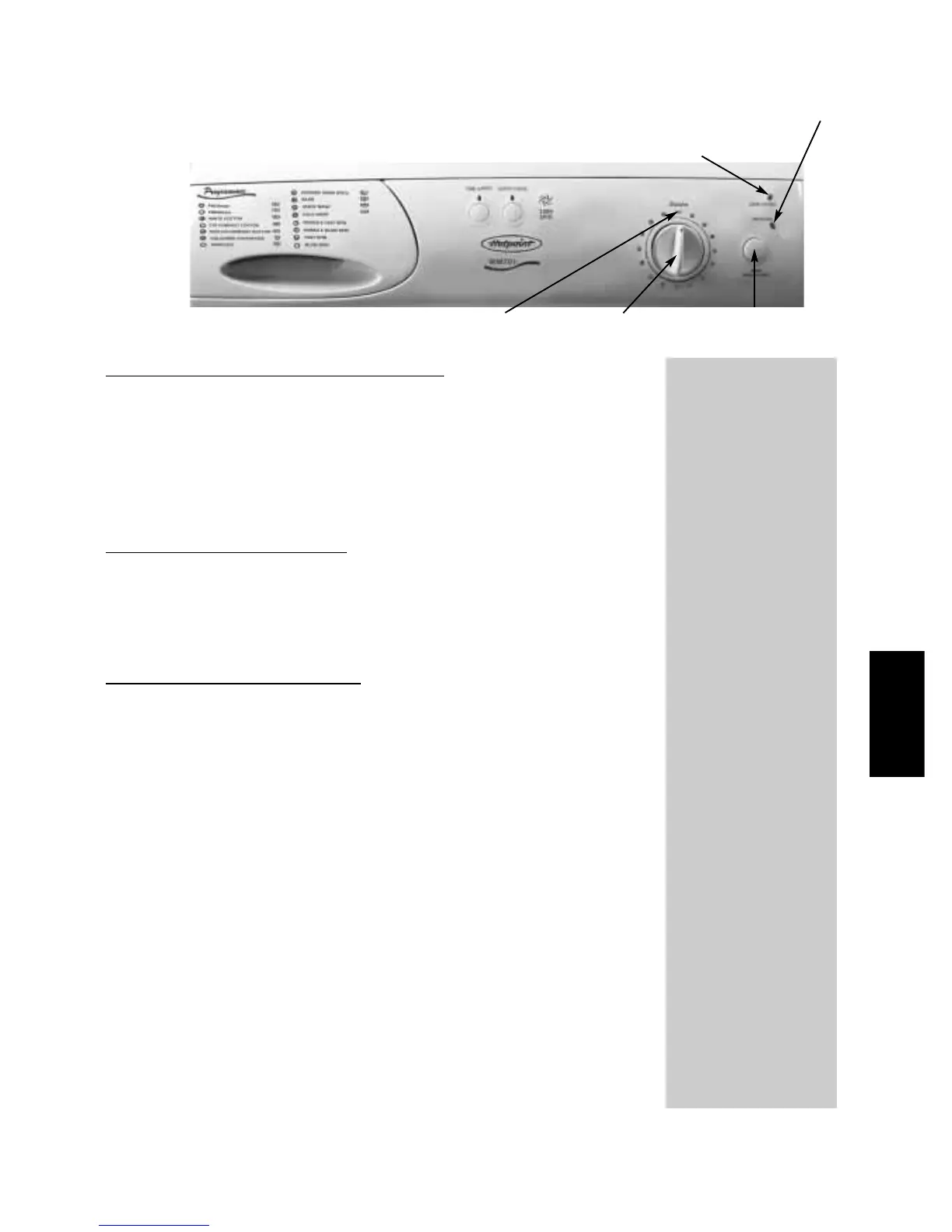
Programme End Indicator Light
Door Locked Indicator Light
OFF position
Wash programmes
PROGRAMMES
AND OPTIONS
15
On-Off / Selecting a programme
The machine is switched on, by turning the programme
selector dial away from the‘OFF’ position, to your selected
programme. To start the programme press and release the
‘START/HOLD TO RESET’ button.
When the programme has finished return the programme
selector dial to the ‘OFF’ position.
To pause a programme
To pause a programme hold the ‘START/HOLD TO RESET’
button for two seconds until the ‘PROG.END’ indicator light
flashes. To continue press the ‘START/HOLD TO RESET’
button once more.
To change a programme
If you want to change a programme, hold the ‘START/HOLD
TO RESET’ button for two seconds until the ‘PROG.END’
indicator light flashes. You can then change the programme.
Press the ‘START/HOLD TO RESET’ button to continue.
‘START/Hold To Reset’
button
Programme
selector dial


 To Next Page