Need help?
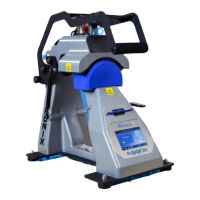
Do you have a question about the Hotronix 360 IQ HAT PRESS and is the answer not in the manual?
Connect the power cord into the press's IEC inlet and a properly grounded electrical outlet.
Remove packaging bolt, flip power switch ON to start, and OFF to turn off. Use Standby Mode for Auto On feature.
Provides advice on hat positioning, alignment, sweatband extension, covering logos, and post-application care for best results.
Accesses configuration options like Date & Time, Display, Auto On/Off, System Setup, and Calibration.
Allows managers to set and manage user passwords, controlling access to heat press settings and user management.
Configure the heat press clock, set time zone, enable daylight saving, and synchronize with the internet via Wi-Fi.
Adjust display settings, including switching between Fahrenheit and Celsius temperature units and setting language.
Configure scheduled times for the heat press to automatically turn on and enter standby mode.
Configure power save settings, machine settings, and target temperature for electromagnet activation.
Procedure for checking and installing available software updates via the cloud or a memory card.
Instructions on visiting iq.hotronix.com to create a user account for the portal.
Steps to register the heat press by entering serial number and verification code into the IQ® Portal.
Guide on creating new users, assigning privilege levels, and assigning machines within the IQ® Portal.
 General
| Brand | Hotronix |
|---|---|
| Model | 360 IQ HAT PRESS |
| Category | Power Tool |
| Language | English |

 To Next Page